
A quick-reference guide for diagnostics, performance tuning, and operations on Azure SQL Database and Managed Instance.
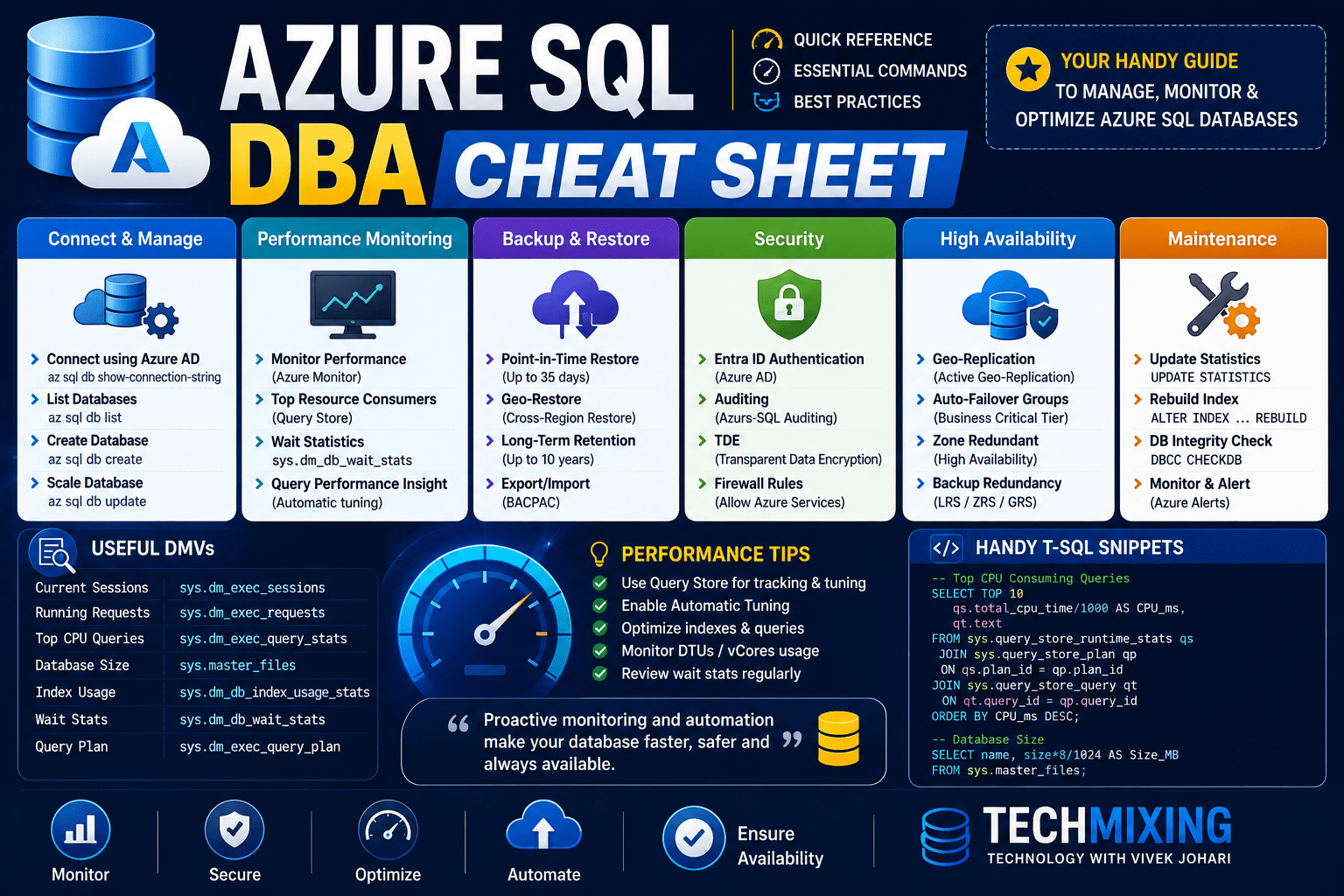
1. Service Tiers & Compute Models
| Model | Use Case | Key Trait |
|---|---|---|
| DTU-based | Simple, predictable workloads | Bundled compute/storage/IO |
| vCore — Provisioned | Steady, predictable workloads | Pay for fixed compute |
| vCore — Serverless | Intermittent, unpredictable workloads | Auto-pause/scale, per-second billing |
| Hyperscale | Large DBs (up to 100TB), fast scaling | Multiple read replicas, fast backups |
| Elastic Pool | Many DBs with variable usage | Shared resource pool, cost-efficient |
Quick decision rule: Unpredictable/bursty traffic → Serverless. Very large or fast-growing DB → Hyperscale. Many small DBs → Elastic Pool.
2. Essential DMVs for Diagnostics
-- Current resource consumption (CPU, memory, IO) per query
SELECT * FROM sys.dm_db_resource_stats ORDER BY end_time DESC;

-- Top CPU-consuming queries
SELECT TOP 20 qs.total_worker_time/qs.execution_count AS avg_cpu_time,
       qs.execution_count, qs.total_logical_reads, st.text
FROM sys.dm_exec_query_stats qs
CROSS APPLY sys.dm_exec_sql_text(qs.sql_handle) st
ORDER BY avg_cpu_time DESC;

-- Currently running requests
SELECT * FROM sys.dm_exec_requests WHERE session_id <> @@SPID;

-- Blocking chains
SELECT blocking_session_id, session_id, wait_type, wait_time, wait_resource
FROM sys.dm_exec_requests WHERE blocking_session_id <> 0;

-- Index usage stats (find unused indexes)
SELECT OBJECT_NAME(s.object_id) AS table_name, i.name AS index_name,
       s.user_seeks, s.user_scans, s.user_lookups, s.user_updates
FROM sys.dm_db_index_usage_stats s
JOIN sys.indexes i ON s.object_id = i.object_id AND s.index_id = i.index_id
WHERE OBJECTPROPERTY(s.object_id,'IsUserTable') = 1;

-- Missing index suggestions
SELECT mid.statement, migs.avg_user_impact, migs.avg_total_user_cost,
       mid.equality_columns, mid.inequality_columns, mid.included_columns
FROM sys.dm_db_missing_index_details mid
JOIN sys.dm_db_missing_index_group_stats migs
  ON mid.index_handle = migs.group_handle
ORDER BY migs.avg_user_impact DESC;

-- Wait stats summary
SELECT wait_type, wait_time_ms, waiting_tasks_count
FROM sys.dm_os_wait_stats
WHERE wait_type NOT IN ('CLR_SEMAPHORE','SLEEP_TASK','LAZYWRITER_SLEEP')
ORDER BY wait_time_ms DESC;
3. Query Store (Enabled by default in Azure SQL DB)
-- Check Query Store status
SELECT actual_state_desc, desired_state_desc, current_storage_size_mb,
       max_storage_size_mb, query_capture_mode_desc
FROM sys.database_query_store_options;

-- Top regressed queries (plan changed for the worse)
SELECT q.query_id, qt.query_sql_text, rs.avg_duration, p.plan_id
FROM sys.query_store_query q
JOIN sys.query_store_query_text qt ON q.query_text_id = qt.query_text_id
JOIN sys.query_store_plan p ON q.query_id = p.query_id
JOIN sys.query_store_runtime_stats rs ON p.plan_id = rs.plan_id
ORDER BY rs.avg_duration DESC;

-- Force a specific plan (after identifying regression)
EXEC sp_query_store_force_plan @query_id = <id>, @plan_id = <id>;
Use Query Store to: catch plan regressions after deployments, compare plan performance over time, and force known-good plans without touching code.

4. Automatic Tuning
-- Check current automatic tuning settings
SELECT name, desired_state_desc, actual_state_desc
FROM sys.database_automatic_tuning_options;

-- Enable FORCE_LAST_GOOD_PLAN (auto plan-regression correction)
ALTER DATABASE CURRENT SET AUTOMATIC_TUNING (FORCE_LAST_GOOD_PLAN = ON);

-- Enable automatic index create/drop
ALTER DATABASE CURRENT SET AUTOMATIC_TUNING (CREATE_INDEX = ON, DROP_INDEX = ON);
5. Intelligent Query Processing (IQP) Quick Reference
| Feature | Benefit | Min Compat Level |
|---|---|---|
| Adaptive Joins | Switches join strategy at runtime | 140 |
| Memory Grant Feedback | Fixes over/under-allocated memory | 140 |
| Interleaved Execution | Fixes bad cardinality from MSTVFs | 140 |
| Table Variable Deferred Compilation | Better estimates for table variables | 150 |
| Batch Mode on Rowstore | Batch processing without columnstore | 150 |
| Scalar UDF Inlining | Converts scalar UDFs to relational logic | 150 |
| Optimized Plan Forcing | Faster plan forcing | 160 |
-- Check/set compatibility level
SELECT compatibility_level FROM sys.databases WHERE name = DB_NAME();
ALTER DATABASE CURRENT SET COMPATIBILITY_LEVEL = 160;
6. Index Maintenance
-- Fragmentation check
SELECT OBJECT_NAME(ips.object_id) AS table_name, i.name AS index_name,
       ips.avg_fragmentation_in_percent, ips.page_count
FROM sys.dm_db_index_physical_stats(DB_ID(), NULL, NULL, NULL, 'LIMITED') ips
JOIN sys.indexes i ON ips.object_id = i.object_id AND ips.index_id = i.index_id
WHERE ips.page_count > 500
ORDER BY ips.avg_fragmentation_in_percent DESC;

-- Rule of thumb: 5-30% fragmentation → REORGANIZE, >30% → REBUILD
ALTER INDEX ALL ON dbo.YourTable REORGANIZE;
ALTER INDEX ALL ON dbo.YourTable REBUILD WITH (ONLINE = ON);

-- Update statistics
UPDATE STATISTICS dbo.YourTable WITH FULLSCAN;
7. Backup & Restore
- Azure SQL DB: automated backups, no manual
BACKUPcommand needed. Full weekly, differential every 12–24h, log backups every 5–10 min. - Point-in-time restore (PITR) via portal, CLI, or PowerShell:
Restore-AzSqlDatabase -FromPointInTimeBackup -PointInTime "2026-07-10T10:00:00Z" `
  -ResourceGroupName "rg" -ServerName "server" -TargetDatabaseName "restoredb" `
  -ResourceId "/subscriptions/.../databases/mydb"
- Long-term retention (LTR): configure weekly/monthly/yearly backup retention (up to 10 years) separately from PITR.
- Managed Instance also supports native
BACKUP ... TO URLfor migration scenarios.
8. Security Essentials
-- Enable Transparent Data Encryption (on by default for new DBs)
ALTER DATABASE [YourDB] SET ENCRYPTION ON;

-- Row-Level Security example
CREATE FUNCTION dbo.fn_securitypredicate(@TenantId int)
RETURNS TABLE WITH SCHEMABINDING AS
RETURN SELECT 1 AS result WHERE @TenantId = CAST(SESSION_CONTEXT(N'TenantId') AS int);

CREATE SECURITY POLICY TenantFilter
ADD FILTER PREDICATE dbo.fn_securitypredicate(TenantId) ON dbo.Orders;

-- Dynamic Data Masking
ALTER TABLE dbo.Customers
ALTER COLUMN Email ADD MASKED WITH (FUNCTION = 'email()');
Checklist: Azure AD authentication enabled, firewall rules scoped (avoid 0.0.0.0–255.255.255.255), Advanced Threat Protection / Defender for SQL on, auditing enabled to storage/Log Analytics, least-privilege roles (avoid db_owner sprawl).
9. High Availability & DR
| Feature | Purpose | RPO/RTO |
|---|---|---|
| Zone-redundant config | Survives AZ failure | Automatic, near-zero |
| Active geo-replication | Readable secondary in another region | RPO ~5s, manual failover |
| Auto-failover groups | Group of DBs, automatic failover, listener endpoint | RPO ~5s, RTO ~1hr |
| Hyperscale named replicas | Scale-out reads | Near real-time |
-- Check geo-replication status
SELECT * FROM sys.dm_geo_replication_link_status;
SELECT * FROM sys.geo_replication_links;
10. Common Wait Types & What They Mean
| Wait Type | Likely Cause |
|---|---|
PAGEIOLATCH_* | Slow storage / IO bottleneck |
CXPACKET / CXCONSUMER | Parallelism — check MAXDOP, query cost threshold |
SOS_SCHEDULER_YIELD | CPU pressure |
RESOURCE_SEMAPHORE | Memory grant contention |
LCK_M_* | Blocking — check sys.dm_tran_locks |
LOGBUFFER / WRITELOG | Transaction log write bottleneck |
ASYNC_NETWORK_IO | Client slow to consume results |
11. Cost Optimization Quick Wins
- Right-size with DTU/vCore Advisor recommendations in the portal before resizing manually.
- Use serverless for dev/test and low-traffic databases.
- Consolidate small databases into an elastic pool.
- Enable auto-pause on serverless databases with idle windows.
- Review Hyperscale for large databases needing fast backup/restore instead of over-provisioning Business Critical.
- Use Reserved Capacity (1 or 3-year) for stable, predictable production workloads — up to ~30-55% savings.
12. Useful CLI Snippets
# Show current DTU/vCore usage
az sql db show --name mydb --server myserver --resource-group rg --query "currentSku"

# List long-term retention backups
az sql db ltr-backup list --location eastus --server myserver --database mydb

# Scale a database
az sql db update --name mydb --server myserver --resource-group rg --service-objective S3
Discover more from Technology with Vivek Johari
Subscribe to get the latest posts sent to your email.