
Introduction
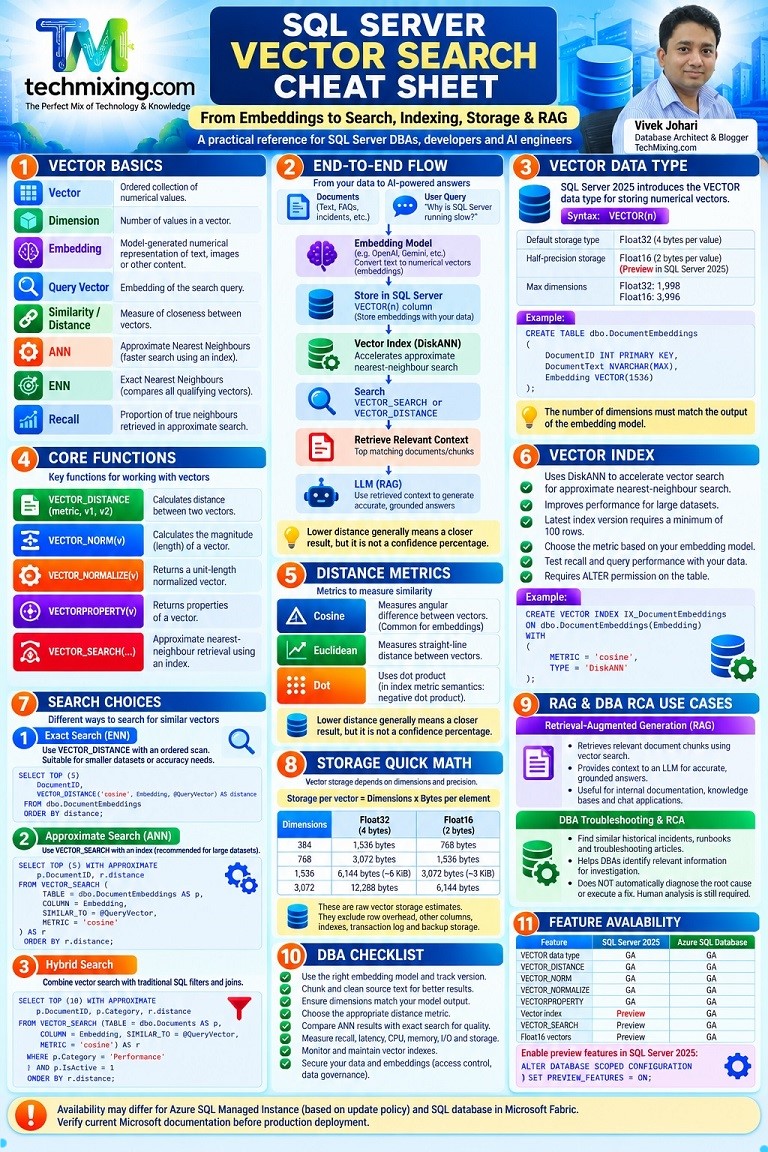
Vector search is becoming an important capability for modern database applications. With SQL Server 2025, developers and database professionals can store vectors, calculate vector distances and build applications that retrieve information based on semantic similarity.

But understanding vector search requires more than knowing one function.
You need to understand how embeddings are generated, how vectors are stored, how similarity is calculated, when to use exact or approximate search, how vector indexes work, and how to troubleshoot performance.
In this practical article, we will connect all these concepts from Embeddings to VECTOR_SEARCH, VECTOR_DISTANCE, DiskANN Indexing, Storage and RAG using SQL Server examples.
1. What Is a Vector?
A vector is an ordered collection of numerical values.
For example:
DECLARE @Vector VECTOR(3) = '[0.1, 0.2, 0.3]';

SELECT @Vector AS VectorValue;
This vector contains three dimensions:
- Dimension 1 = 0.1
- Dimension 2 = 0.2
- Dimension 3 = 0.3
In AI applications, vectors represent information about text, images, audio or other content.
Two pieces of content with similar meanings may have vectors that are close to each other in the vector space.
Practical example
Consider these sentences:
- SQL Server performance tuning
- Database query optimization
- Cooking recipes
An embedding model converts each sentence into a numerical vector. The first two may have greater semantic similarity than the third.
The actual numerical values depend on the embedding model. They should not be manually invented for a production application.
2. What Is an Embedding?
An embedding is a numerical representation of content generated by an embedding model.
For example, an application may convert:
“SQL Server queries are running slowly”
into a vector containing hundreds or thousands of numerical values.
The embedding model determines the number of dimensions.
Common embedding dimensions include 384, 768 and 1,536, although the actual output depends on the model.
Embedding generation workflow
- Collect the source text.
- Clean and prepare the text.
- Generate an embedding using an embedding model.
- Store the resulting vector in SQL Server.
- Generate a query embedding when a user searches.
- Compare the query vector with stored vectors.
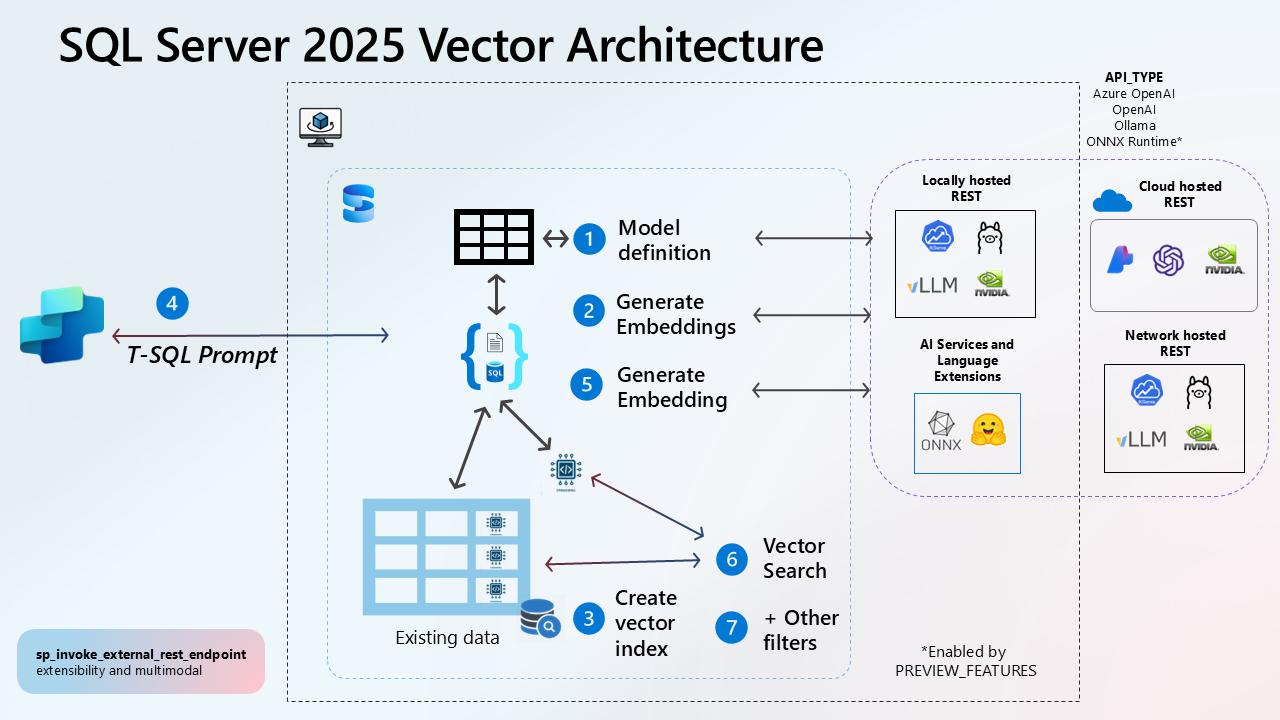
Important: SQL Server stores and searches vectors, but an embedding model is still required to convert ordinary text into meaningful embeddings. You can generate embeddings through an external service or a supported in-database AI integration.
For a reliable implementation, use the same compatible embedding model and configuration for document and query embeddings.
3. SQL Server VECTOR Data Type
SQL Server 2025 introduces the VECTOR data type for storing numerical vectors.
Basic syntax
VECTOR(number_of_dimensions)By default, the base type is float32.
Create a table with a VECTOR column
CREATE TABLE dbo.DocumentEmbeddings
(
    DocumentID INT PRIMARY KEY,
    DocumentTitle NVARCHAR(200),
    DocumentText NVARCHAR(MAX),
    Embedding VECTOR(1536)
);
Here:
DocumentIDidentifies the document.DocumentTitlestores its title.DocumentTextstores its content.Embeddingstores the vector generated by the embedding model.
The dimension count must match the embedding model output.
Insert an illustrative vector
INSERT INTO dbo.DocumentEmbeddings
(
    DocumentID,
    DocumentTitle,
    DocumentText,
    Embedding
)
VALUES
(
    1,
    'SQL Server High CPU',
    'How to troubleshoot high CPU in SQL Server.',
    '[0.21, 0.84, 0.32]'
);
Note: This example uses a three-dimensional vector for demonstration. It is not a real embedding generated from the document. A production embedding must contain the full output from the selected model.
Float32 vs Float16
SQL Server supports the default float32 vector representation and also supports float16 in applicable environments.
CREATE TABLE dbo.VectorStorage
(
    ID INT PRIMARY KEY,
    Embedding32 VECTOR(1536),
    Embedding16 VECTOR(1536, float16)
);| Type | Bytes per element | Main consideration |
|---|---|---|
| Float32 | 4 | Higher numerical precision |
| Float16 | 2 | Lower storage requirement, reduced precision |
The supported maximum dimensions differ by base type: up to 1,998 for float32 and 3,996 for float16 in the current documentation.
In SQL Server 2025, float16 requires preview features to be enabled. Validate its availability and precision trade-offs before using it in production.
4. Important SQL Server Vector Functions
SQL Server provides several built-in vector functions.
| Function | Purpose |
|---|---|
VECTOR_DISTANCE | Calculates distance between two vectors |
VECTOR_SEARCH | Performs approximate nearest-neighbour search |
VECTOR_NORM | Calculates vector magnitude |
VECTOR_NORMALIZE | Normalizes a vector |
VECTORPROPERTY | Returns vector properties such as dimensions and base type |
4.1 VECTOR_DISTANCE
VECTOR_DISTANCE calculates the distance between two vectors.
Syntax
VECTOR_DISTANCE(distance_metric, vector1, vector2)Supported metrics:
cosineeuclideandot
Example:
DECLARE @Vector1 VECTOR(3) = '[1.0, 2.0, 3.0]';
DECLARE @Vector2 VECTOR(3) = '[1.1, 2.1, 3.1]';

SELECT
    VECTOR_DISTANCE('cosine', @Vector1, @Vector2)
        AS CosineDistance,

    VECTOR_DISTANCE('euclidean', @Vector1, @Vector2)
        AS EuclideanDistance,

    VECTOR_DISTANCE('dot', @Vector1, @Vector2)
        AS DotDistance;
How to interpret the results
- Cosine distance measures angular difference.
- Euclidean distance measures straight-line distance.
- Dot distance is calculated using the negative dot product.
For cosine and Euclidean distance, zero means identical vectors. With the dot metric, smaller values indicate more similar vectors.
A lower distance is generally better for nearest-neighbour ranking, but the meaning and range depend on the selected metric.
4.2 VECTOR_NORM
A vector norm measures the magnitude or length of a vector.
Conceptually, for a vector [3, 4], the Euclidean norm is 5.
Use it to understand the magnitude of a vector.
DECLARE @Vector VECTOR(3) = '[1.0, 2.0, 3.0]';

SELECT VECTOR_NORM(@Vector, 'norm2') AS VectorMagnitude;
4.3 VECTOR_NORMALIZE
Normalization scales a vector to a length of 1 according to the selected norm.
DECLARE @Vector VECTOR(3) = '[1.0, 2.0, 3.0]';

SELECT
    VECTOR_NORMALIZE(@Vector, 'norm2')
        AS NormalizedVector;
Supported norm types include:
norm1norm2norminf
Do not normalize vectors automatically without checking the embedding model’s requirements. Some embedding models already produce normalized vectors.
4.4 VECTORPROPERTY
This function helps inspect vector properties.
DECLARE @Vector VECTOR(3) = '[1.0, 2.0, 3.0]';

SELECT
    VECTORPROPERTY(@Vector, 'Dimensions') AS Dimensions,
    VECTORPROPERTY(@Vector, 'BaseType') AS BaseType;
This is useful when validating vector dimensions and storage type.
5. Exact Nearest-Neighbour Search (ENN)
Exact nearest-neighbour search calculates the distance between the query vector and the stored vectors being searched.
It does not use a vector index.
Practical example
Suppose your knowledge base contains troubleshooting documents:
| DocumentID | DocumentTitle |
|---|---|
| 1 | SQL Server High CPU |
| 2 | SQL Server Blocking |
| 3 | SQL Server Memory Grant Issues |
A DBA searches for:
“SQL Server is consuming too much processor time.”
The application generates a query embedding. SQL Server compares that vector with the stored document embeddings.
DECLARE @QueryVector VECTOR(3) = '[0.20, 0.80, 0.30]';

SELECT TOP (5)
    DocumentID,
    DocumentTitle,
    VECTOR_DISTANCE
    (
        'cosine',
        Embedding,
        @QueryVector
    ) AS Distance
FROM dbo.DocumentEmbeddings
ORDER BY Distance;
The query returns the five closest vectors based on cosine distance.
Important: This is a demonstration using three-dimensional illustrative vectors. Meaningful semantic search requires actual model-generated embeddings.
Exact search is useful for smaller datasets, testing and comparing approximate-search quality. At larger scale, scanning and calculating distance for many vectors can become expensive.
6. Approximate Nearest-Neighbour Search (ANN)
Approximate nearest-neighbour search attempts to find close vectors efficiently without exhaustively calculating every distance.
SQL Server supports approximate vector search through VECTOR_SEARCH.
It uses a compatible vector index when one is available.
VECTOR_SEARCH syntax
SELECT TOP (N) WITH APPROXIMATE
    columns,
    r.distance
FROM VECTOR_SEARCH
(
    TABLE = dbo.YourTable AS t,
    COLUMN = Embedding,
    SIMILAR_TO = @QueryVector,
    METRIC = 'cosine'
) AS r
ORDER BY r.distance;
The WITH APPROXIMATE syntax is the current approach for the latest vector index version.
Example:
DECLARE @QueryVector VECTOR(1536) = @GeneratedQueryVector;

SELECT TOP (10) WITH APPROXIMATE
    d.DocumentID,
    d.DocumentTitle,
    r.distance
FROM VECTOR_SEARCH
(
    TABLE = dbo.DocumentEmbeddings AS d,
    COLUMN = Embedding,
    SIMILAR_TO = @QueryVector,
    METRIC = 'cosine'
) AS r
ORDER BY r.distance;
@GeneratedQueryVector represents a variable populated by your embedding-generation workflow. It must be declared and populated with a real compatible vector before executing the query.
Remember: VECTOR_DISTANCE performs exact distance calculation. VECTOR_SEARCH provides approximate nearest-neighbour retrieval. They are not interchangeable.
7. Vector Index and DiskANN
A vector index helps accelerate approximate nearest-neighbour searches.
SQL Server supports DiskANN for vector indexing.
DiskANN is a graph-based approximate nearest-neighbour approach that helps navigate through vectors to find nearby candidates.
Create a vector index
CREATE VECTOR INDEX IX_DocumentEmbeddings
ON dbo.DocumentEmbeddings(Embedding)
WITH
(
    METRIC = 'cosine',
    TYPE = 'DiskANN'
);
Important requirements
- The index must be created on a vector column.
- The selected metric must match the metric used in the search.
- The latest index implementation requires at least 100 rows before index creation.
ALTERpermission on the table is required to create the index.- The latest index version supports DML operations and iterative filtering.
- Test recall, query latency and resource usage with representative data.
For SQL Server 2025, vector index and VECTOR_SEARCH are preview features. The database preview configuration must be enabled before using them.
ALTER DATABASE SCOPED CONFIGURATION
SET PREVIEW_FEATURES = ON;
GO
Do not enable preview features in a production environment without reviewing the support and deployment implications.
8. Vector Storage and Capacity Planning
Vector storage depends on:
- Number of dimensions
- Numerical precision
- Number of stored records
- Vector index overhead
- Other document and metadata columns
Storage calculation
Raw vector storage per row:
Dimensions × Bytes per element
Example for 1,536 dimensions:
| Precision | Calculation | Raw vector size |
|---|---|---|
| Float32 | 1,536 × 4 | 6,144 bytes |
| Float16 | 1,536 × 2 | 3,072 bytes |
One million vectors
| Precision | Approximate raw vector storage |
|---|---|
| Float32 | 5.72 GiB |
| Float16 | 2.86 GiB |
These are raw vector payload estimates, not total database size.
They exclude:
- Row and page overhead
- Document text and metadata
- Vector index structures
- Transaction log
- Backups
- Additional database objects
DBA recommendation: Estimate vector storage and index overhead separately. Monitor database growth, I/O, CPU, memory and backup requirements.
9. RAG: Retrieval-Augmented Generation
RAG connects vector search with a Large Language Model.
Instead of asking an LLM to answer only from its general training, an application retrieves relevant information from its own knowledge base and provides that context to the model.
RAG workflow
User Question
      |
Generate Query Embedding
      |
Search SQL Server Vectors
      |
Retrieve Relevant Documents
      |
Pass Context to LLM
      |
Generate Answer
Practical DBA example
A DBA asks:
“Why are SQL Server queries running slowly?”
The vector search retrieves relevant internal documents about:
- High CPU utilization
- Blocking and deadlocks
- Memory grant pressure
- Parameter sniffing
- Missing indexes
- TempDB contention
The application sends the retrieved content to an LLM, which prepares an answer grounded in that information.
Vector search retrieves relevant context. The LLM generates the response.
10. Vector Search for DBA RCA
Vector search can support Root Cause Analysis workflows by retrieving similar historical incidents, troubleshooting notes and known resolutions.
Example:
An application team reports that response times increased after a deployment.
A DBA assistant could retrieve previous incidents involving:
- Query plan regressions
- Increased logical reads
- Blocking
- Statistics changes
- Parameter-sensitive queries
The DBA can then validate the suspected causes using actual database evidence.
Useful SQL Server tools include:
- Query Store
- Execution Plans
- Dynamic Management Views
- Extended Events
- Wait Statistics
- Query performance metrics
Important: Vector search helps find related knowledge. It does not prove the root cause, execute a safe fix or replace DBA investigation.
11. Hybrid Search: Combining Vector Search with SQL
Real applications often need both semantic search and structured filtering.
For example:
“Find relevant SQL Server performance documents for Azure SQL Database.”
Vector search identifies semantically related documents. SQL filters restrict the results to the required platform or category.
With the latest vector index version, supported predicates can be applied during the search process.
DECLARE @QueryVector VECTOR(1536) = @GeneratedQueryVector;

SELECT TOP (10) WITH APPROXIMATE
    d.DocumentID,
    d.DocumentTitle,
    d.Platform,
    r.distance
FROM VECTOR_SEARCH
(
    TABLE = dbo.DocumentEmbeddings AS d,
    COLUMN = Embedding,
    SIMILAR_TO = @QueryVector,
    METRIC = 'cosine'
) AS r
WHERE d.Platform = 'Azure SQL Database'
  AND d.IsPublished = 1
ORDER BY r.distance;
Check the vector index version before relying on filter behaviour. Earlier index versions apply predicates after retrieving the nearest vectors, which can result in fewer qualifying rows.
Hybrid search is useful when applications need semantic relevance along with business rules, access filters, dates, categories or status conditions.
12. Vector Search Performance Troubleshooting
| Problem | What to investigate |
|---|---|
| Poor search relevance | Embedding model, content quality, chunking and query generation |
| Slow exact search | Number of rows, vector dimensions and CPU consumption |
| Slow approximate search | Index availability, metric compatibility and index version |
| Low recall | Compare ANN results with exact nearest-neighbour results |
| High storage growth | Dimensions, precision, index size and document retention |
| Missing results | Filters, query vector and source-data coverage |
| Index creation failure | Row count, permissions, feature availability and supported configuration |
| Inconsistent results | Embedding model/version changes and preprocessing differences |
Practical validation checklist
- Confirm that the embedding model is correct.
- Verify vector dimensions and base type.
- Check that document and query embeddings are compatible.
- Validate the distance metric.
- Compare exact and approximate results.
- Check whether a compatible vector index is being used.
- Measure query duration, CPU, memory and I/O.
- Review the effect of filtering on returned results.
- Validate retrieved content with real user queries.
- Reassess index and storage requirements as data grows.
13. SQL Server Feature Availability
| Feature | SQL Server 2025 | Azure SQL Database |
|---|---|---|
| VECTOR data type | GA | GA |
| VECTOR_DISTANCE | GA | GA |
| VECTOR_NORM | GA | GA |
| VECTOR_NORMALIZE | GA | GA |
| VECTORPROPERTY | GA | GA |
| Float16 vectors | Preview | GA |
| Vector index | Preview | GA |
| VECTOR_SEARCH | Preview | GA |
Azure SQL Managed Instance availability also depends on the update policy. SQL database in Microsoft Fabric has its own feature availability.
For SQL Server 2025, enable preview features where required:
ALTER DATABASE SCOPED CONFIGURATION
SET PREVIEW_FEATURES = ON;
GO
Always check the latest Microsoft documentation before implementing these features because preview capabilities, limitations and syntax can change.
14. Summary
- A vector is an ordered collection of numerical values.
- An embedding represents content numerically.
- The VECTOR data type stores vectors in SQL Server.
VECTOR_DISTANCEcalculates exact distance between two vectors.VECTOR_SEARCHperforms approximate nearest-neighbour retrieval.- DiskANN supports vector indexing.
- Storage depends on dimensions and precision.
- RAG uses retrieved context to improve LLM responses.
- Vector search can support DBA troubleshooting and RCA workflows.
- Hybrid search combines semantic relevance with traditional SQL filtering.
The key takeaway: Vector search does not replace relational database capabilities. It extends SQL Server with a way to retrieve information based on semantic similarity.
For DBAs and developers, the opportunity is to combine traditional SQL, vector search and AI applications in a secure, measurable and well-governed architecture.
Official Microsoft References
- Vector Search and Vector Indexes in the SQL Database Engine
- VECTOR Data Type
- VECTOR_DISTANCE (Transact-SQL)
- VECTOR_SEARCH (Transact-SQL)
- CREATE VECTOR INDEX (Transact-SQL)
- Vector Functions
Version note: This article focuses on SQL Server 2025 (17.x) and current Azure SQL capabilities. Check the target platform, update policy and preview status before running the examples.
Discover more from Technology with Vivek Johari
Subscribe to get the latest posts sent to your email.

