
Introduction
AI applications are changing the way we search data.

A traditional SQL query might ask:
SELECT *
FROM Products
WHERE ProductName LIKE '%laptop%';
This works well when we know the exact words we are looking for.
But what if a user searches:
“A lightweight computer for college students”
and the database contains:
“Portable laptop with long battery life”
A traditional keyword search may not understand that these two descriptions are closely related.
This is where vectors and embeddings become important.
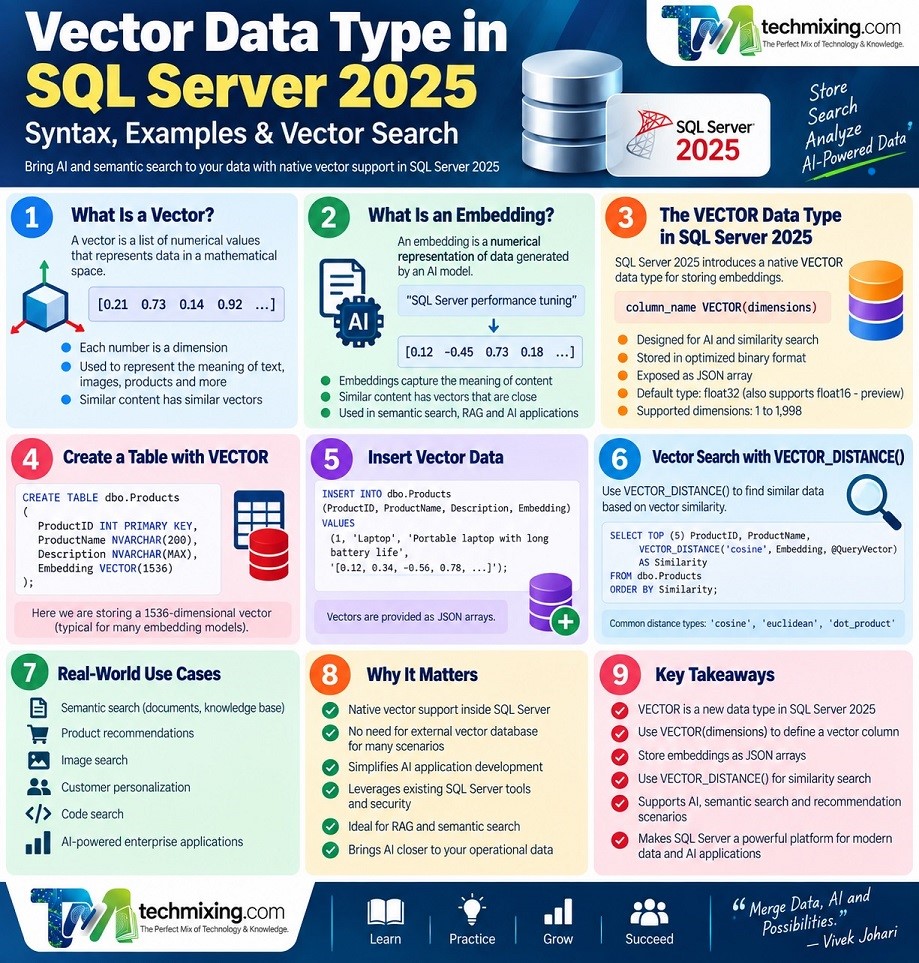
With SQL Server 2025, Microsoft introduced a native VECTOR data type designed for storing vector data used in similarity search and machine-learning/AI scenarios. Vectors are stored internally in an optimized binary format while being exposed conveniently as JSON arrays. The default element type is float32.
This makes SQL Server much more interesting for developers building:
- AI applications
- Semantic search
- Retrieval-Augmented Generation (RAG)
- Recommendation systems
- Document search
- Similarity search
- AI-powered enterprise applications
In this article, we’ll understand what the Vector Data Type is, how to create it, how to store embeddings, how VECTOR_DISTANCE() works, and where SQL Server 2025 fits into the modern vector database landscape.
1. What Is a Vector?
Before understanding the SQL Server VECTOR data type, we need to understand what a vector actually is.
In simple terms, a vector is a list of numerical values representing something in a mathematical space.
For example:
[0.21, 0.73, 0.14, 0.92]Each number represents one dimension of the vector.
In AI applications, vectors are commonly used to represent the meaning or characteristics of:
- Text
- Documents
- Images
- Products
- Audio
- Videos
- Customer profiles
- Code
Instead of comparing two documents word by word, an AI system can compare their vector representations.
Think of it this way
Traditional database:
LaptopVector representation:
[0.21, -0.34, 0.78, 0.15, ...]The numbers themselves aren’t normally meaningful to humans.
Their value comes from how vectors relate to each other.
2. What Is an Embedding?
An embedding is a numerical representation of data generated by an embedding model.
For example:
"SQL Server performance tuning"might be converted into something conceptually like:
[0.12, -0.45, 0.73, 0.18, ...]The embedding model transforms the original content into a high-dimensional numerical representation.
Content with similar meaning tends to produce vectors that are relatively close according to an appropriate similarity/distance measure.
For example:
"How can I improve SQL Server performance?"and
"SQL Server query optimization techniques"are semantically related even though they don’t contain exactly the same words.
That’s the fundamental idea behind semantic search.
3. What Is the Vector Data Type in SQL Server 2025?
SQL Server 2025 introduces a native:
VECTORdata type.
It is specifically designed for storing vectors used in scenarios such as:
- Similarity search
- Machine learning
- AI applications
- Semantic search
- Recommendation systems
Microsoft documents the syntax as:
column_name VECTOR(dimensions)The default base type is float32. SQL Server 2025 also supports float16, although Microsoft’s documentation currently identifies half-precision support as a preview capability.
For the standard float32 vector type, the supported dimension range is 1 through 1,998.
For example:
VECTOR(3)represents a vector with three dimensions.
4. Why Did SQL Server Need a Vector Data Type?
Before native vector support, developers often had to store embeddings using alternatives such as:
VARBINARY
NVARCHAR
JSON
FLOAT columns
Those approaches could store the data, but they weren’t designed specifically for vector workloads.
The native VECTOR type gives SQL Server a data type designed around vector operations.
This is important because modern AI applications frequently need to perform two things:
Store embeddings
        ↓
Search embeddings by similarity
SQL Server 2025 brings these capabilities closer to the relational database engine.
5. SQL Server 2025 VECTOR Syntax
The basic syntax is:
VECTOR(dimensions)For example:
VECTOR(3)A table can therefore be created like this:
CREATE TABLE dbo.Products
(
    ProductID INT PRIMARY KEY,
    ProductName NVARCHAR(200),
    Description NVARCHAR(MAX),
    Embedding VECTOR(3)
);
Here:
ProductID       → Traditional relational data
ProductName     → Text
Description     → Text
Embedding       → Vector representation
A more realistic AI embedding might contain hundreds or thousands of dimensions, depending on the embedding model.
6. Creating a Table With a Vector Column
Let’s create a simple example.
CREATE TABLE dbo.Documents
(
    DocumentID INT PRIMARY KEY,
    Title NVARCHAR(200),
    Content NVARCHAR(MAX),
    Embedding VECTOR(4)
);
The Embedding column can now store a four-dimensional vector.
For example:
[0.10, 0.20, 0.30, 0.40]The important point is that the number of values must match the declared dimension.
For example:
VECTOR(4)expects four vector elements.
7. Inserting Vector Data
We can insert a vector using its JSON-array representation:
INSERT INTO dbo.Documents
(
    DocumentID,
    Title,
    Content,
    Embedding
)
VALUES
(
    1,
    'SQL Server Performance',
    'Learn how to improve query performance.',
    '[0.10, 0.20, 0.30, 0.40]'
);
Another row:
INSERT INTO dbo.Documents
(
    DocumentID,
    Title,
    Content,
    Embedding
)
VALUES
(
    2,
    'SQL Server Indexing',
    'Learn how indexes improve query performance.',
    '[0.12, 0.21, 0.31, 0.39]'
);
Notice that the vectors are very similar.
That’s intentional.
In a real AI application, these vectors would normally be generated by an embedding model rather than manually entered.
8. Querying Vector Data
You can retrieve the vector just like other SQL Server columns:
SELECT
    DocumentID,
    Title,
    Embedding
FROM dbo.Documents;
SQL Server exposes vectors in a JSON-array representation for convenience, while internally storing them in an optimized binary format.
This makes the data relatively easy to inspect while still giving the database an optimized representation.
9. Understanding Vector Dimensions
One of the most important concepts when working with embeddings is dimension.
Consider:
VECTOR(3)It contains:
[0.10, 0.20, 0.30]while:
VECTOR(4)contains:
[0.10, 0.20, 0.30, 0.40]An embedding model determines the dimensionality of the embeddings it produces.
Therefore, you should design your database schema around the embedding model you plan to use.
For example:
Embedding model
       ↓
1536-dimensional vector
       ↓
SQL Server column
       ↓
VECTOR(1536)
A common mistake is to choose a vector dimension independently of the embedding model.
The database vector dimension must match the embeddings being stored.
10. VECTOR_DISTANCE in SQL Server 2025
Storing vectors is only half the story.
The real value comes from comparing them.
SQL Server 2025 provides:
VECTOR_DISTANCE()The function calculates the distance between two vectors using a specified metric. Microsoft currently documents support for:
cosineeuclideandot
VECTOR_DISTANCE() performs an exact distance calculation and does not use a vector index.
The syntax is:
VECTOR_DISTANCE
(
    distance_metric,
    vector1,
    vector2
)
11. Cosine, Euclidean, and Dot Distance
Cosine distance
VECTOR_DISTANCE('cosine', vector1, vector2)Cosine distance measures the angular difference between vectors.
It is commonly useful for comparing embeddings where the direction of the vector matters more than its magnitude.
Euclidean distance
VECTOR_DISTANCE('euclidean', vector1, vector2)This measures the straight-line distance between two vectors.
Dot distance
VECTOR_DISTANCE('dot', vector1, vector2)SQL Server documents this as a negative dot-product-based distance.
With these metrics, the interpretation of “smaller” or “larger” differs, so applications should use the metric appropriate for their embedding model and ranking strategy.
12. Finding Similar Records
Let’s say we have:
DECLARE @QueryVector VECTOR(4) =
    '[0.11, 0.20, 0.29, 0.41]';
We can calculate the distance from every document:
SELECT
    DocumentID,
    Title,
    VECTOR_DISTANCE(
        'cosine',
        @QueryVector,
        Embedding
    ) AS Distance
FROM dbo.Documents
ORDER BY Distance;
The closest vectors appear first because we are ordering by the distance in ascending order.
We can also return only the top results:
SELECT TOP (5)
    DocumentID,
    Title,
    VECTOR_DISTANCE(
        'cosine',
        @QueryVector,
        Embedding
    ) AS Distance
FROM dbo.Documents
ORDER BY Distance;
This is the basic idea behind semantic similarity search.
13. Vector Search With Real Business Data
Imagine an e-commerce database.
Product
-------------------------------
Gaming Laptop
Business Laptop
Laptop Backpack
Wireless Mouse
Mechanical Keyboard
A user searches:
“computer for gaming”
Traditional keyword search looks for matching words.
Vector search can instead compare the query embedding against product embeddings.
Conceptually:
User Query
   ↓
"computer for gaming"
   ↓
Embedding Model
   ↓
Query Vector
   ↓
Compare against product vectors
   ↓
Rank by similarity
   ↓
Gaming Laptop
Gaming Desktop
High-performance Laptop
...
This is why vectors are so important for modern AI-powered search.
14. Vector Data Type and AI Embeddings
The VECTOR data type does not automatically turn ordinary text into embeddings.
This distinction is extremely important.
The workflow is usually:
Text
 ↓
Embedding Model
 ↓
Vector
 ↓
SQL Server VECTOR column
SQL Server 2025 also introduces AI-related capabilities such as AI_GENERATE_EMBEDDINGS, which can create embeddings using a precreated AI model definition stored in the database.
So there are increasingly two approaches:
External embedding generation
Application
    ↓
Embedding API / Model
    ↓
Vector
    ↓
SQL Server
SQL Server AI capabilities
SQL Server
    ↓
AI model
    ↓
AI_GENERATE_EMBEDDINGS
    ↓
VECTOR
The appropriate architecture depends on your application, model, deployment environment, security requirements, and operational needs.
15. Vector Data Type and RAG
One of the biggest applications of vector databases is Retrieval-Augmented Generation (RAG).
A simplified RAG architecture looks like this:
Documents
    ↓
Chunking
    ↓
Embeddings
    ↓
VECTOR column
    ↓
Vector Search
    ↓
Relevant Documents
    ↓
LLM
    ↓
Answer
For example, imagine a company has thousands of internal documents.
A user asks:
“What is our policy for remote employees?”
Instead of sending every document to an LLM, the application can:
- Convert the question into an embedding.
- Search for similar document vectors.
- Retrieve the most relevant documents.
- Send those documents to the LLM.
- Generate an answer.
SQL Server 2025 can therefore become an important component in a RAG architecture.
16. SQL Server 2025 Vector Index
For small datasets, calculating the distance against every vector may be acceptable.
But imagine:
10,000 vectors
1,000,000 vectors
100,000,000 vectors
Scanning every vector for every query can become expensive.
That’s where approximate nearest-neighbor (ANN) vector indexing becomes important.
SQL Server 2025 provides vector indexing capabilities using DiskANN. Microsoft’s current documentation describes CREATE VECTOR INDEX as creating an approximate index on a vector column to improve nearest-neighbor search performance.
The basic syntax is:
CREATE VECTOR INDEX IX_Documents_Embedding
ON dbo.Documents(Embedding)
WITH
(
    METRIC = 'COSINE',
    TYPE = 'DISKANN'
);
However, there is an important version/status detail.
Microsoft’s current SQL Server 2025 release notes, updated August 19, 2026, list Vector Index, CREATE VECTOR INDEX, and VECTOR_SEARCH as RTM, while some individual Learn pages still label these capabilities as preview. Always verify the status against the SQL Server 2025 build/CU and current Microsoft documentation before deploying them in production.
17. VECTOR_SEARCH
SQL Server 2025 also provides:
VECTOR_SEARCH()Unlike VECTOR_DISTANCE(), which calculates exact distance, VECTOR_SEARCH() is designed for approximate vector search and can use a vector index.
Conceptually:
VECTOR_DISTANCE()
        ↓
Exact comparison

VECTOR_SEARCH()
        ↓
Approximate nearest-neighbor search
        ↓
Vector index
This distinction is extremely important when designing a production vector-search system.
18. Vector Data Type vs Traditional SQL Data Types
Consider the difference:
| Data Type | Typical Purpose |
|---|---|
INT | Numbers/IDs |
DECIMAL | Precise numeric values |
NVARCHAR | Text |
DATE | Dates |
VARBINARY | Binary data |
JSON | Semi-structured data |
VECTOR | Numerical embeddings |
The VECTOR type isn’t intended to replace these types.
Instead, it complements them.
A typical AI-enabled table might look like:
CREATE TABLE dbo.Documents
(
    DocumentID INT PRIMARY KEY,
    Title NVARCHAR(200),
    Category NVARCHAR(100),
    CreatedDate DATETIME2,
    Content NVARCHAR(MAX),
    Embedding VECTOR(1536)
);
Now one row can contain:
Business metadata
        +
Original content
        +
AI embedding
That’s extremely useful for enterprise AI applications.
19. Vector Data Type vs a Separate Vector Database
Does native vector support mean you no longer need dedicated vector databases?
Not necessarily.
There are situations where a specialized vector database may still make sense.
However, SQL Server 2025 can be very attractive when your application already stores most of its business data in SQL Server.
Instead of:
SQL Server
     +
Separate Vector Database
     +
Application synchronization
you may be able to build:
              SQL Server 2025
          ┌─────────────────────┐
          │ Business Data       │
          │ Metadata            │
          │ Documents           │
          │ Embeddings          │
          │ Vector Search       │
          └─────────────────────┘
                    ↑
                    │
                Application
                    ↑
                    │
                  LLM
This can reduce architectural complexity.
But workload size, latency requirements, vector dimensions, indexing capabilities, operational requirements, and ecosystem fit should all be evaluated before choosing the architecture.
20. SQL Server 2025 Vector Use Cases
The native vector capabilities open up several interesting use cases.
1. Semantic Search
Search based on meaning rather than exact keywords.
2. RAG Applications
Retrieve relevant enterprise content before generating an AI answer.
3. Recommendation Systems
Find products, articles, or content similar to something a user already likes.
4. Document Search
Find related documents based on semantic meaning.
5. Knowledge Assistants
Build AI assistants over enterprise databases and documentation.
6. Product Search
Find products based on descriptions rather than exact keywords.
7. Customer Support
Match a new customer question with previously resolved support cases.
8. Code Search
Find code that performs similar functionality.
9. Content Discovery
Recommend similar articles, videos, or other content.
10. Enterprise Knowledge Bases
Combine relational business data with AI-generated embeddings.
21. Important Limitations
Vector databases aren’t magic.
There are several things to consider.
Dimension limits
For standard float32 vectors, SQL Server supports up to 1,998 dimensions.
If your embedding model produces a higher-dimensional vector, you need to verify compatibility before designing your schema.
SQL Server 2025 also supports float16 vectors as a preview capability, with different dimensional characteristics.
Embedding quality matters
A vector database cannot compensate for poor embeddings.
If the embedding model doesn’t represent your business domain well, similarity search results may also be poor.
Vector indexes have requirements
For the current vector-index implementation, Microsoft documents requirements including a minimum of 100 rows with non-NULL vectors before creating the latest vector index format.
For small datasets, brute-force/exact search may be perfectly reasonable.
22. Performance Considerations
Vector workloads behave differently from traditional relational queries.
Important factors include:
Vector dimension
Higher-dimensional vectors generally require more storage and computation.
Distance metric
Choose the metric appropriate for your embedding model and application.
Indexing
Large datasets may benefit significantly from approximate nearest-neighbor indexing.
Filtering
Real applications often need queries such as:
Find similar products
WHERE Category = 'Laptop'
AND Price < 100000
Vector search therefore needs to work alongside traditional SQL filtering.
Hardware
CPU, memory, storage, and workload concurrency can all affect vector-search performance.
Most importantly:
Don’t assume that adding a vector index automatically makes every vector query faster.
Measure the workload.
23. Security Considerations
Embeddings can contain information derived from sensitive business content.
Therefore, treat them as potentially sensitive data.
Consider:
- Authentication
- Authorization
- Encryption
- Row-level access controls
- Tenant isolation
- Data retention
- Access to embedding-generation models
- Sensitive information in source documents
For example, if a vector was generated from confidential HR documents, simply restricting the original document table isn’t necessarily enough.
Your entire retrieval pipeline should respect the same authorization rules.
24. Best Practices for SQL Server 2025 Vector Data
Here are practical recommendations.
1. Choose the embedding model first
Know the model’s dimensionality before defining:
VECTOR(n)2. Keep embeddings consistent
Don’t mix embeddings generated by incompatible models in the same vector-search column.
3. Store metadata with embeddings
For example:
DocumentID
TenantID
Category
CreatedDate
Embedding
This makes filtered retrieval much easier.
4. Start with exact search
For smaller datasets, begin with:
VECTOR_DISTANCE()Then measure performance.
5. Introduce ANN indexing when necessary
Don’t add vector indexing simply because the feature exists.
Add it when workload size and latency requirements justify it.
6. Monitor retrieval quality
Performance isn’t the only metric.
You also need to evaluate:
Precision
Recall
Relevance
Latency
Cost
7. Keep traditional indexes
Vector indexes don’t replace normal SQL Server indexes.
A real application may need both:
B-tree indexes
        +
Vector index
Microsoft specifically documents combining vector indexes with traditional indexes for filtering and broader query performance.
25. A Simple End-to-End Example
Let’s put the concepts together.
Step 1: Create the table
CREATE TABLE dbo.Articles
(
    ArticleID INT PRIMARY KEY,
    Title NVARCHAR(200),
    Content NVARCHAR(MAX),
    Embedding VECTOR(4)
);
Step 2: Insert sample vectors
INSERT INTO dbo.Articles
(
    ArticleID,
    Title,
    Content,
    Embedding
)
VALUES
(
    1,
    'SQL Server Performance',
    'Learn about query optimization.',
    '[0.10, 0.20, 0.30, 0.40]'
),
(
    2,
    'SQL Server Indexing',
    'Learn how indexes improve performance.',
    '[0.12, 0.21, 0.31, 0.39]'
),
(
    3,
    'Python Basics',
    'Learn Python programming.',
    '[0.80, 0.70, 0.20, 0.10]'
);
Step 3: Create a query vector
DECLARE @QueryVector VECTOR(4) =
    '[0.11, 0.20, 0.29, 0.41]';
Step 4: Find similar articles
SELECT TOP (2)
    ArticleID,
    Title,
    VECTOR_DISTANCE(
        'cosine',
        @QueryVector,
        Embedding
    ) AS Distance
FROM dbo.Articles
ORDER BY Distance;
The first two articles should be much closer to the query vector than the unrelated Python article, assuming these example vectors were intentionally constructed that way.
This demonstrates the fundamental vector-search pattern:
Query
  ↓
Query Vector
  ↓
Compare
  ↓
Calculate Distance
  ↓
Sort
  ↓
Return Most Similar Results
26. The Bigger Picture: SQL Server 2025 + AI
The most interesting part isn’t simply the new VECTOR data type.
It’s the combination of capabilities.
Think about this architecture:
                User
                  │
                  ▼
            AI Application
                  │
          ┌───────┴────────┐
          │                │
          ▼                ▼
      SQL Query       Vector Search
          │                │
          │                ▼
          │           Embeddings
          │                │
          └───────┬────────┘
                  ▼
             SQL Server
                  │
                  ▼
                 LLM
                  │
                  ▼
               Answer
SQL Server 2025 brings together relational data, vector data, vector functions, AI-related functionality, and vector indexing capabilities in the SQL Server ecosystem.
That is the real story.
27. Frequently Asked Questions
What is the Vector Data Type in SQL Server 2025?
The VECTOR data type is a native SQL Server 2025 data type designed to store numerical vectors, including AI embeddings used for similarity search and machine-learning applications.
What is the syntax for VECTOR in SQL Server 2025?
The basic syntax is:
VECTOR(dimensions)For example:
Embedding VECTOR(1536)The default base type is float32.
What is the maximum vector dimension in SQL Server 2025?
The standard float32 vector type supports up to 1,998 dimensions.
What is VECTOR_DISTANCE?
VECTOR_DISTANCE() calculates the distance between two vectors using a selected metric such as cosine, Euclidean, or dot distance. It performs an exact distance calculation.
Does SQL Server 2025 support vector indexes?
Yes. SQL Server 2025 supports vector indexing based on DiskANN. Microsoft’s current release notes list vector indexing capabilities as RTM, although some individual Learn pages still carry preview labeling, so production deployments should verify the status for the specific SQL Server 2025 build/CU being used.
Is SQL Server 2025 a vector database?
It can provide many capabilities expected from a vector database, including native vector storage, similarity functions, and vector indexing. Whether you should use SQL Server instead of a dedicated vector database depends on your workload and architecture.
Can SQL Server 2025 be used for RAG?
Yes. SQL Server 2025’s vector capabilities can be used to store embeddings and retrieve semantically relevant content for RAG applications.
Does VECTOR automatically generate embeddings?
No.
The VECTOR type stores vectors. Embeddings still need to be generated by an embedding model. SQL Server 2025 also provides AI_GENERATE_EMBEDDINGS for supported AI-model configurations.
28. Final Thoughts
The introduction of the Vector Data Type in SQL Server 2025 is more than the addition of another SQL data type.
It represents an important shift in how relational databases can participate in AI applications.
Traditionally, we thought about databases like this:
Rows
Columns
Relationships
Transactions
Queries
AI applications add another dimension:
Embeddings
Similarity
Semantic Search
RAG
AI Retrieval
SQL Server 2025 brings these worlds closer together.
The basic workflow is surprisingly simple:
          Data
           ↓
      Embedding Model
           ↓
        VECTOR
           ↓
    Vector Similarity
           ↓
      Relevant Data
           ↓
           AI
And that’s why the VECTOR data type is one of the more important SQL Server 2025 features for developers and database professionals working with AI.
If your organization already relies heavily on SQL Server, you don’t necessarily have to move all your data to a separate vector database to start experimenting with semantic search and RAG.
Start small.
Store a few embeddings.
Try VECTOR_DISTANCE().
Measure retrieval quality.
Then evaluate vector indexing and approximate search as your workload grows.
The future of database development isn’t necessarily SQL vs AI.
It is increasingly:
SQL + AI.
Discover more from Technology with Vivek Johari
Subscribe to get the latest posts sent to your email.

