
Introduction
SQL Server patching sounds simple:

Download the latest patch → install it → restart SQL Server → done.
In a production environment, it is rarely that simple.
A SQL Server patch can affect the database engine, SQL Agent, Full-Text Search, Integration Services, client components, drivers, execution plans, security configuration, and even application behavior.
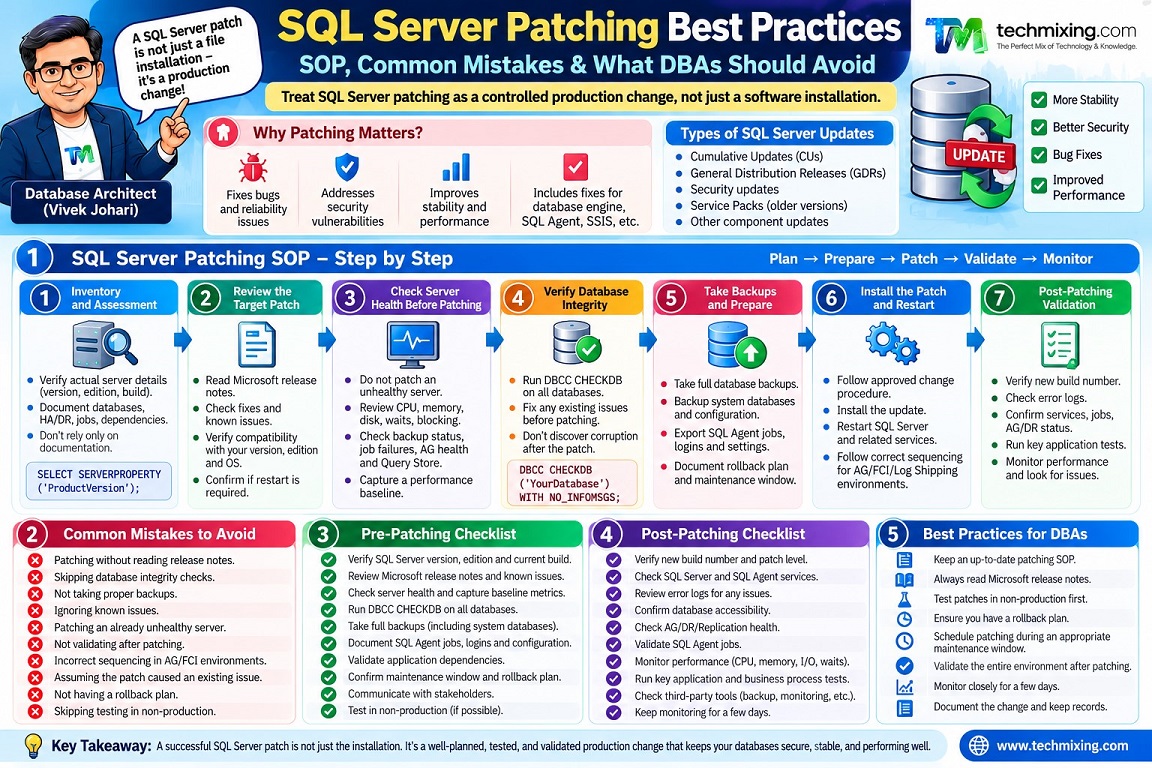
That is why experienced DBAs don’t treat patching as a software-installation task. They treat it as a controlled production change.
In my experience, the biggest SQL Server patching problems are often not caused by the patch itself. They are caused by poor preparation, incomplete testing, incorrect sequencing, missing backups, or inadequate post-patching validation.
This article covers a practical SQL Server patching SOP, common mistakes, what to avoid, and the checks I recommend before and after patching.
1. What Is SQL Server Patching?
SQL Server servicing generally includes:
- Cumulative Updates (CUs)
- General Distribution Releases (GDRs)
- Security updates
- Service Packs for older SQL Server versions that support them
- Other servicing components depending on the SQL Server version and installation
A CU can contain fixes for multiple SQL Server issues, including bugs and reliability improvements. Security updates address security vulnerabilities.
The important point is:
Never choose a SQL Server patch simply because it is the newest file you can download.
First determine:
- SQL Server version
- Edition
- Build number
- Operating system
- Existing CU/GDR level
- Required security fixes
- Known issues with the target update
- Application compatibility
- HA/DR architecture
- Maintenance window
2. Why SQL Server Patching Requires an SOP
A production SQL Server may support:
- OLTP applications
- Reporting
- ETL
- Power BI
- APIs
- Business applications
- SQL Agent jobs
- Replication
- Availability Groups
- Log shipping
- Database mirroring in older environments
- Linked servers
- SSIS/SSRS components
- Third-party monitoring and backup tools
A patch can therefore have a much larger impact than simply restarting the SQL Server service.
A good patching process should answer five questions:
Before: Is the server ready?
During: Are we following the approved change procedure?
After: Is SQL Server healthy?
Rollback: What will we do if something goes wrong?
Evidence: Can we prove that patching completed successfully?
3. SQL Server Patching SOP
A practical SOP can be divided into seven phases.
Phase 1 – Inventory and Assessment
Before planning the patch, collect the current environment information.
At minimum, capture:
SELECT
    SERVERPROPERTY('ServerName') AS ServerName,
    SERVERPROPERTY('InstanceName') AS InstanceName,
    SERVERPROPERTY('Edition') AS Edition,
    SERVERPROPERTY('ProductVersion') AS ProductVersion,
    SERVERPROPERTY('ProductLevel') AS ProductLevel,
    SERVERPROPERTY('ProductUpdateLevel') AS ProductUpdateLevel,
    SERVERPROPERTY('ProductUpdateReference') AS ProductUpdateReference;
Also document:
- SQL Server version
- Instance name
- Edition
- Current build
- Number of databases
- Database sizes
- HA/DR configuration
- SQL Agent jobs
- Replication
- Linked servers
- SSIS/SSRS dependencies
- Backup solution
- Monitoring solution
- Application dependencies
Don’t assume the documentation is correct.
Verify the actual server.
Phase 2 – Review the Target Patch
Before installing anything in production:
- Read the official Microsoft release notes.
- Verify the target build.
- Review fixes included in the update.
- Review known issues.
- Check whether the update applies to your SQL Server version and edition.
- Check whether a restart is required.
- Check whether other components need updating.
This step is frequently skipped.
That’s a mistake.
A patch should be treated like a production change, not just an executable file.
4. Check the SQL Server Health Before Patching
Do not patch an unhealthy server.
If SQL Server already has:
- long-running queries
- blocking
- corruption
- failed jobs
- backup failures
- high CPU
- memory pressure
- storage problems
- Always On synchronization issues
then patching may make troubleshooting much harder.
For example, if an application reports performance degradation immediately after patching, you need to know whether the problem existed before the patch.
Capture a baseline
Useful baseline information includes:
- CPU utilization
- Memory utilization
- Disk latency
- I/O throughput
- Batch requests/sec
- Wait statistics
- Query Store activity
- Blocking
- Database health
- Backup status
- SQL Agent job status
5. Verify Database Integrity
A critical pre-patching check is database integrity.
For example:
DBCC CHECKDB ('YourDatabase')
WITH NO_INFOMSGS;
For production environments, the exact integrity-check strategy should be based on database size, maintenance policy, and available maintenance window.
The important principle is:
Don’t discover corruption after patching and assume the patch caused it.
If corruption already existed, your troubleshooting becomes much more difficult.
6. Verify Backups
Before patching, verify that you have usable backups.
Check:
- Latest full backup
- Latest differential backup, if applicable
- Transaction-log backups
- Backup completion status
- Backup retention
- Backup storage availability
More importantly:
A backup that has never been tested is only an assumption of recoverability.
Where appropriate, perform a restore test.
For critical environments, document:
- RPO
- RTO
- Recovery procedure
- Restore location
- Responsible person
7. Test the Patch Before Production
This is one of the most important steps.
Ideally:
Development → Test → UAT → Production
The closer the test environment is to production, the more valuable the test becomes.
Testing should include:
- Application connectivity
- Critical queries
- Stored procedures
- SQL Agent jobs
- ETL processes
- Reports
- Linked servers
- Authentication
- Backup jobs
- Monitoring
- HA/DR functionality
Don’t test only whether:
“SQL Server service started successfully.”
That is not sufficient validation.
SQL Server can start successfully while the application is broken.
8. Review Query Store Before Patching
Query Store can provide a useful performance baseline.
Identify important queries and capture:
- Execution duration
- CPU
- Logical reads
- Execution count
- Query plans
- Plan changes
This becomes valuable if the application reports a performance regression after patching.
You can then compare:
Before patch
vs.
After patch
Instead of relying on:
“The application seems slower.”
you have actual performance data.
9. Plan the Maintenance Window
Define:
- Start time
- Expected duration
- Application downtime
- DBA owner
- Application owner
- Infrastructure owner
- Backup owner
- Communication channel
- Validation owner
- Rollback decision maker
Also define the maximum acceptable outage.
For example:
Maintenance window: 01:00–03:00
Patching target: 01:15
Validation: 01:45
Rollback decision: 02:15
The exact timings will obviously depend on the environment.
10. HA/DR Environments Need Special Planning
Patching an Always On Availability Group is different from patching a standalone SQL Server.
For an AG environment, consider:
Secondary → validate → failover → patch former primary → validate
The exact sequence depends on your architecture and operational requirements.
Before patching, verify:
- Replica health
- Synchronization state
- Synchronization health
- Listener connectivity
- Failover readiness
- Backup configuration
- Application connectivity
Do not perform a failover simply because:
“The secondary is available.”
It should be healthy and suitable for production workload.
Also remember that patching an AG is not just an installation exercise. You are changing the version/build of members of the HA topology, so sequencing matters.
11. The Actual Patching Procedure
During the maintenance window:
Step 1
Stop or drain application workload according to the approved change plan.
Step 2
Verify the final pre-patching checks.
Step 3
Take/verify required backups.
Step 4
Confirm there are no unexpected active workloads.
Step 5
Install the approved SQL Server update.
Step 6
Monitor the installation.
Step 7
Restart the server if required.
Step 8
Verify SQL Server services.
For example:
SELECT
    servicename,
    startup_type_desc,
    status_desc
FROM sys.dm_server_services;
Step 9
Verify the SQL Server build.
SELECT
    SERVERPROPERTY('ProductVersion') AS ProductVersion,
    SERVERPROPERTY('ProductLevel') AS ProductLevel,
    SERVERPROPERTY('ProductUpdateLevel') AS ProductUpdateLevel;
Compare this against the expected target build.
Don’t simply check:
“SQL Server is running.”
Check:
“SQL Server is running on the expected build.”
12. Post-Patching Validation
This is where many patching procedures become too weak.
A successful installer does not mean a successful change.
Run application-level validation.
Database checks
Verify:
- Databases are online
- No unexpected database state
- TempDB is healthy
- System databases are healthy
- Database connectivity works
For example:
SELECT
    name,
    state_desc,
    recovery_model_desc
FROM sys.databases
ORDER BY name;
SQL Agent
Check:
- SQL Server Agent is running
- Critical jobs are enabled
- Job schedules exist
- Jobs can execute successfully
Application
Test:
- Login
- Core transactions
- Critical stored procedures
- Reports
- ETL
- APIs
- Application connectivity
Monitoring
Verify:
- Monitoring agent
- Backup monitoring
- Alerting
- Performance monitoring
- SQL Agent alerts
HA/DR
If applicable:
- AG synchronization
- Listener
- Failover readiness
- Replication
- Log shipping
13. Compare Performance With the Baseline
Don’t immediately declare success.
Monitor the environment after patching.
Compare:
CPU
Memory
I/O
Wait statistics
Query duration
Logical reads
Blocking
Query Store
A patch can occasionally expose changes in query behavior or execution plans.
If application performance changes, investigate rather than immediately blaming the patch.
14. Common SQL Server Patching Mistakes
Mistake #1 – Patching directly in production
This is probably the biggest mistake.
Better approach:
Test first.
Mistake #2 – Installing the latest CU without reviewing it
“Latest” doesn’t automatically mean “appropriate for my environment.”
Review release notes and known issues.
Mistake #3 – No backup verification
Some DBAs check:
“Backup job succeeded.”
But don’t verify whether the backup is actually usable.
Mistake #4 – No performance baseline
Without a baseline, post-patch performance troubleshooting becomes guesswork.
Mistake #5 – Ignoring HA/DR state
Never patch an AG node without understanding the current synchronization and failover state.
Mistake #6 – Assuming SQL Server startup means success
SQL Server starting is only one validation point.
The application may still be broken.
Mistake #7 – Forgetting SQL Agent
SQL Server may be healthy while critical SQL Agent jobs remain disabled or fail after maintenance.
Mistake #8 – No rollback plan
One of the most dangerous statements in production is:
“We’ll figure it out if something goes wrong.”
Before starting, know what you will do if:
- SQL Server won’t start
- Application connectivity fails
- Performance regresses
- AG synchronization fails
- Patch installation fails
Mistake #9 – Patching everything at once
If you have multiple SQL Server instances, don’t necessarily patch every production instance simultaneously.
A phased approach reduces risk.
Mistake #10 – Not documenting the change
Record:
- Previous build
- Target build
- Patch name
- Installation time
- Result
- Issues
- Validation results
- Rollback decision
- Post-patch observations
This becomes extremely valuable during audits and future troubleshooting.
15. What DBAs Should Avoid
Avoid these practices:
- Patching production without testing
- Downloading patches from unofficial sources
- Ignoring Microsoft release notes
- Patching during peak business hours without a strong reason
- Skipping backups
- Assuming backups are recoverable without testing
- Ignoring Query Store/performance baselines
- Ignoring application owners
- Ignoring SQL Agent jobs
- Ignoring HA/DR health
- Having no rollback strategy
- Making multiple unrelated production changes during the same window
That last point is especially important.
If possible, don’t combine:
SQL patch + OS patch + storage change + application deployment + configuration change
into one maintenance window.
If something breaks, you have too many variables.
16. Recommended SQL Server Patching Checklist
Before Patching
- Confirm SQL Server version and build
- Identify target patch
- Review Microsoft release notes
- Check known issues
- Verify backups
- Verify database integrity
- Check database status
- Check SQL Agent
- Check HA/DR
- Capture performance baseline
- Review Query Store
- Test patch in non-production
- Confirm application compatibility
- Prepare rollback plan
- Obtain change approval
- Communicate maintenance window
During Patching
- Confirm application is ready
- Perform final backup checks
- maintenance window
- Install approved patch
- Monitor installation
- Restart if required
- Verify SQL Server services
- Verify target build
- Check databases
After Patching
- Validate database status
- Validate SQL Agent
- Validate application connectivity
- Validate critical transactions
- Validate jobs
- Validate backups
- Validate monitoring
- Validate HA/DR
- Compare performance with baseline
- Monitor for abnormal errors
- Document results Close change only after validation
17. A Simple Production SOP
I would summarize the complete process like this:
Assess → Review → Backup → Test → Approve → Baseline → Patch → Validate → Monitor → Document
Or, for a DBA runbook:
1. Identify SQL Server build
2. Identify required patch
3. Review release notes
4. Check known issues
5. Check server/database health
6. Verify backups
7. Verify DB integrity
8. Capture performance baseline
9. Test patch
10. Obtain change approval
11. Notify stakeholders
12. Check HA/DR readiness
13. Start maintenance window
14. Install patch
15. Restart if required
16. Verify target build
17. Validate SQL Server
18. Validate application
19. Validate jobs and backups
20. Validate HA/DR
21. Monitor performance
22. Document results
23. Close change
18. The Most Important Principle
SQL Server patching should not be measured by:
“Did the patch install successfully?”
It should be measured by:
“Did the production environment return to a healthy state after the change?”
That difference is important.
A patch installation is a technical operation.
Production patching is a change-management process.
A good DBA therefore doesn’t just know how to install a CU.
They know:
- when to patch
- why to patch
- how to test
- how to reduce risk
- how to validate
- how to troubleshoot
- when to stop
- and how to recover
That’s what makes SQL Server patching a reliable operational process rather than a risky maintenance activity.
Discover more from Technology with Vivek Johari
Subscribe to get the latest posts sent to your email.

