
Introduction
1. What Is SQL Server High Availability?
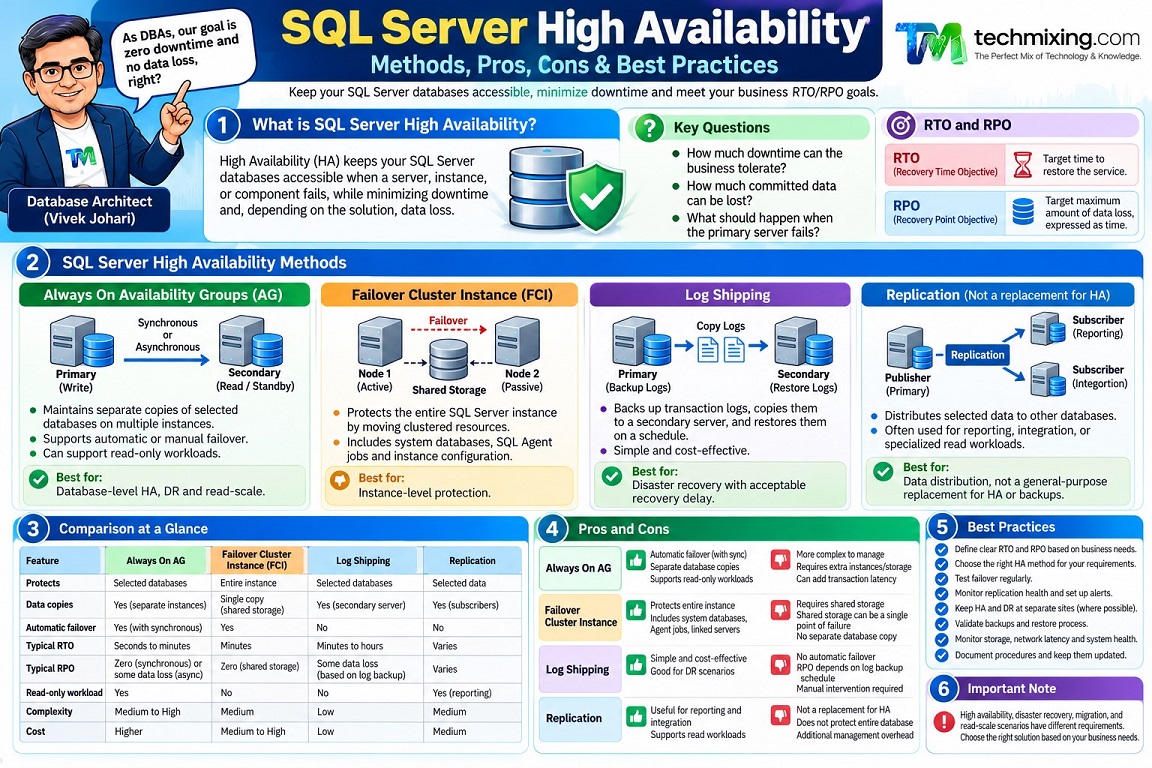
SQL Server High Availability (HA) is the ability to keep a database service accessible when a server, instance, or component fails, while minimizing downtime and, depending on the solution, data loss.

A good HA design answers three questions:
- How much downtime can the business tolerate?
- How much committed data can the business afford to lose?
- What should happen when the primary server fails?
Two measurements help define the requirements:
- RTO (Recovery Time Objective): The target time to restore the service.
- RPO (Recovery Point Objective): The target maximum amount of data loss, expressed as time.
For example, an application with an RTO of five minutes and an RPO of zero needs a different architecture from an internal reporting system that can tolerate two hours of downtime and losing up to 30 minutes of data.
Microsoft distinguishes high availability, disaster recovery, migration, and read-scale scenarios because each has different requirements.
2. SQL Server High Availability Methods
The main options are Always On Availability Groups, Failover Cluster Instances, and Log Shipping. Replication can also help maintain additional copies of data for specific use cases, but it is not a general-purpose replacement for HA or backups.

Always On Availability Groups (AG)
Maintains separate copies of selected databases on multiple SQL Server instances. Depending on synchronization and failover configuration, it can support automatic or manual failover.
Best for: Database-level HA, DR, and optional read-only workloads.

Failover Cluster Instance (FCI)
Protects a SQL Server instance by moving its clustered resources to another node. The nodes typically access shared storage.
Best for: Instance-level protection, including system databases, SQL Agent jobs, and instance configuration.

Log Shipping
Backs up transaction logs on the primary, copies them to a secondary server, and restores them there on a schedule.
Best for: Cost-effective DR where some recovery delay is acceptable.

Replication
Distributes selected data to other databases, often for reporting, integration, or specialized read workloads.
Best for: Data distribution, not as a direct substitute for complete database HA.
These methods have different failure coverage and operating requirements. For example, an FCI protects the SQL Server instance but normally relies on shared storage, whereas an AG maintains separate database copies on different instances.
3. Always On Availability Groups: Pros, Cons, and When to Use Them
Availability Groups are often a strong choice when the business needs database-level protection and wants to minimize downtime.
How they work
A primary replica processes transactions and sends transaction log records to secondary replicas. The secondary replicas harden and, depending on their state, apply those records to their copies of the databases.
There are two important availability modes.
| Feature | Synchronous commit | Asynchronous commit |
|---|---|---|
| Transaction behavior | Primary waits for secondary log hardening when synchronized and connected | Primary does not wait for secondary log hardening |
| Data-loss exposure | Can provide zero-data-loss planned/automatic failover when synchronized | Failover can lose transactions not yet hardened at the secondary |
| Performance | Can add transaction latency | Lower commit latency relative to the remote secondary |
| Typical use | Local HA | Remote DR |
Automatic failover requires synchronous-commit mode, automatic failover configured on both partners, a synchronized secondary, and the required cluster conditions. Asynchronous replicas require forced manual failover, which may involve data loss.
Pros
- Can provide automatic failover in a suitable configuration.
- Maintains separate copies of databases.
- Supports planned failover and, where configured, read-only workloads.
- Can be combined with a remote asynchronous replica for DR.
Cons
- More complex to configure and monitor than log shipping.
- Requires additional SQL Server capacity and storage.
- Synchronous replication can increase transaction latency.
- Does not automatically protect against every logical error or accidental deletion.
When should you choose AG?
Consider AG when the business needs a short RTO, strong data protection, and the budget and skills to operate multiple SQL Server instances.
Practical example: An order-processing application must recover quickly from a primary-server failure and cannot afford to lose committed transactions during an eligible failover. A synchronized synchronous-commit secondary configured for automatic failover may be appropriate.
4. Failover Cluster Instance: Pros, Cons, and When to Use It
An FCI protects the SQL Server instance rather than maintaining a separate copy of each database through SQL Server replication.
If one cluster node fails, the SQL Server instance’s clustered resources can move to another eligible node.
Pros
- Protects the SQL Server instance, not just selected user databases.
- Includes instance-level objects such as SQL Server Agent jobs and linked servers.
- Can protect against node or operating-system failures.
Cons
- Requires shared storage or an equivalent supported clustered-storage design.
- Shared storage can remain a single point of failure unless separately protected.
- Failover requires SQL Server resources to start on the other node, so interruption still occurs.
- Does not by itself provide a separate database copy at a remote DR site.
Microsoft notes that an FCI has one copy of the data on its underlying shared storage; combining an FCI with an AG or log shipping can provide additional database-copy protection.
When should you choose an FCI?
Choose an FCI when the business needs instance-level failover and the storage architecture supports it.
Practical example: A legacy application depends on SQL Agent jobs, linked servers, instance settings, and multiple databases that should move together. An FCI may fit better than designing database-by-database AG failover.
5. Log Shipping: Pros, Cons, and When to Use It
Log shipping is based on scheduled transaction log backups, copying those backups to a secondary, and restoring them.
The secondary is not continuously synchronized in the same way as a synchronous AG replica. Recovery depends on the backup, copy, and restore schedule.
Pros
- Relatively simple compared with AGs.
- Often cost-effective for DR.
- Can be configured with a delay before restoring logs, giving teams additional time to react to certain accidental changes.
- Useful for maintaining a standby database at a remote site.
Cons
- Recovery is not instantaneous.
- Data loss may occur after the last available log backup.
- Monitoring the backup, copy, and restore jobs is essential.
- Failover and application redirection require an operational procedure.
When should you choose log shipping?
Use log shipping when the business can tolerate some recovery delay and wants a simpler, cost-effective standby solution.
Practical example: A reporting database can tolerate a 30-minute recovery point and up to an hour of downtime. Log shipping might be sufficient if the backup schedule and restore latency consistently meet those targets.
For more demanding RPO/RTO requirements, evaluate AGs or another architecture that meets the target.
6. Replication: Where Does It Fit?
SQL Server replication can distribute selected tables or data changes to subscribers. Transactional replication, for example, is commonly used to distribute changes to other databases.
However, replication is not a general-purpose HA solution:
- It may not copy every database object or instance setting.
- Replicated changes can include accidental data changes.
- Promoting a subscriber to a replacement production system requires planning.
- Consistency, latency, schema changes, and application dependencies must be considered.
Use replication when the requirement is data distribution or integration, not simply because you need an automatic failover solution.
7. Which Method Should You Choose?
Use the business requirement first, rather than selecting a technology because it is familiar.
| Business requirement | Option to evaluate |
|---|---|
| Fast failover with strong protection against data loss | Synchronous AG with eligible failover configuration |
| Instance-level protection across cluster nodes | FCI |
| Remote DR with some acceptable recovery delay | Log shipping or asynchronous AG |
| Read-only workloads on secondary copies | AG, where supported and configured |
| Distribution of selected data to other systems | Replication |
| Recovery from accidental deletion or corruption | Backups and restore; HA alone is insufficient |
| Protection against loss of an entire site | Remote DR architecture, such as a remote AG replica or log shipping |
A common enterprise design combines technologies, for example, an FCI for local instance protection and an AG or log shipping for remote recovery. The correct design depends on failure scenarios, data-loss tolerance, performance, and operational cost.
8. A Practical DBA HA Readiness Checklist
Regardless of the technology, verify these areas routinely.
- RTO and RPO are documented and approved by the business.
- The HA topology and supported failure scenarios are documented.
- Replicas, cluster nodes, or log-shipping jobs are healthy.
- Synchronization lag and recovery delays are monitored.
- Failover procedures are documented and tested.
- Application connection strings and reconnection behavior are tested.
- SQL Server logins, jobs, credentials, and required dependencies are available after failover.
- Backups are stored independently and restore tests are successful.
- Monitoring and alerts reach the right support team.
- Remote DR procedures are tested, not just local failover.
- Failback procedures are documented.
- Capacity at the secondary site is sufficient to run the production workload.
The most common mistake is to assume that a healthy replica proves the complete application can recover. The database may fail over successfully while the application still fails because of connection, login, job, DNS, or dependency issues.
9. High Availability Is Not a Backup Strategy
This distinction is critical.
If a user accidentally deletes a row and the change is replicated to the secondary, the secondary may contain the same deletion. If the primary database becomes corrupted, some HA technologies may propagate or reproduce the effects of that logical problem.
Backups provide a separate recovery path. SQL Server HA features do not eliminate the need for a tested backup and restore strategy.
Summary
SQL Server High Availability is not simply about keeping a second server ready. It is about designing for the failures your business cannot afford.
- Choose Availability Groups when database-level protection and fast failover are priorities.
- Choose FCIs when instance-level failover is required.
- Choose Log Shipping when a simpler, cost-effective DR solution meets the recovery targets.
- Use Replication for data distribution when that is the actual requirement.
- Keep backups and tested restores as the foundation of recovery.
Before selecting any method, ask three questions:
How much downtime can we tolerate? How much data can we lose? And have we tested recovery under realistic conditions?
Those answers should drive the architecture not the other way around.
Discover more from Technology with Vivek Johari
Subscribe to get the latest posts sent to your email.

