
Introduction
SQL Server has many concepts that look similar but behave differently.
For example:
DELETEvsTRUNCATEvsDROPWHEREvsHAVING- Clustered vs Nonclustered Index
- Temp Table vs Table Variable
- CTE vs Temp Table
- Stored Procedure vs Function
- View vs Stored Procedure
UNIONvsUNION ALLCHARvsVARCHARVARCHARvsNVARCHARGETDATE()vsSYSDATETIME()- Login vs User
- Blocking vs Deadlock
- Full Backup vs Differential Backup
- SQL Server vs Azure SQL Database
- SQL Server Agent vs Azure Automation
- SQL Server Developer vs Express Edition
Understanding these differences is important for SQL Server DBAs, developers, database architects and interview candidates.
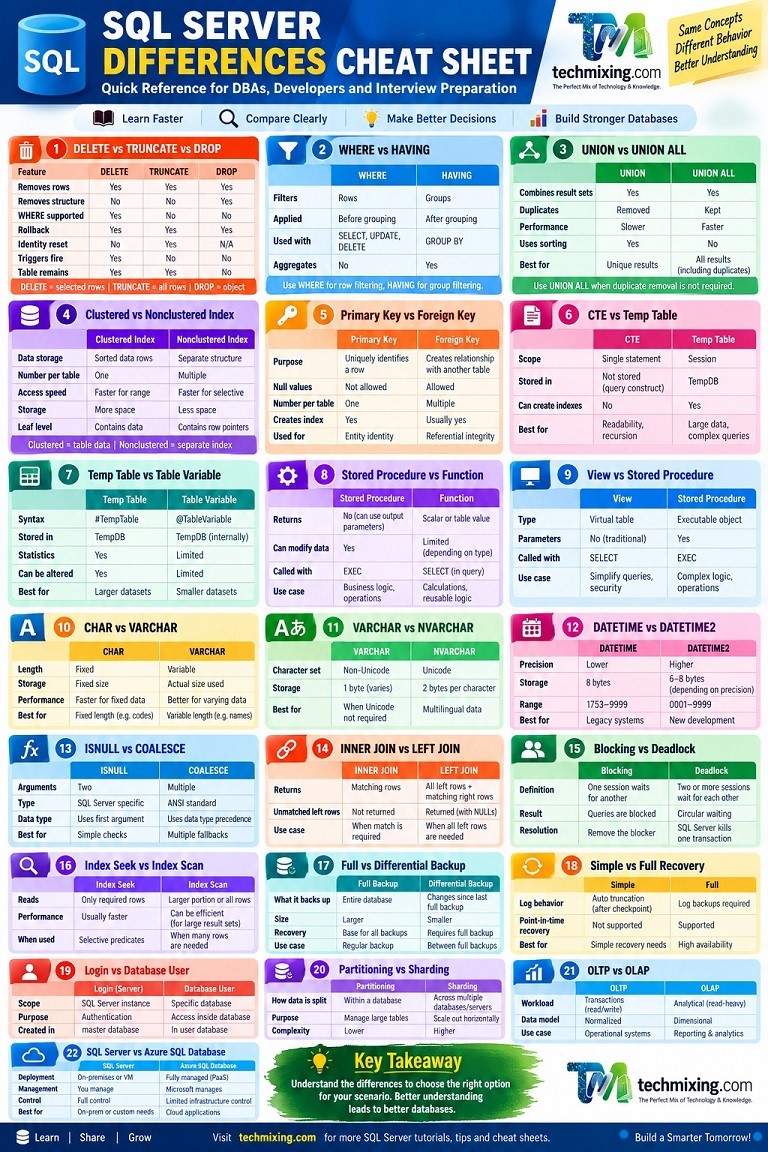
This SQL Server Differences Cheat Sheet provides a quick reference for some of the most commonly confused SQL Server concepts.
1. DELETE vs TRUNCATE vs DROP
| Feature | DELETE | TRUNCATE | DROP |
|---|---|---|---|
| Removes rows | Yes | Yes | Yes |
| Removes table structure | No | No | Yes |
WHERE supported | Yes | No | No |
| Can be rolled back in transaction | Yes | Yes | Yes |
| Usually faster for removing all rows | No | Yes | N/A |
| Identity reset | No | Usually yes | Object removed |
| Trigger behavior | DELETE triggers can fire | Does not fire DELETE triggers | Object removed |
| Table remains | Yes | Yes | No |
Simple rule
DELETE → Remove selected rows.
TRUNCATE → Quickly remove all rows.
DROP → Remove the object itself.
Example:
DELETE FROM Employee
WHERE DepartmentID = 10;
TRUNCATE TABLE Employee;DROP TABLE Employee;Always be especially careful with TRUNCATE and DROP in production.
2. WHERE vs HAVING
| WHERE | HAVING |
|---|---|
| Filters rows | Filters groups |
| Applied before grouping | Applied after grouping |
| Commonly used with SELECT | Commonly used with GROUP BY |
| Aggregate filtering is generally done with HAVING | Designed for aggregate/group filtering |
Example:
SELECT DepartmentID, COUNT(*)
FROM Employee
WHERE Status = 'Active'
GROUP BY DepartmentID
HAVING COUNT(*) > 10;
Here:
WHEREfilters individual rows.HAVINGfilters the grouped result.
3. UNION vs UNION ALL
| UNION | UNION ALL |
|---|---|
| Combines result sets | Combines result sets |
| Removes duplicates | Keeps duplicates |
| Usually requires additional work to remove duplicates | Generally faster |
| Can require sorting/hashing | No duplicate-removal step |
Example:
SELECT City FROM Customer
UNION
SELECT City FROM Supplier;
versus:
SELECT City FROM Customer
UNION ALL
SELECT City FROM Supplier;
Use UNION ALL when duplicate removal isn’t required.
4. Clustered Index vs Nonclustered Index
| Clustered Index | Nonclustered Index |
|---|---|
| Determines physical/logical ordering of table data | Separate index structure |
| One per table | Multiple allowed |
| Leaf level contains table data | Leaf level contains index keys plus included/bookmark information |
| Important for range access | Useful for selective lookups and covering queries |
A table can have only one clustered index, but it can have multiple nonclustered indexes.
Example:
CREATE CLUSTERED INDEX IX_Employee_ID
ON Employee(EmployeeID);
CREATE NONCLUSTERED INDEX IX_Employee_Department
ON Employee(DepartmentID);Don’t create indexes simply because they appear in an execution plan recommendation. Consider the complete workload.
5. Primary Key vs Unique Key
| Primary Key | Unique Constraint |
|---|---|
| Identifies a row | Enforces uniqueness |
| One primary key per table | Multiple unique constraints possible |
| Does not allow NULL | NULL handling differs based on SQL Server’s unique constraint semantics |
| Commonly used as main identifier | Used to enforce alternate uniqueness |
Example:
CREATE TABLE Employee
(
    EmployeeID INT PRIMARY KEY,
    Email VARCHAR(200) UNIQUE
);
Here EmployeeID is the primary identifier, while Email is also required to be unique.
6. Primary Key vs Foreign Key
A Primary Key uniquely identifies rows in a table.
A Foreign Key creates a relationship to a key in another table.
Example:
Department
-----------
DepartmentID PK

Employee
-----------
EmployeeID PK
DepartmentID FK
The foreign key helps maintain referential integrity between the tables.
7. CHAR vs VARCHAR
| CHAR | VARCHAR |
|---|---|
| Fixed-length character data | Variable-length character data |
| Can use more storage when values vary significantly | Usually more space-efficient for varying-length strings |
| Useful for genuinely fixed-length values | Useful for variable-length values |
Example:
CHAR(10)VARCHAR(10)If values are naturally variable in length, VARCHAR is often more appropriate.
8. VARCHAR vs NVARCHAR
| VARCHAR | NVARCHAR |
|---|---|
| Non-Unicode character data | Unicode character data |
| Uses 1 or more bytes per character depending on code page | Uses Unicode storage |
| Suitable when Unicode isn’t required | Suitable for multilingual data |
Example:
DECLARE @Name VARCHAR(100);
DECLARE @UnicodeName NVARCHAR(100);
Use NVARCHAR when your application needs Unicode/multilingual characters.
9. DATETIME vs DATETIME2
| DATETIME | DATETIME2 |
|---|---|
| Older data type | More modern date/time type |
| Lower fractional-second precision | Higher precision available |
| Fixed storage characteristics | Storage depends on precision |
| Common in older applications | Generally preferred for new development |
For new SQL Server development, DATETIME2 is usually the better default when you need date and time values.
10. GETDATE() vs SYSDATETIME()
| GETDATE() | SYSDATETIME() |
|---|---|
| Returns current date/time | Returns current date/time |
Returns datetime | Returns datetime2 |
| Lower precision | Higher precision |
Example:
SELECT GETDATE();SELECT SYSDATETIME();11. ISNULL vs COALESCE
| ISNULL | COALESCE |
|---|---|
| SQL Server-specific function | SQL standard expression |
| Two arguments | Can handle multiple expressions |
| Data type behavior differs | Uses data type precedence rules |
| Often simple and convenient | Useful for multiple fallback values |
Example:
SELECT ISNULL(Phone, 'Not Available')
FROM Customer;
SELECT COALESCE(Phone, MobilePhone, 'Not Available')
FROM Customer;Be careful when mixing data types because implicit conversion behavior can differ.
12. CTE vs Temporary Table
| CTE | Temporary Table |
|---|---|
| Defined within a statement | Physical temporary object in tempdb |
| Scope generally limited to the statement | Can be used across multiple statements within its scope |
| Useful for readable query logic | Useful for intermediate results |
| Doesn’t automatically provide reusable stored results | Can be indexed |
| Often useful for recursive queries | Useful for larger intermediate datasets |
CTE example:
WITH EmployeeData AS
(
    SELECT EmployeeID, DepartmentID
    FROM Employee
)
SELECT *
FROM EmployeeData;
Temporary table:
CREATE TABLE #EmployeeData
(
    EmployeeID INT,
    DepartmentID INT
);
13. Temporary Table vs Table Variable
| Temporary Table | Table Variable |
|---|---|
#TempTable | @TableVariable |
Stored in tempdb | Uses tempdb internally as needed |
| Supports indexes/statistics with some differences | Has different optimization/statistics behavior |
| Generally better suited to larger/intermediate workloads | Useful for smaller/simple intermediate data |
| Can be altered | More limited |
Example:
CREATE TABLE #Employee
(
    EmployeeID INT
);
DECLARE @Employee TABLE
(
EmployeeID INT
);Do not choose between them based only on table size. Query shape, SQL Server version, statistics behavior and workload matter.
14. Stored Procedure vs Function
| Stored Procedure | Function |
|---|---|
| Can perform broader procedural operations | Designed to return a value/table |
| Can have output parameters | Returns a scalar or table depending on function type |
| Can modify data | Restrictions apply depending on function type |
Commonly executed with EXEC | Can be referenced in queries depending on type |
Stored procedure:
EXEC dbo.GetEmployeeDetails;Function:
SELECT dbo.GetEmployeeCount();15. View vs Stored Procedure
| View | Stored Procedure |
|---|---|
| Represents a query/result set | Encapsulates executable logic |
| Can generally be queried with SELECT | Executed with EXEC |
| Usually doesn’t accept traditional parameters | Can accept parameters |
| Useful for abstraction/security | Useful for complex procedural operations |
16. View vs CTE
A View is a database object stored in the database.
A CTE is a query construct defined within a statement.
View
↓
Reusable database object
CTE
↓
Statement-level query structure17. EXISTS vs IN
Both can be used to test whether matching rows exist.
Example:
SELECT *
FROM Customer c
WHERE EXISTS
(
    SELECT 1
    FROM Orders o
    WHERE o.CustomerID = c.CustomerID
);
versus:
SELECT *
FROM Customer
WHERE CustomerID IN
(
    SELECT CustomerID
    FROM Orders
);
Neither is universally faster.
The optimizer, data distribution, indexes and query structure determine the actual performance.
18. INNER JOIN vs LEFT JOIN
INNER JOIN
Returns matching rows from both tables.
LEFT JOIN
Returns all rows from the left table and matching rows from the right table.
SELECT *
FROM Customer c
INNER JOIN Orders o
    ON c.CustomerID = o.CustomerID;
SELECT *
FROM Customer c
LEFT JOIN Orders o
ON c.CustomerID = o.CustomerID;Use the join that matches the business requirement rather than choosing based on assumed performance.
19. DELETE vs TRUNCATE: Trigger Difference
This is an important DBA interview question.
DELETE can fire a DELETE trigger.
TRUNCATE TABLE does not fire a DELETE trigger.
Therefore, replacing a DELETE with TRUNCATE can change application behavior.
Always understand the dependencies before making this change.
20. Full Backup vs Differential Backup
| Full Backup | Differential Backup |
|---|---|
| Backs up the database | Backs up changes since the relevant full backup |
| Larger | Usually smaller |
| Foundation for differential backups | Depends on full backup |
| Can take longer | Usually faster |
Typical recovery sequence:
Full Backup
     +
Latest Differential Backup
     +
Transaction Log Backups
The exact recovery strategy depends on the recovery model and backup strategy.
21. Full Recovery vs Simple Recovery Model
| Simple | Full |
|---|---|
| Transaction log is automatically reusable after checkpoints subject to active transactions/other factors | Log backups are required to manage log truncation |
| Point-in-time recovery isn’t supported | Point-in-time recovery is supported |
| Simpler backup strategy | More comprehensive recovery options |
Choose the recovery model based on business recovery requirements.
22. Blocking vs Deadlock
Blocking
One session waits because another session is holding a required resource.
Session A
   ↓
Holds Lock

Session B
   ↓
Waiting
Deadlock
Two or more sessions wait for each other in a cycle.
Session A → waits for B
Session B → waits for A
SQL Server detects a deadlock and chooses a victim transaction.
Important: Blocking and deadlocking are not the same problem.
23. Index Seek vs Index Scan
| Index Seek | Index Scan |
|---|---|
| Navigates to qualifying rows | Reads a larger portion/all of the index |
| Often efficient for selective predicates | Can be efficient when many rows are needed |
| Not automatically better | Not automatically bad |
A common mistake is:
“Index Scan = Bad.”
That is not always true.
Always consider the number of rows requested and the cost of accessing them.
24. SARGable vs Non-SARGable Predicate
A SARGable predicate allows SQL Server to use an index efficiently where appropriate.
Example:
WHERE OrderDate >= '2026-01-01'A potentially non-SARGable form:
WHERE YEAR(OrderDate) = 2026The second expression applies a function to the column, which can make efficient index access more difficult.
A better approach can be:
WHERE OrderDate >= '2026-01-01'
  AND OrderDate < '2027-01-01'
25. Logical Reads vs Physical Reads
Logical Reads
Pages read from the buffer cache.
Physical Reads
Pages that SQL Server had to read from storage.
A query can have high logical reads even when physical reads are low because the data may already be cached.
For performance tuning, high logical reads can be an important signal.
26. CPU Time vs Elapsed Time
CPU time represents processor time consumed.
Elapsed time represents how long the operation took from start to finish.
For example:
CPU Time:      500 ms
Elapsed Time:  5000 ms
This may indicate the query spent significant time waiting rather than consuming CPU.
Always consider waits when CPU and elapsed time differ significantly.
27. Query Store vs Execution Plan
| Query Store | Execution Plan |
|---|---|
| Stores historical query performance information | Shows how a query is executed |
| Helps identify regressions | Helps investigate query execution |
| Tracks multiple plans | Represents a particular execution plan |
| Excellent for production troubleshooting | Excellent for query-level analysis |
They work especially well together.
28. Statistics IO vs Statistics TIME
SET STATISTICS IO ON;
SET STATISTICS TIME ON;
STATISTICS IO → I/O and logical/physical reads.
STATISTICS TIME → CPU and elapsed time.
Use both when tuning queries.
29. SQL Server Agent vs Windows Task Scheduler
| SQL Server Agent | Windows Task Scheduler |
|---|---|
| Designed for SQL Server jobs | Designed for Windows tasks |
| Supports SQL Agent job steps | Supports OS-level tasks |
| Supports schedules, alerts and operators | General Windows scheduling |
| Integrated with SQL Server | Integrated with Windows |
For database maintenance and SQL workloads, SQL Server Agent is generally the natural choice where available.
30. SQL Server Login vs Database User
This is another important security concept.
Login
Provides authentication at the SQL Server instance level.
User
Represents access inside a specific database.
Conceptually:
Login
  ↓
Server
  ↓
Database User
  ↓
Database Permissions
A login can be mapped to a database user.
31. Server Role vs Database Role
Server Role
Controls permissions at the SQL Server instance level.
Examples include:
sysadmin
securityadmin
serveradmin
Database Role
Controls permissions inside a database.
Examples:
db_owner
db_datareader
db_datawriter
Don’t grant sysadmin simply because a user needs access to a particular database.
32. SQL Server Authentication vs Windows Authentication
| Windows Authentication | SQL Server Authentication |
|---|---|
| Uses Windows/Active Directory identity | Uses SQL Server login/password |
| Generally preferred in domain environments | Useful when SQL authentication is required |
| Centralized identity management | Credentials managed by SQL Server |
| Supports integrated security | Requires SQL login |
The appropriate choice depends on the organization’s authentication architecture and requirements.
33. Database Mail vs SQL Server Agent Alerts
Database Mail provides email functionality.
SQL Server Agent Alerts can detect certain SQL Server events and trigger responses such as notifications.
They often work together:
SQL Server Event
       ↓
Agent Alert
       ↓
Notification
       ↓
Database Mail
       ↓
DBA
34. SQL Server Express vs Developer vs Standard vs Enterprise
| Edition | Typical Use |
|---|---|
| Express | Small applications, learning and lightweight workloads |
| Developer | Development/testing with Enterprise feature set; licensing restrictions apply |
| Standard | Production workloads with a defined feature/resource set |
| Enterprise | Advanced enterprise capabilities |
Edition capabilities and limits can change between SQL Server versions, so always check the documentation for the specific version you are deploying.
35. SQL Server vs Azure SQL Database
| SQL Server | Azure SQL Database |
|---|---|
| Can be self-managed | Fully managed PaaS database |
| You manage infrastructure depending on deployment | Microsoft manages underlying infrastructure |
| Broad control over OS/instance | Less infrastructure-level control |
| Can run on-premises or in cloud VMs | Cloud database service |
| Traditional SQL Server administration | Cloud-oriented management model |
Azure SQL Database isn’t simply “SQL Server hosted somewhere.” It is a managed database service with its own architecture, capabilities and management model.
36. Azure SQL Database vs Azure SQL Managed Instance
| Azure SQL Database | Azure SQL Managed Instance |
|---|---|
| Database-level PaaS service | Instance-level managed service |
| Excellent for modern cloud applications | Designed for higher SQL Server compatibility |
| Less instance-level control | More instance-like capabilities |
| Generally simpler management | More SQL Server-like environment |
Choosing between them depends on application compatibility, architecture, migration requirements and operational needs.
37. SQL Server VM vs Azure SQL Database
SQL Server on Azure VM
You manage more of the SQL Server environment.
Azure SQL Database
Microsoft manages the underlying infrastructure and platform.
Simple decision:
Need more infrastructure control?
        ↓
SQL Server on Azure VM

Want a managed database service?
        ↓
Azure SQL Database
38. OLTP vs OLAP
| OLTP | OLAP |
|---|---|
| Transaction processing | Analytical processing |
| Many short transactions | Complex analytical queries |
| Frequent INSERT/UPDATE/DELETE | Usually read-heavy |
| Highly normalized designs are common | Dimensional models are common |
| Low-latency transactions | Aggregation and analysis |
Example:
Bank transaction system → OLTP
Business reporting/data warehouse → OLAP
39. Normalization vs Denormalization
Normalization
Reduces redundancy and improves data integrity.
Denormalization
Introduces controlled redundancy to improve read performance or simplify reporting.
Neither is universally better.
The correct design depends on the workload.
40. Partitioning vs Sharding
| Partitioning | Sharding |
|---|---|
| Splits data within a database/table structure | Splits data across separate databases/nodes |
| Managed within the database architecture | Distributed architecture |
| Useful for large tables and manageability | Useful for horizontal scale |
| Can simplify data lifecycle management | Can increase application complexity |
These concepts are often confused but are fundamentally different.
41. Temp Table vs Permanent Table
| Temporary Table | Permanent Table |
|---|---|
| Temporary object | Persistent object |
Commonly stored in tempdb | Stored in user database |
| Useful for intermediate processing | Stores application/business data |
| Scope/lifetime is limited | Remains until explicitly removed |
42. Local Temporary Table vs Global Temporary Table
| Local Temp Table | Global Temp Table |
|---|---|
#Table | ##Table |
| Session-specific | Visible to multiple sessions while it exists |
| Automatically removed when appropriate | Removed when no sessions reference it and creator is gone |
Example:
CREATE TABLE #Employee
(
    EmployeeID INT
);
CREATE TABLE ##Employee
(
EmployeeID INT
);Global temporary tables require additional care in multi-user environments.
43. Identity vs Sequence
| Identity | Sequence |
|---|---|
| Associated with a table column | Independent database object |
| Generates values for a column | Can be used by multiple tables |
| Common for surrogate keys | Useful when a shared number generator is required |
Example:
CREATE SEQUENCE dbo.OrderSequence
AS INT
START WITH 1
INCREMENT BY 1;
44. ROW_NUMBER vs RANK vs DENSE_RANK
| Function | Behavior |
|---|---|
ROW_NUMBER() | Always produces unique sequential numbers |
RANK() | Ties receive the same rank and gaps can occur |
DENSE_RANK() | Ties receive the same rank without gaps |
Example scores:
100
100
90
Results:
ROW_NUMBER   RANK   DENSE_RANK
1            1      1
2            1      1
3            3      2
45. CROSS APPLY vs CROSS JOIN
CROSS JOIN produces a Cartesian product.
SELECT *
FROM Customer
CROSS JOIN Department;
CROSS APPLY evaluates the right-side expression for each row from the left side.
It is especially useful with:
- Table-valued functions
- Correlated subqueries
- Top-N-per-group patterns
They are not interchangeable.
SQL Server Difference Cheat Sheet: Quick Reference
| Difference | Remember This |
|---|---|
| DELETE vs TRUNCATE | Selected rows vs all rows |
| TRUNCATE vs DROP | Remove rows vs remove object |
| WHERE vs HAVING | Rows vs groups |
| UNION vs UNION ALL | Remove duplicates vs keep duplicates |
| Clustered vs Nonclustered | Table data ordering vs separate index |
| Primary Key vs Foreign Key | Identity vs relationship |
| CTE vs Temp Table | Query scope vs reusable intermediate object |
| Temp Table vs Table Variable | Different optimization/use cases |
| View vs Procedure | Query abstraction vs executable logic |
| Procedure vs Function | Procedural operation vs returned value/table |
| CHAR vs VARCHAR | Fixed vs variable length |
| VARCHAR vs NVARCHAR | Non-Unicode vs Unicode |
| DATETIME vs DATETIME2 | Legacy date/time vs higher precision |
| GETDATE vs SYSDATETIME | datetime vs datetime2 |
| ISNULL vs COALESCE | SQL Server function vs standard expression |
| EXISTS vs IN | Existence test vs membership test |
| INNER JOIN vs LEFT JOIN | Matching rows vs all left rows |
| Blocking vs Deadlock | Waiting vs circular waiting |
| Seek vs Scan | Targeted access vs broader reading |
| Logical vs Physical Reads | Buffer cache vs storage reads |
| CPU vs Elapsed Time | Processor time vs total duration |
| Full vs Differential Backup | Full database vs changes since full |
| Simple vs Full Recovery | Simpler recovery vs point-in-time recovery |
| Login vs User | Server authentication vs database identity |
| Server Role vs Database Role | Instance permissions vs database permissions |
| Partitioning vs Sharding | Within database vs distributed databases |
| OLTP vs OLAP | Transactions vs analytics |
| Normalization vs Denormalization | Reduce redundancy vs controlled redundancy |
| SQL Server vs Azure SQL Database | Self-managed vs managed PaaS |
| Azure SQL DB vs Managed Instance | Database-level vs instance-level PaaS |
How to Use This SQL Server Differences Cheat Sheet
This cheat sheet can be useful in three situations.
For SQL Server DBAs
Use it as a quick reference during:
- Production troubleshooting
- Performance tuning
- Database administration
- Backup and recovery planning
- Security reviews
- Architecture discussions
For SQL Server Developers
It can help when deciding between:
- CTE and temp tables
- Different joins
- Data types
- Index types
- Functions and procedures
- Query filtering approaches
For SQL Server Interviews
Many of these differences are frequently discussed in DBA and SQL Server developer interviews.
Instead of memorizing definitions, understand when and why you would choose one option over another.
Final Thoughts
Knowing SQL Server syntax is important, but understanding the differences between similar SQL Server concepts is what helps you make better database design, development and troubleshooting decisions.
The most important rule is:
Don’t choose a SQL Server feature simply because it is popular. Choose it based on the workload, business requirement, performance characteristics and operational needs.
Keep this SQL Server Differences Cheat Sheet as a quick reference for your daily DBA and development work.
Discover more from Technology with Vivek Johari
Subscribe to get the latest posts sent to your email.

