
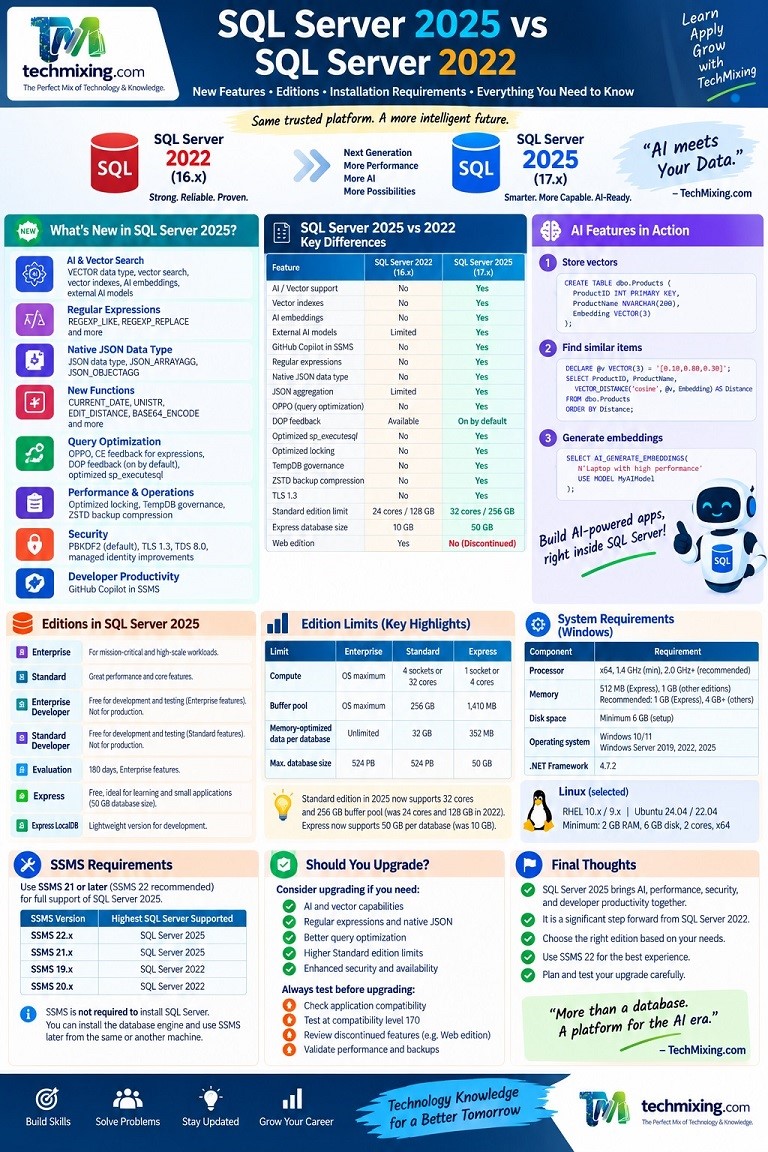
SQL Server 2025 is a major release of Microsoft SQL Server.
SQL Server 2022 was already a powerful database platform with features such as Parameter Sensitive Plan Optimization, Query Store improvements, Intelligent Query Processing, Azure integration, security enhancements, and improved availability.
SQL Server 2025 takes the platform further, especially in AI, vector search, query optimization, security, developer productivity, and hybrid cloud integration.
SQL Server 2025 became generally available on November 18, 2025. It is version 17.x, while SQL Server 2022 is version 16.x. (Microsoft Learn)
This article explains the most important differences between SQL Server 2025 and SQL Server 2022, along with the editions, hardware requirements, memory, disk space, operating system support, SSMS requirements, and some practical examples.

Contents
- SQL Server 2025 at a Glance
- SQL Server 2025 vs SQL Server 2022
- AI Features in SQL Server 2025
- Vector Data Type
- Vector Search and Vector Indexes
- AI Embeddings and External AI Models
- GitHub Copilot in SSMS
- Regular Expressions
- Native JSON Data Type
- New String and Language Functions
- Intelligent Query Processing Improvements
- Optimized sp_executesql
- Optimized Locking
- TempDB Improvements
- Backup and Availability Improvements
- Security Improvements
- SQL Server 2025 Editions
- SQL Server 2025 Edition Limits
- What Happened to SQL Server Web Edition?
- What Happened to Developer Edition?
- SQL Server 2025 Hardware Requirements
- Memory Requirements
- Disk Space Requirements
- Operating System Requirements
- Linux Requirements
- Which SSMS Version Is Required?
- Is SSMS Required to Install SQL Server?
- Practical Installation Recommendation
- Checking the SQL Server 2025 Installation
- Should You Upgrade from SQL Server 2022?
- Final Thoughts
1. SQL Server 2025 at a Glance
The biggest change in SQL Server 2025 is that Microsoft has moved SQL Server further toward becoming an AI-ready database platform.
Some of the most important additions are:
- Native
VECTORdata type - Vector similarity functions
- Vector search
- Vector indexes
- AI embedding generation
- External AI model integration
- GitHub Copilot in SSMS
- Regular expression functions
- Native JSON data type
- New JSON aggregation functions
- Optional Parameter Plan Optimization
- Cardinality Estimation Feedback for expressions
- DOP Feedback enabled by default
- Optimized
sp_executesql - Optimized locking
- TempDB space resource governance
- ZSTD backup compression
- TLS 1.3 and TDS 8.0 support
- PBKDF2 password hashing by default
- Additional Always On improvements
- Microsoft Fabric mirroring capabilities
These changes make SQL Server 2025 considerably more interesting for both traditional database workloads and modern AI applications. (Microsoft Learn)
2. SQL Server 2025 vs SQL Server 2022
Here is a simplified comparison.
| Area | SQL Server 2022 | SQL Server 2025 |
|---|---|---|
| Version | 16.x | 17.x |
| Compatibility level | Up to 160 | Up to 170 |
| Native vector data type | No | Yes |
| Vector search | No | Yes |
| Vector indexes | No | Yes |
| AI embedding generation | No native SQL Server 2022 equivalent | Yes |
| External AI models | Limited external integration | Native external model support |
| GitHub Copilot in SSMS | No | Yes |
| Regular expressions | No native regex functions | Yes |
| Native JSON data type | No | Yes |
| JSON aggregation | Limited | JSON_ARRAYAGG, JSON_OBJECTAGG |
| OPPO | No | Yes |
| CE Feedback for expressions | No | Yes |
| DOP Feedback | Available | Enabled by default |
Optimized sp_executesql | No | Yes |
| Optimized locking | No | Yes |
| TempDB space governance | No | Yes |
| ZSTD backup compression | No | Yes |
| TLS 1.3 with TDS 8.0 | No | Yes |
| PBKDF2 password hashing by default | No | Yes |
| Web Edition | Yes | Discontinued |
| Standard capacity | 24 cores, 128 GB buffer pool | 32 cores, 256 GB buffer pool |
| Express database size | 10 GB | 50 GB |
The capacity improvements are particularly important. SQL Server 2025 Standard increases the single-instance Database Engine limit from the lesser of 4 sockets or 24 cores to the lesser of 4 sockets or 32 cores, and its maximum buffer pool increases from 128 GB to 256 GB. Express increases its maximum relational database size from 10 GB to 50 GB. (Microsoft Learn)
3. AI Features in SQL Server 2025
This is probably the biggest difference between SQL Server 2022 and SQL Server 2025.
SQL Server 2025 introduces database capabilities specifically designed for AI workloads.
The major AI capabilities include:
VECTOR
VECTOR_DISTANCE
VECTOR_SEARCH
CREATE VECTOR INDEX
AI_GENERATE_EMBEDDINGS
AI_GENERATE_CHUNKS
CREATE EXTERNAL MODEL
It also adds SQL Server integration with tools such as GitHub Copilot and an SQL MCP Server. (Microsoft Learn)
This means SQL Server can now participate directly in applications such as:
- Semantic search
- Recommendation systems
- RAG applications
- Document search
- AI assistants
- Similarity matching
- Knowledge bases
- AI-powered applications
4. Vector Data Type
A vector is a collection of numerical values that represents information such as text, images, or other objects in a form that AI systems can process.
SQL Server 2025 introduces the native VECTOR data type.
For example:
CREATE TABLE dbo.Products
(
    ProductID INT PRIMARY KEY,
    ProductName NVARCHAR(200),
    Description NVARCHAR(MAX),
    Embedding VECTOR(3)
);
You can insert a vector like this:
INSERT INTO dbo.Products
(
    ProductID,
    ProductName,
    Description,
    Embedding
)
VALUES
(
    1,
    'Laptop',
    'High performance business laptop',
    '[0.12, 0.85, 0.31]'
);
SQL Server stores the vector in an optimized binary format while exposing it conveniently as a JSON-style array.
The standard vector element type is float32, and SQL Server 2025 supports up to 1,998 dimensions for float32 vectors. Half-precision vectors are also supported in the current release. (Microsoft Learn)
This is a major change because previous SQL Server versions did not have a native vector data type.
5. Vector Search and Vector Indexes
Storing vectors is only one part of an AI application.
You also need to find vectors that are similar to a given vector.
SQL Server 2025 provides functions such as:
VECTOR_DISTANCE
VECTOR_NORM
VECTOR_NORMALIZE
VECTORPROPERTY
VECTOR_SEARCH
For example:
DECLARE @QueryVector VECTOR(3) =
    '[0.10, 0.80, 0.30]';

SELECT
    ProductID,
    ProductName,
    VECTOR_DISTANCE(
        'cosine',
        @QueryVector,
        Embedding
    ) AS Distance
FROM dbo.Products
ORDER BY Distance;
A smaller distance generally means the vectors are more similar for the selected metric.
SQL Server 2025 also provides approximate vector search and vector indexes for larger workloads. (Microsoft Learn)
This makes SQL Server much more suitable for AI applications that previously required a separate vector database.
6. AI Embeddings and External AI Models
SQL Server 2025 also provides functionality for working with AI models.
For example, AI_GENERATE_EMBEDDINGS can create embeddings from text using a configured AI model.
Conceptually:
Text
 ↓
AI Model
 ↓
Embedding
 ↓
VECTOR column
 ↓
Similarity Search
The syntax is based on:
AI_GENERATE_EMBEDDINGS
(
    source
    USE MODEL model_identifier
)
The model definition is stored in SQL Server using external model functionality. (Microsoft Learn)
This opens the door to architectures such as:
Documents
   ↓
Chunking
   ↓
Embeddings
   ↓
SQL Server VECTOR
   ↓
Vector Search
   ↓
Relevant Documents
   ↓
AI Application
This is particularly useful for RAG applications.
7. GitHub Copilot in SSMS
SQL Server 2025 also brings AI assistance directly into SQL Server Management Studio.

GitHub Copilot in SSMS can help developers and DBAs:
- Generate T-SQL
- Explain queries
- Fix SQL
- Improve queries
- Investigate database problems
- Complete code
- Work with database context
For example, you can ask:
Find the top 10 queries by CPU usage.Copilot can help generate the appropriate DMV query.
You can also ask:
Explain why this query might be slow.This is particularly useful because the AI assistance is available directly inside the SQL development environment. Microsoft documents GitHub Copilot as part of the SQL Server 2025 tool ecosystem. (Microsoft Learn)
8. Regular Expressions
Another important developer improvement is native regular expression support.
SQL Server 2025 introduces functions such as:
REGEXP_LIKE
REGEXP_REPLACE
REGEXP_SUBSTR
REGEXP_INSTR
REGEXP_COUNT
REGEXP_MATCHES
REGEXP_SPLIT_TO_TABLE
For example:
SELECT
    EmailAddress
FROM dbo.Customers
WHERE REGEXP_LIKE(
    EmailAddress,
    '^[A-Za-z0-9._%+-]+@[A-Za-z0-9.-]+\.[A-Za-z]{2,}$'
);
This makes many text-validation and text-processing tasks easier directly inside T-SQL.
SQL Server 2022 does not provide this native regular expression function family. (Microsoft Learn)
9. Native JSON Data Type
SQL Server has supported JSON processing for years, but SQL Server 2025 adds a native JSON data type.
This allows JSON data to be stored in a native binary representation and queried using SQL Server functionality.
SQL Server 2025 also adds:
JSON_ARRAYAGG
JSON_OBJECTAGG
For example:
SELECT
    CustomerID,
    JSON_ARRAYAGG(OrderAmount) AS OrderAmounts
FROM dbo.Orders
GROUP BY CustomerID;
This is useful when applications work heavily with JSON data and APIs.
Microsoft describes the SQL Server 2025 JSON enhancements as including native JSON storage and additional JSON functions. (Microsoft Learn)
10. New String and Language Functions
SQL Server 2025 adds several useful functions and language improvements.
Examples include:
CURRENT_DATE
UNISTR
PRODUCT
EDIT_DISTANCE
EDIT_DISTANCE_SIMILARITY
JARO_WINKLER_DISTANCE
JARO_WINKLER_SIMILARITY
BASE64_ENCODE
BASE64_DECODE
There are also improvements to existing functions.
For example, DATEADD now supports a bigint number argument.
The || operator can also be used for string concatenation.
These additions make T-SQL more capable for modern application and data-processing workloads. (Microsoft Learn)
11. Intelligent Query Processing Improvements
SQL Server 2022 introduced several important Intelligent Query Processing capabilities.
SQL Server 2025 continues this work.
Three particularly important improvements are:
Optional Parameter Plan Optimization
This is called OPPO.
Consider:
SELECT *
FROM dbo.Orders
WHERE
    CustomerID = @CustomerID
    OR @CustomerID IS NULL;
This type of query can have different optimal plans depending on whether @CustomerID is NULL.
SQL Server 2025 can generate multiple plan variants and select a more appropriate one at runtime.
OPPO works with compatibility level 170 and is enabled by default for databases using that level. (Microsoft Learn)
Cardinality Estimation Feedback for Expressions
SQL Server 2025 can learn from previous executions of expressions and improve cardinality estimates for future executions.
This can help the optimizer make better decisions when estimates are repeatedly inaccurate. (Microsoft Learn)
DOP Feedback
SQL Server 2022 introduced Degree of Parallelism Feedback.
SQL Server 2025 makes DOP Feedback enabled by default.
The goal is to help SQL Server learn when a query’s parallelism level is not appropriate for the workload. (Microsoft Learn)
12. Optimized sp_executesql
SQL Server 2025 introduces OPTIMIZED_SP_EXECUTESQL.
Consider an application that sends many dynamically generated statements using:
EXEC sp_executesql
    N'SELECT *
      FROM dbo.Orders
      WHERE CustomerID = @CustomerID',
    N'@CustomerID INT',
    @CustomerID = 100;
When many sessions simultaneously compile similar statements, compilation itself can become a source of contention.
SQL Server 2025 can serialize compilation for sp_executesql statements so that other sessions can reuse the compiled plan rather than creating a compilation storm.
The feature is controlled through:
ALTER DATABASE SCOPED CONFIGURATION
SET OPTIMIZED_SP_EXECUTESQL = ON;
It is available in SQL Server 2025. (Microsoft Learn)
13. Optimized Locking
SQL Server 2025 introduces optimized locking.
The goal is to reduce:
- Blocking
- Lock memory consumption
- Lock escalation
This can be particularly useful for workloads with significant concurrency.
It is important to remember that optimized locking does not mean blocking disappears.
It is an improvement to the way SQL Server manages locking and should still be evaluated against the application’s workload. (Microsoft Learn)
14. TempDB Improvements
SQL Server 2025 introduces TempDB space resource governance.
This helps prevent a runaway workload from consuming excessive TempDB space and potentially causing an outage.
SQL Server 2025 also adds accelerated database recovery support for TempDB transactions. (Microsoft Learn)
For DBAs, this is an important operational improvement because TempDB problems can affect the entire SQL Server instance.
15. Backup and Availability Improvements
SQL Server 2025 includes several availability and backup improvements.
Some examples are:
ZSTD backup compression
SQL Server 2025 introduces ZSTD as a backup compression algorithm.
BACKUP DATABASE SalesDB
TO DISK = 'D:\Backup\SalesDB.bak'
WITH COMPRESSION;
The compression configuration and supported syntax should be reviewed for your specific SQL Server build and environment. (Microsoft Learn)
Backups on secondary replicas
SQL Server 2025 allows full and differential backups on secondary replicas in addition to copy-only backups. (Microsoft Learn)
Immutable blob storage
SQL Server 2025 adds support for backing up to immutable blob storage when using backup to URL. (Microsoft Learn)
Always On improvements
There are also improvements around:
- Availability group synchronization
- Failover recovery
- Group commit
- Communication flow
- Distributed availability groups
- Listener management
- TLS 1.3
These are particularly relevant for high-availability environments. (Microsoft Learn)
16. Security Improvements
Security is another area where SQL Server 2025 adds important capabilities.
One significant change is PBKDF2 password hashing by default for password-based authentication.
PBKDF2 increases the computational cost of password hashing, improving resistance to password cracking. Microsoft notes that the additional work can increase login CPU usage and login time, particularly in environments without connection pooling. (Microsoft Learn)
SQL Server 2025 also adds:
- TLS 1.3 with TDS 8.0 support
- OAEP padding support for RSA encryption
- Managed identity improvements
- Microsoft Entra authentication improvements
- Azure Key Vault managed identity support
- Security cache improvements
- Custom password policy support on Linux
17. SQL Server 2025 Editions
This is one of the areas where SQL Server 2025 is quite different from SQL Server 2022.
SQL Server 2025 editions are:
- Enterprise
- Standard
- Enterprise Developer
- Standard Developer
- Evaluation
- Express
- Express LocalDB as a lightweight installation option
Microsoft discontinued Web Edition in SQL Server 2025. (Microsoft Learn)
Enterprise
Designed for mission-critical and highly scalable workloads.
It provides the highest level of scalability and enterprise capabilities.
Standard
Designed for organizations that need enterprise database capabilities at a lower cost than Enterprise.
Enterprise Developer
This is a free development and test edition with Enterprise functionality.
It should not be used as a production server. (Microsoft Learn)
Standard Developer
This is a new free development and test edition containing the functionality of Standard edition.
It is useful when you want to develop and test specifically against Standard edition capabilities. (Microsoft Learn)
Evaluation
This edition contains Enterprise functionality and can be used for evaluation for 180 days. (Microsoft Learn)
Express
This is the free edition designed for learning, small applications, development, and lightweight workloads.
SQL Server 2025 Express now includes functionality that was previously provided through Express with Advanced Services. (Microsoft Learn)
18. SQL Server 2025 Edition Limits
Here are some of the most important limits.
| Limit | Enterprise | Standard | Express |
|---|---|---|---|
| Database Engine compute | OS maximum | 4 sockets or 32 cores, whichever is lower | 1 socket or 4 cores, whichever is lower |
| Buffer pool | OS maximum | 256 GB | 1,410 MB |
| Memory-optimized data per database | Unlimited | 32 GB | 352 MB |
| Maximum relational database size | 524 PB | 524 PB | 50 GB |
SQL Server 2022 Standard was limited to 24 cores and 128 GB of buffer pool, while SQL Server 2022 Express was limited to a 10 GB relational database. (Microsoft Learn)
This makes SQL Server 2025 Standard considerably more capable for medium-sized workloads.
19. What Happened to SQL Server Web Edition?
This is an important change for organizations currently using SQL Server Web.
SQL Server Web Edition is discontinued in SQL Server 2025.
It was available in SQL Server 2022 but is no longer an edition in SQL Server 2025.
Organizations using Web Edition should review their licensing and deployment strategy before planning an upgrade. (Microsoft Learn)
20. What Happened to Developer Edition?
SQL Server 2022 had one general Developer Edition.
SQL Server 2025 introduces two developer editions:
Enterprise Developer
Standard Developer
The difference is straightforward.
Enterprise Developer
Enterprise functionality
Development and testing only
Free
Standard Developer
Standard functionality
Development and testing only
Free
Microsoft describes Enterprise Developer as functionally equivalent to the Developer edition from previous versions. (Microsoft Learn)
For someone currently using SQL Server 2022 Developer and wanting the closest functional match, Enterprise Developer is the natural choice.
21. SQL Server 2025 Hardware Requirements
Now let’s look at the actual installation requirements.
For Windows installations, Microsoft currently lists the following minimum requirements:
| Component | SQL Server 2025 requirement |
|---|---|
| Processor | x64 |
| Minimum processor speed | 1.4 GHz |
| Recommended processor speed | 2.0 GHz or faster |
| Minimum memory | 512 MB Express, 1 GB other editions |
| Recommended memory | 1 GB Express, at least 4 GB other editions |
| Minimum available disk space | 6 GB |
| .NET Framework | 4.7.2 |
| Windows | Windows 10 or later, or Windows Server 2019 or later |
SQL Server 2025 supports x64 Intel and AMD processors. Windows Arm64 is not currently supported for the SQL Server engine. (Microsoft Learn)
There is an important distinction here:
These are minimum installation requirements, not recommended production server sizing.
A production SQL Server normally requires considerably more CPU, memory, and storage based on workload.
22. Memory Requirements
The official minimum memory requirements are:
Express
Minimum: 512 MB
Recommended: 1 GB
Standard, Enterprise and other non-Express editions
Minimum: 1 GB
Recommended: At least 4 GB
Microsoft also states that memory should be increased as database size increases. (Microsoft Learn)
For a developer laptop or test VM, I would not recommend building a SQL Server 2025 lab with only 1 GB or 4 GB of RAM.
For example, a more comfortable development environment could be:
CPU:     4 cores
RAM:     8 to 16 GB
Storage: SSD
This is a practical recommendation rather than a Microsoft minimum requirement.
For production, memory should be sized based on the workload, database size, concurrency, and other services running on the server.
23. Disk Space Requirements
SQL Server 2025 requires at least 6 GB of available space on the system drive during setup for temporary installation files.
This requirement applies even if you install SQL Server components on another drive. (Microsoft Learn)
Microsoft lists approximately:
| Component | Approximate space |
|---|---|
| Database Engine, data files, Replication, Full-Text Search | 1,480 MB |
| Database Engine with R Services | 2,744 MB |
| Database Engine with PolyBase Query Service | 4,194 MB |
| Analysis Services | 698 MB |
| Reporting Services | 967 MB |
Actual requirements depend on which features you install. (Microsoft Learn)
But there is an important practical point.
The SQL Server engine is not the only thing consuming disk space.
You also need room for:
Operating system
SQL Server binaries
Data files
Transaction log files
TempDB
Backups
Extended Events
Query Store
Cumulative updates
Temporary installation files
Therefore, 6 GB should be treated as a minimum setup requirement, not as a sensible amount of free space for a working SQL Server server.
24. Operating System Requirements
On Windows, SQL Server 2025 supports:
Windows Server 2025
Windows Server 2022
Windows Server 2019
Windows 11
Windows 10
However, supported editions vary by operating system.
For example, the Microsoft compatibility matrix shows Enterprise, Standard, and Express support on the relevant Windows Server versions, while Windows client operating systems have edition-specific restrictions. (Microsoft Learn)
For a development laptop, Windows 11 with SQL Server 2025 Standard Developer or Express is a practical option.
For an enterprise production installation, Windows Server is generally the more appropriate platform.
25. Linux Requirements
SQL Server 2025 also runs on Linux.
Current supported Linux platforms include:
- Red Hat Enterprise Linux 10.x
- Red Hat Enterprise Linux 9.x
- Ubuntu 24.04
- Ubuntu 22.04
- Linux containers on supported x64 Linux hosts
SQL Server 2025 no longer supports SUSE Linux Enterprise Server. (Microsoft Learn)
The minimum Linux requirements are:
Memory:       2 GB
Disk:         6 GB
Processor:    2 GHz
CPU cores:    2
Architecture: x64
File system:  XFS or ext4
The 2 GB requirement is the minimum needed to start SQL Server on Linux. (Microsoft Learn)
SQL Server 2025 also adds Linux-specific improvements such as TLS 1.3, tempdb on tmpfs, and additional platform support. (Microsoft Learn)
26. Which SSMS Version Is Required?
This is an important question.
SQL Server 2025 does not require a specific SSMS version to install the database engine.
However, you should use an SSMS version that fully supports SQL Server 2025 features.
Microsoft currently lists:
| SSMS version | Highest SQL Server supported |
|---|---|
| SSMS 22.x | SQL Server 2025 |
| SSMS 21.x | SQL Server 2025 |
| SSMS 19.x | SQL Server 2022 |
| SSMS 20.x | SQL Server 2022 |
So if you are installing SQL Server 2025, use SSMS 21 or later.
My recommendation is to use the latest SSMS 22 release rather than installing an older SSMS version. Microsoft currently lists SSMS 22 as the latest GA release, with SSMS 22.9.2 released on August 25, 2026. (Microsoft Learn)
SSMS 22 also provides full compatibility with SQL Server 2025 and includes SQL Server 2025-specific tooling improvements. (Microsoft Learn)
27. Is SSMS Required to Install SQL Server?
No.
This is an important distinction.
SQL Server Database Engine and SSMS are separate products.
You can install:
SQL Server 2025without installing:
SSMSThe database engine runs independently.
SSMS is a management and development tool that you can install on the same machine or another Windows computer.
For example:
Server
   |
   +---- SQL Server 2025

Developer Laptop
   |
   +---- SSMS 22
The laptop can connect to the SQL Server remotely.
SSMS itself requires Windows and Microsoft currently lists 4 GB RAM minimum and 4 GB available disk space, along with a 1.8 GHz or faster processor. (Microsoft Learn)
28. Practical Installation Recommendation
If you want to install SQL Server 2025 on a personal development machine, I would recommend something like:
Operating System:
Windows 11

SQL Server:
SQL Server 2025 Enterprise Developer

CPU:
4 cores or more

RAM:
8 to 16 GB

Storage:
SSD with at least 30 to 50 GB of free space

Management Tool:
Latest SSMS 22

Database Compatibility:
170
The 30 to 50 GB storage recommendation is a practical lab recommendation, not Microsoft’s minimum requirement.
If you want to test Standard edition behavior specifically, use:
SQL Server 2025 Standard Developerinstead.
For learning SQL Server 2025 AI features, Enterprise Developer is generally more convenient because it provides Enterprise functionality in a non-production development environment.
29. Checking the SQL Server 2025 Installation
After installation, connect through SSMS and run:
SELECT
    SERVERPROPERTY('ProductVersion') AS ProductVersion,
    SERVERPROPERTY('ProductLevel') AS ProductLevel,
    SERVERPROPERTY('Edition') AS Edition,
    SERVERPROPERTY('ProductMajorVersion') AS MajorVersion;
You can also run:
SELECT @@VERSION;SQL Server 2025 is version:
17.xThe original GA build was:
17.0.1000.7As of August 2026, Microsoft’s build history lists SQL Server 2025 CU8 as build 17.0.4075.5. (Microsoft Learn)
After installation, I strongly recommend applying the latest supported cumulative update rather than leaving the instance at RTM.
You can also check the database compatibility level:
SELECT
    name,
    compatibility_level
FROM sys.databases;
For SQL Server 2025, the new compatibility level is:
170SQL Server 2025 supports compatibility levels from 100 through 170, with 170 being the SQL Server 2025 level. (Microsoft Learn)
For a database where you want to use SQL Server 2025 compatibility-level features:
ALTER DATABASE YourDatabase
SET COMPATIBILITY_LEVEL = 170;
Do not change production databases to compatibility level 170 without testing. Compatibility-level changes can affect query optimization and application behavior.
30. Should You Upgrade from SQL Server 2022?
There is no single answer for every organization.
If your SQL Server 2022 environment is stable and you do not need the new features, there may be no immediate reason to upgrade.
But SQL Server 2025 becomes particularly attractive if you need:
AI workloads
Vector
Embeddings
Vector search
RAG
AI applications
Modern developer capabilities
Regular expressions
Native JSON
GitHub Copilot
REST integration
MCP
Query optimization improvements
OPPO
CE Feedback for expressions
DOP Feedback improvements
Optimized sp_executesql
Operational improvements
Optimized locking
TempDB governance
ZSTD backup compression
Availability improvements
Higher Standard edition capacity
The increase from:
24 cores → 32 cores
128 GB → 256 GB buffer pool
can also be important for organizations whose SQL Server 2022 Standard workloads are approaching those limits. (Microsoft Learn)
However, an upgrade should always include compatibility testing, application testing, performance testing, backup and recovery validation, and a review of discontinued features.
SQL Server 2025 has some important discontinued components, including:
Data Quality Services
Master Data Services
Synapse Link
Web Edition is also discontinued. (Microsoft Learn)
This makes upgrade assessment particularly important for older environments.
31. Final Thoughts
SQL Server 2025 is more than a normal incremental SQL Server release.
SQL Server 2022 focused heavily on intelligent query processing, security, availability, and Azure integration.
SQL Server 2025 takes another major step by bringing AI capabilities directly into the database platform.
The most important changes include:
SQL Server 2025
       |
       +-- AI
       |    +-- VECTOR
       |    +-- Vector Search
       |    +-- Embeddings
       |    +-- External AI Models
       |    +-- Copilot
       |
       +-- Developer
       |    +-- Regex
       |    +-- Native JSON
       |    +-- New T-SQL functions
       |
       +-- Performance
       |    +-- OPPO
       |    +-- CE Feedback
       |    +-- DOP Feedback
       |    +-- Optimized sp_executesql
       |    +-- Optimized locking
       |
       +-- Operations
       |    +-- TempDB governance
       |    +-- ZSTD compression
       |    +-- Availability improvements
       |
       +-- Security
            +-- PBKDF2
            +-- TLS 1.3
            +-- Managed Identity
For someone learning SQL Server 2025, a good starting environment is:
SQL Server 2025 Enterprise Developer + latest SSMS 22 + Windows 11 + 8 to 16 GB RAM + SSD storage.
For organizations planning an upgrade from SQL Server 2022, the biggest questions should be:
Do we need the new AI capabilities?
Will the higher Standard edition limits help us?
Are we using any discontinued SQL Server 2022 features?
Have we tested our applications at compatibility level 170?
If the answer to these questions is favorable, SQL Server 2025 provides a strong reason to start planning the upgrade.
Official Microsoft documentation
SQL Server 2025 Hardware and Software Requirements
SQL Server 2025 Editions and Supported Features
SQL Server Management Studio 22
I’ll be publishing a series of easy-to-understand articles on Vector Databases, Vector Data Types, Vector Search, Vector Indexes, Vector Distance, and Embeddings in SQL Server.
Subscribe 𝐡𝐭𝐭𝐩𝐬://𝐰𝐰𝐰.𝐭𝐞𝐜𝐡𝐦𝐢𝐱𝐢𝐧𝐠.𝐜𝐨𝐦 and stay tuned for practical insights into SQL Server + AI!
Read more articles on SQL server & Azure SQL
What Is GitHub Copilot in SQL Server Management Studio?
How AI Understands Your SQL Query: From Natural Language to SQL
GPT-6 Astra: The Complete Guide to the Future of AI, Jobs, Careers & Professional Work
SQL Server 2025 vs SQL Server 2022: What’s New for AI?
AI in SQL Server: What Can AI Actually Do for Database Professionals?
Can an AI Agent Troubleshoot a SQL Server Performance Problem?
How to Use AI Like “GPT-6 Astra” in Your Career: 10 Powerful Ways to Get Ahead in the AI Era
SQL Server Execution Plans Explained: A Beginner’s Guide for DBAs and Developers
For Interview Questions on SQL SQL Server, Azure SQL, Performance Tuning, Security, and DBA, click the link below:-
https://www.techmixing.com/interview-questions-2
Explore the Complete TechMixing Article Sitemap – Click the Link Below
https://www.techmixing.com/site-map
Discover more from Technology with Vivek Johari
Subscribe to get the latest posts sent to your email.

