
Introduction
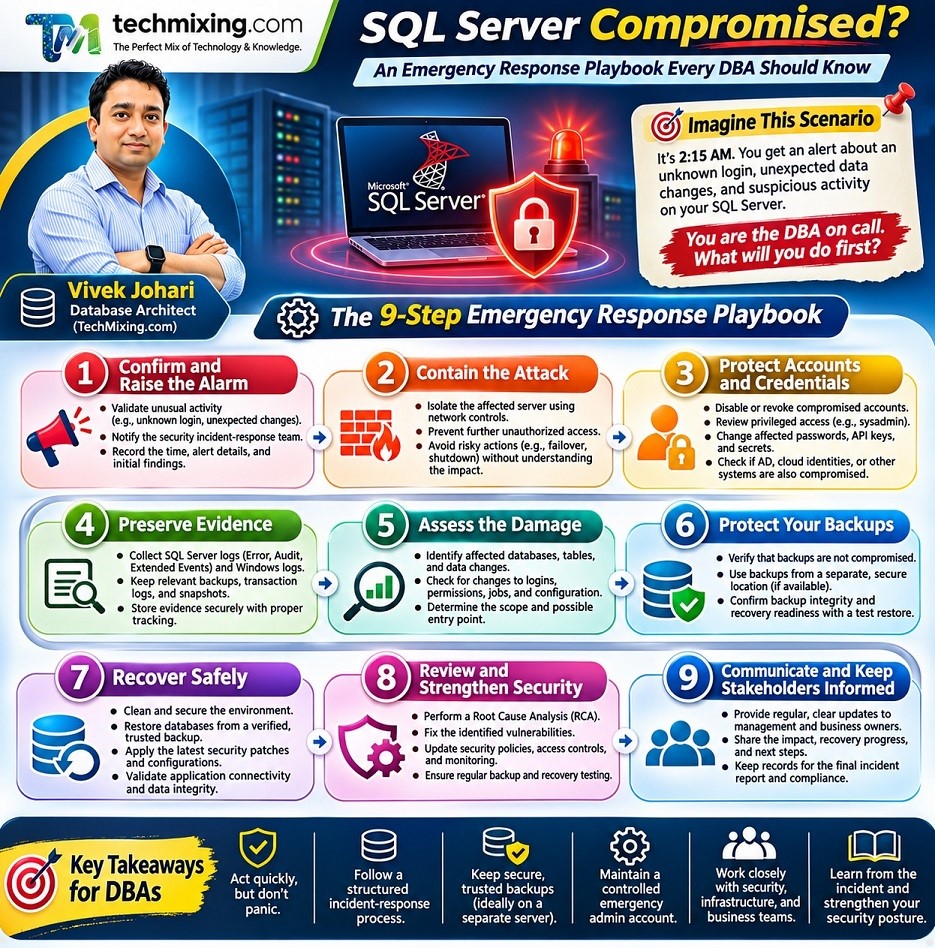
Imagine this scenario.

It is night time at 2:15 AM. You receive an alert that an unknown login has been created on your production SQL Server. A few minutes later, several tables show unexpected changes, and your security team reports suspicious activity on the database server.
You are the DBA on call.
What would you do first?
Would you restart SQL Server? Disable the suspicious login? Restore yesterday’s backup? Or shut down the entire server?
In a real security incident, the first few decisions can make a significant difference. Your job is not just to bring SQL Server back online. You must contain the threat, protect your data and backups, preserve evidence, and recover safely.
Let’s walk through a practical incident-response plan.
1. Confirm the incident and raise the alarm
Do not assume every unusual login or query means the server has been compromised. However, do not ignore credible indicators either.
Look for warning signs such as:
- Unknown SQL Server logins or unexpected members of the
sysadminrole. - Suspicious changes to permissions, database objects, or server configuration.
- Unexpected data deletion, modification, or encryption.
- Unusual connections, unfamiliar source IP addresses, or unexplained administrative activity.
- Ransom notes, security alerts, or evidence of malware on the host.
Immediate action: Do not Panic. Contact your security incident-response team and follow your organization’s incident-response process. Notify the appropriate infrastructure, application, and business owners.
Record the discovery time, alert details, affected server, observed symptoms, and actions taken. Keep a timeline.
2. Contain the attack without making the situation worse
Your first priority is to stop further unauthorized access and prevent the incident from spreading.
Work with the security or infrastructure team to isolate the affected server using appropriate network controls. Restrict connections to trusted management and application systems as the incident plan permits.
If the attacker may have compromised other machines, investigate connected application servers, management systems, backup infrastructure, and identity services as well.
Important: Isolation is not the same as immediately powering off the server. If it is safe to do so, preserve the system’s current state and coordinate evidence collection with incident responders. In an active destructive attack, immediate containment may take priority over collecting every piece of evidence.
Do not independently disconnect an Always On availability group node, force a failover, or alter cluster configuration without understanding the consequences. These actions can affect availability and data recovery.
3. Protect privileged accounts and credentials
An attacker with sysadmin access may be able to change permissions, access data, disable auditing, or interfere with recovery.
From a secure computer, communicate with the security team through a trusted channel and work together to:
- Revoke or disable confirmed compromised accounts where appropriate.
- Review unexpected members of
sysadminand other privileged roles. - Change compromised passwords, API keys, and other access credentials, and replace them with new, secure credentials.
- Revoke exposed secrets, tokens, and certificates where applicable.
- Investigate whether the attack also compromised Active Directory, cloud identities, or privileged management tools.
Do not simply change one SQL login password and assume the environment is safe. If the attacker controls a privileged identity or has established another way to regain access, the compromise may persist.
4. Preserve evidence before cleaning up
Before removing suspicious objects or changing configurations, coordinate with incident responders to preserve relevant evidence.
Depending on the incident and available tools, this may include:
- SQL Server error logs, SQL Server Audit records, and Extended Events files.
- Windows Security, System, and application logs.
- Firewall, endpoint detection, identity, and network logs.
- Relevant database backups, transaction logs, and snapshots.
- Suspicious login details, permission changes, timestamps, and affected objects.
- System images or memory captures collected by qualified responders when appropriate.
Store collected evidence securely, restrict access, and maintain a record of who collected it and when.
Remember that an attacker with sufficient privileges may have altered or deleted some logs. The absence of a suspicious event in one log does not prove it never happened.
5. Assess the damage and identify the entry point
Now investigate the scope of the compromise.
Ask these questions:
- Which databases and tables were accessed or modified?
- Was sensitive information read, copied, or exposed?
- Were databases deleted, encrypted, or corrupted?
- Were SQL Server logins, permissions, jobs, linked servers, or configuration settings changed?
- Was the operating system compromised?
- Are other SQL Server instances or backup systems affected?
- When did the attacker first gain access, and what access path was used?
Review available audit records, authentication logs, endpoint alerts, network activity, and database changes. Use trusted evidence to build a timeline rather than relying on assumptions.
A suspicious login is an indicator to investigate, not proof of the complete attack path.
6. Protect your backups they may be your lifeline
A backup is useful only if it is trustworthy and can be restored.
Check whether the attacker could access or modify:
- SQL Server full, differential, and transaction log backups.
- Backup shares and backup-management systems.
- Storage snapshots and disaster-recovery copies.
- Backup credentials, encryption keys, and recovery documentation.
Preserve known-good copies in a protected location that the compromised environment cannot modify. Do not overwrite existing backups or blindly trust the most recent backup.
Restore candidate backups in an isolated recovery environment. Validate their provenance and integrity, investigate whether they may contain attacker-created changes, and confirm that the recovered databases are usable.
A successful RESTORE VERIFYONLY check alone does not prove that a backup is clean or that the restored application will work correctly.
7. Rebuild or recover from a trusted state
If the operating system or SQL Server host is compromised, removing a few suspicious logins may not be enough.
Work with security and infrastructure teams to determine whether the safest recovery path is a clean rebuild, a trusted image, or another approved recovery method.
A typical recovery plan includes:
- Provision a clean, isolated server or recovery environment.
- Install a supported operating system and SQL Server build with approved security updates.
- Apply hardened configuration and restrict network access.
- Restore trusted backups and required transaction logs where appropriate.
- Recreate only reviewed logins, permissions, jobs, linked servers, and other configuration.
- Rotate credentials and secrets that could have been exposed.
- Validate database consistency, application behavior, data integrity, and security controls.
- Obtain security and business approval before reconnecting production traffic.
Do not automatically fail over to a secondary replica. If the attacker or malicious changes have reached that replica, failover can simply move the problem to another server.
8. Monitor carefully before declaring the incident resolved
Before returning the service to normal operations, verify that the original entry point has been addressed and that unauthorized access cannot easily resume.
Monitor for:
- New or unexpected privileged logins.
- Repeated authentication failures and unusual successful logins.
- Unexpected changes to SQL Agent jobs, permissions, or configuration.
- Unusual outbound network connections and data movement.
- Unexpected changes to database records or application behavior.
- Security alerts from the host, identity platform, and network.
Keep enhanced monitoring in place during the recovery period. Document the root cause, impact, recovery decisions, and lessons learned.
The first-hour checklist for a DBA
Use this as a quick reference during a suspected compromise.
- Alert the incident-response and security teams.
- Record the discovery time, symptoms, and actions taken.
- Contain unauthorized access using coordinated network controls.
- Preserve relevant logs and forensic evidence.
- Protect privileged accounts and rotate compromised credentials through trusted channels.
- Check the scope of the incident, including replicas and connected systems.
- Protect backups and recovery infrastructure from further modification.
- Agree on a trusted recovery plan before restoring or reconnecting production.
Mistakes a DBA must avoid
Do not:
- Restart or power off the server automatically before considering evidence and containment needs.
- Delete suspicious logins, jobs, or files before preserving relevant evidence, unless immediate containment requires it.
- Restore an unverified backup directly into production.
- Assume an availability-group replica or secondary server is clean.
- Change credentials from a device that may itself be compromised.
- Reconnect the server simply because SQL Server starts successfully.
- Declare the incident resolved without investigating the entry point and possible persistence.
A Real-World Database Security Incident: My Experience as a DBA
I would like to share a real-world database security incident that I experienced while working at one of my previous organizations.
One day, I received an urgent call from the application team reporting that the application had stopped communicating with the SQL Server database.
When I tried connecting to the database server using my regular DBA login, I discovered that my login was no longer working. I tried accessing the server using a few other DBA accounts, but those logins were also failing.
Initially, it looked like someone had changed the passwords.
Things became more concerning when other DBAs started reporting the same issue with their database accounts.
So, we suspected a possible security incident rather than a normal authentication or connectivity problem.
How We Responded to the Incident
Fortunately, we identified the problem early and followed our incident response approach.
1. Isolated the affected database server
As our first containment measure, we coordinated with the relevant infrastructure and security teams to isolate the affected database server and prevent further unauthorized access.
2. Used an alternative privileged account
Fortunately, we maintained an additional highly privileged administrative account apart from the SQL Server sa account. This account had not been compromised, allowing us to regain administrative access to the SQL Server instance.
We had created this account specifically for emergency situations where our regular DBA accounts or SQL logins became unavailable. However, this does not mean that organizations should maintain multiple highly privileged administrative accounts. Such an emergency account should be limited in number, securely stored, closely monitored, and used only when necessary.
3. Collected investigation evidence
We collected the available SQL Server error logs, login-related information, and other relevant evidence to help investigate what had happened.
We avoided making unnecessary changes before preserving the available investigation data.
4. Protected our database backups
One important security practice we had already implemented was maintaining database backups on a separate server.
Fortunately, that backup server was not compromised.
This decision proved extremely valuable during the recovery process.
5. Investigated and secured database access
We investigated the affected logins and their activities, identified compromised credentials, and replaced the affected passwords and other exposed credentials.
We also reviewed administrative access to ensure that unauthorized users could no longer access the database environment.
6. Restored the database
After the security team had assessed the environment and approved the recovery approach, we used the latest available database backup from the separate backup server to restore the database.
The backup had been taken a few hours before the incident. Since the database was not frequently updated, we were fortunate that the recovery resulted in no significant data loss.
What We Did After Recovery
Our responsibility did not end with restoring the database and bringing the application back online.
We continued monitoring the database server, investigating the incident further, and reviewing the security of the database environment.
We also prepared a Root Cause Analysis (RCA) report documenting the incident, its impact, investigation findings, and recovery activities.
Based on the investigation, we reviewed and strengthened our existing database security policies to reduce the possibility of similar incidents in the future.
Three Important Lessons I Learned
Looking back at this incident, three things made a significant difference.
1. Always maintain secure emergency administrative access.
Never depend on a single privileged account. Maintain a properly secured and tested emergency access mechanism.
2. Keep database backups separate from production infrastructure.
If production infrastructure is compromised, backups stored in the same environment may also be at risk. Maintain isolated or immutable backups and regularly test restoration.
3. Never panic during a security incident.
This is something I particularly remember from the incident.
Throughout the investigation and recovery process, we kept senior management informed through regular updates.
These updates helped management understand what had happened, what actions were being taken, and how recovery was progressing.
Regular communication reduced uncertainty and prevented unnecessary panic among the management team.
My takeaway: Database security is not just about implementing firewalls, permissions, encryption, and strong passwords. It is also about being prepared for unexpected incidents, having reliable backups, maintaining emergency access, and knowing how to respond when something goes wrong.
Summary
When SQL Server is compromised, the DBA’s role extends far beyond database administration. You become a key part of the organization’s incident-response and recovery effort.
Contain first. Preserve evidence. Protect backups. Recover from a trusted state. Validate before reconnecting.
The exact sequence depends on the threat, business impact, and incident-response plan. In a destructive attack, rapid isolation may be essential; in other cases, carefully coordinated evidence collection can prevent critical information from being lost.
The best time to prepare is before an incident happens. Keep a tested recovery plan, protected backups, clear escalation contacts, and a documented procedure for isolating SQL Server and its dependencies.
Discover more from Technology with Vivek Johari
Subscribe to get the latest posts sent to your email.

