
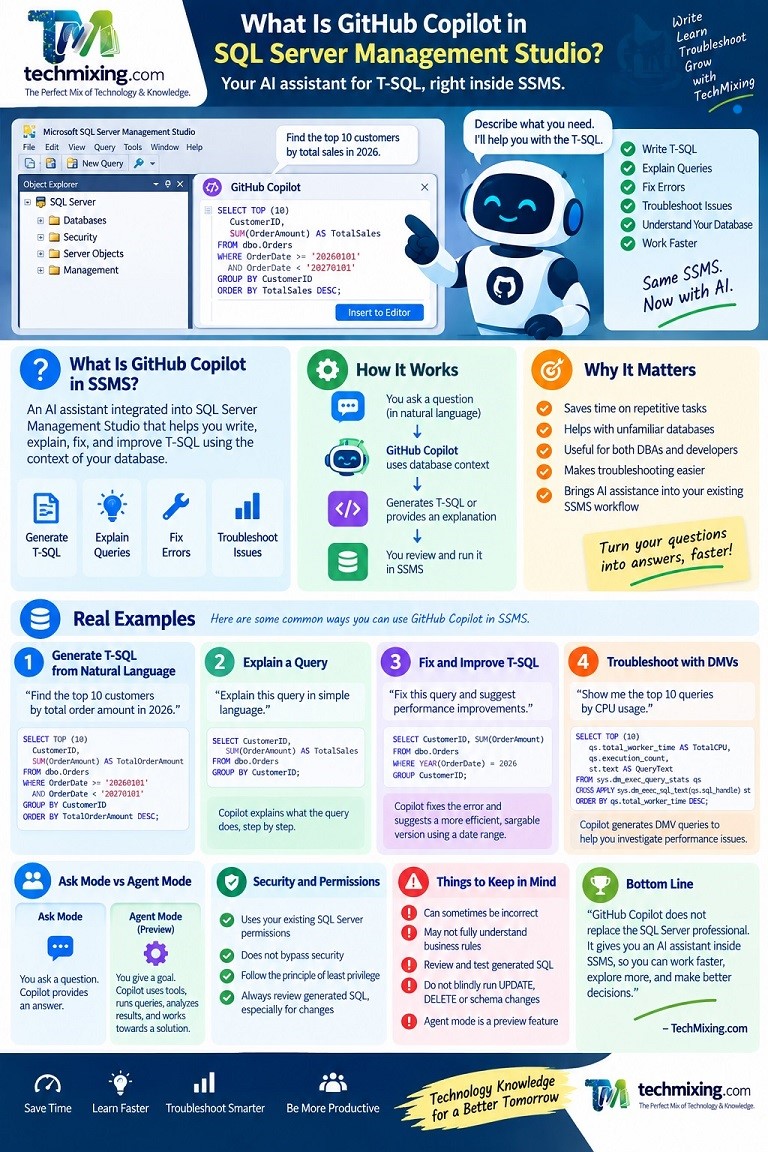
GitHub Copilot in SQL Server Management Studio brings AI assistance directly into SSMS. It can help you write T-SQL, explain queries, fix errors, improve SQL, understand database objects, and investigate SQL Server problems.
Instead of always writing SQL from scratch, you can describe what you want in normal English and ask Copilot to help.
For example:
Find the top 10 customers by total sales in 2026.Copilot can help turn that requirement into T-SQL.
This can save time, especially when working with unfamiliar databases or complex SQL.
However, Copilot is an assistant, not a replacement for SQL knowledge or a DBA.
Contents
- What Is GitHub Copilot in SSMS?
- Why GitHub Copilot in SSMS Matters
- Requirements and How to Get Started
- How Copilot Understands Your Database
- Generating T-SQL from Natural Language
- Explaining Existing SQL Queries
- Fixing and Improving T-SQL
- Using Copilot for SQL Server Troubleshooting
- Using Copilot with Query Store and Execution Plans
- Code Completions and Next Edit Suggestions
- What Are Database Instructions?
- Ask Mode vs Agent Mode
- What Is Agent Mode?
- Practical Agent Mode Troubleshooting Example
- Permissions and Security
- What Copilot Does Well
- Where Copilot Can Get Things Wrong
- Best Practices for DBAs and Developers
- GitHub Copilot in SSMS vs ChatGPT
- Final Thoughts
1. What Is GitHub Copilot in SSMS?
GitHub Copilot in SSMS is an AI assistant integrated into SQL Server Management Studio.

It can help with tasks such as:
- Writing T-SQL
- Explaining T-SQL
- Fixing SQL errors
- Improving queries
- Generating diagnostic queries
- Exploring database objects
- Completing SQL code
- Understanding SQL Server concepts
- Assisting with database troubleshooting
Microsoft currently documents GitHub Copilot support in SSMS for SQL Server, Azure SQL Database, Azure SQL Managed Instance, SQL Server on Azure VMs, and SQL database in Microsoft Fabric, depending on the feature.
The basic idea is:
Your Question
      ↓
GitHub Copilot
      ↓
SQL / Explanation / Recommendation
      ↓
SSMS
      ↓
SQL Server
Instead of switching between SSMS and another AI application, you can get AI assistance within your SQL development environment.
2. Why GitHub Copilot in SSMS Matters
SQL Server environments can become complicated.
A database might contain:
500+ tables
Hundreds of stored procedures
Thousands of indexes
Complex relationships
Large amounts of data
Years of legacy SQL
Understanding such an environment can take considerable time.
Copilot can reduce some of that effort.
For example, instead of manually remembering the syntax for finding expensive queries, you can ask:
Show me the top 10 queries by CPU usage.Or:
Explain why this query might be slow.Or:
Find tables related to customer orders.The AI provides a starting point that you can review and refine.
This is particularly useful for developers who are learning SQL Server and DBAs who frequently perform repetitive diagnostic tasks.
3. Requirements and How to Get Started
Microsoft currently documents GitHub Copilot in SSMS 22 or later. You also need a GitHub account with access to Copilot. Microsoft provides different Copilot plans, including a limited free option.
A typical setup is:
- Install or update SSMS.
- Connect to your SQL Server.
- Open a query window.
- Open the GitHub Copilot chat experience.
- Sign in with your GitHub account.
- Start asking questions.
For example:
Explain the tables in this database that are related to orders.The exact features available can depend on your SSMS version and Copilot access.
4. How Copilot Understands Your Database
One of the useful aspects of Copilot in SSMS is database context.
When working in a connected query editor, Copilot can use relevant context such as:
- The selected SQL
- The current query
- The database connection
- SQL Server context
Microsoft documents these forms of context for Copilot in SSMS.
Consider this query:
SELECT
    CustomerID,
    SUM(OrderAmount) AS TotalSales
FROM dbo.Orders
GROUP BY CustomerID;
You could select the query and ask:
Explain this query in simple language.Copilot can then explain what the query is doing.
Context is important because an AI response based only on your question may not understand the structure of your actual database.
5. Generating T-SQL from Natural Language
This is one of the most useful features.
Suppose your database contains:
dbo.Customers
dbo.Orders
dbo.OrderDetails
You can ask:
Find the top 10 customers by total order amount in 2026.Copilot might generate something similar to:
SELECT TOP (10)
    CustomerID,
    SUM(OrderAmount) AS TotalOrderAmount
FROM dbo.Orders
WHERE OrderDate >= '20260101'
  AND OrderDate < '20270101'
GROUP BY CustomerID
ORDER BY TotalOrderAmount DESC;
You can then ask:
Also show the number of orders for each customer.Copilot can modify the query:
SELECT TOP (10)
    CustomerID,
    COUNT(*) AS OrderCount,
    SUM(OrderAmount) AS TotalOrderAmount
FROM dbo.Orders
WHERE OrderDate >= '20260101'
  AND OrderDate < '20270101'
GROUP BY CustomerID
ORDER BY TotalOrderAmount DESC;
This conversational approach can make SQL development much faster.
However, always check that the generated query matches your actual schema and business requirements.
6. Explaining Existing SQL Queries
Another simple but useful capability is query explanation.
Consider:
SELECT
    CustomerID,
    SUM(OrderAmount) AS TotalSales
FROM dbo.Orders
WHERE OrderDate >= DATEADD(MONTH, -12, GETDATE())
GROUP BY CustomerID
HAVING SUM(OrderAmount) > 100000
ORDER BY TotalSales DESC;
You can ask:
Explain this query step by step in simple language.Copilot can explain that the query:
- Looks at orders from the last 12 months.
- Groups them by customer.
- Calculates total sales.
- Keeps customers with sales above 100,000.
- Sorts the results by sales.
This is especially useful when you inherit a large or unfamiliar SQL codebase.
7. Fixing and Improving T-SQL
Copilot can also help identify SQL problems.
For example:
SELECT
    CustomerID,
    SUM(OrderAmount)
FROM dbo.Orders
WHERE YEAR(OrderDate) = 2026
GROUP CustomerID;
There are two obvious issues.
The query should use:
GROUP BY CustomerIDrather than:
GROUP CustomerIDYou can ask:
Fix this query and explain the errors.You can also ask Copilot to review performance.
For example:
Review this query for non-sargable predicates.It may identify:
YEAR(OrderDate)as something worth investigating.
A range-based predicate is often preferable:
WHERE OrderDate >= '20260101'
  AND OrderDate < '20270101'
This can make better use of an appropriate index on OrderDate.
But the final decision should be based on actual execution plans and workload behavior.
8. Using Copilot for SQL Server Troubleshooting
Copilot can be useful when troubleshooting SQL Server problems.
For example, you could ask:
Generate a query to identify currently running requests
ordered by CPU time.
A possible query is:
SELECT TOP (20)
    r.session_id,
    r.status,
    r.cpu_time,
    r.total_elapsed_time,
    r.wait_type,
    t.text AS QueryText
FROM sys.dm_exec_requests AS r
CROSS APPLY sys.dm_exec_sql_text(r.sql_handle) AS t
WHERE r.status = 'running'
ORDER BY r.cpu_time DESC;
You could then ask:
Generate a query to check whether these sessions
are blocked.
Copilot can generate another diagnostic query.
This makes it easier to move from:
Problem
   ↓
Diagnostic question
   ↓
T-SQL
   ↓
Results
   ↓
Next investigation
However, a diagnostic query is only a starting point.
A real performance investigation may require DMVs, Query Store, execution plans, wait statistics, server metrics, and application information.
9. Using Copilot with Query Store and Execution Plans
Query Store is an important SQL Server performance feature.
You can ask Copilot:
Generate a Query Store query to find
the queries consuming the most CPU.
For example:
SELECT TOP (20)
    q.query_id,
    qt.query_sql_text,
    SUM(rs.avg_cpu_time * rs.count_executions) AS TotalCPU
FROM sys.query_store_query AS q
INNER JOIN sys.query_store_query_text AS qt
    ON q.query_text_id = qt.query_text_id
INNER JOIN sys.query_store_plan AS p
    ON q.query_id = p.query_id
INNER JOIN sys.query_store_runtime_stats AS rs
    ON p.plan_id = rs.plan_id
GROUP BY
    q.query_id,
    qt.query_sql_text
ORDER BY TotalCPU DESC;
Copilot can also help explain an execution plan.
For example:
Why is this query using a clustered index scan?or:
Explain this Key Lookup and tell me what I should investigate.This can be valuable when learning SQL Server performance tuning.
Still, execution plans should be reviewed carefully. Copilot can explain a plan, but it does not replace actual performance testing.
10. Code Completions and Next Edit Suggestions
Copilot can also help while you are typing SQL.
For example, you start with:
SELECT *
FROM dbo.Cust
Copilot may suggest the rest of the statement.
SSMS also supports Next Edit Suggestions, which can suggest likely changes based on your recent edits. Microsoft documents both code completions and Next Edit Suggestions as Copilot capabilities in SSMS.
This is useful for repetitive development tasks.
Instead of typing every part of a query manually, you can accept useful suggestions and continue editing.
11. What Are Database Instructions?
Database instructions allow organizations to provide additional guidance to Copilot about a particular database.
This can be useful when technical database structures do not fully explain business rules.
For example, suppose your company defines revenue as:
Revenue = completed orders minus refundsYou could provide this type of business guidance to Copilot.
Then a request such as:
Calculate monthly revenue.has more useful context.
This is important because database systems often contain business rules that cannot be understood simply from table and column names.
Microsoft documents database instructions as a way to provide database-specific context and guidance to Copilot.
12. Ask Mode vs Agent Mode
There is an important difference between asking Copilot a question and allowing it to work on a larger task.
Ask Mode
You ask a question and Copilot provides an answer.
For example:
Write a query to find blocking sessions.Copilot generates the SQL.
Agent Mode
You give Copilot a goal.
For example:
Investigate the current database performance
and identify the main queries contributing to CPU usage.
Agent mode can work through multiple steps using available tools.
Microsoft currently documents Agent mode in SSMS as a preview feature.
The difference can be represented as:
Ask Mode

Question
   ↓
Answer


Agent Mode

Goal
   ↓
Plan
   ↓
Use tools
   ↓
Analyze results
   ↓
Continue
   ↓
Final result
13. What Is Agent Mode?
Agent mode takes Copilot beyond simple question-and-answer interaction.
Instead of asking:
Give me a query to check CPU usage.you might say:
Investigate the current CPU usage and identify
the top queries contributing to it.
The agent can potentially:
- Determine what information is needed.
- Run supported SQL tools.
- Read the results.
- Decide what to investigate next.
- Perform additional queries.
- Summarize the findings.
Microsoft documents Agent mode as using SQL tools through the sql-tools MCP server.
This is an important development because it moves from:
AI generates SQLtoward:
AI uses SQL tools to investigate a task14. Practical Agent Mode Troubleshooting Example
Imagine you want to investigate CPU usage.
You could give the agent a request such as:
Investigate whether any currently running queries
are consuming significant CPU.

Identify the top three queries and explain
what I should investigate next.

Do not modify data or schema.
The agent could potentially follow a process like:
Check active requests
        ↓
Find CPU-heavy sessions
        ↓
Retrieve SQL text
        ↓
Review execution information
        ↓
Analyze results
        ↓
Provide findings
Suppose it discovers a query such as:
SELECT
    CustomerID,
    SUM(OrderAmount)
FROM dbo.Orders
WHERE YEAR(OrderDate) = 2026
GROUP BY CustomerID;
It may identify the use of:
YEAR(OrderDate)as something worth investigating.
It could then suggest:
SELECT
    CustomerID,
    SUM(OrderAmount)
FROM dbo.Orders
WHERE OrderDate >= '20260101'
  AND OrderDate < '20270101'
GROUP BY CustomerID;
The DBA should still verify the recommendation using an actual execution plan and performance measurements.
15. Permissions and Security
Security is extremely important when AI is connected to a database.
Copilot does not bypass SQL Server security.
Queries execute within the user’s permissions and configured execution context. Microsoft also emphasizes that AI-generated query classification should not be treated as a security boundary. SQL Server permissions remain the actual security control.
For example, if a user does not have permission to read:
dbo.CustomerSalaryCopilot should not be used as a way to bypass that restriction.
The same principle applies to production changes.
Avoid giving unnecessary permissions such as:
db_ownerwhen the user only needs read access.
Use least privilege wherever possible.
16. What Copilot Does Well
Copilot can be very useful for:
Writing SQL
Turn a requirement into a first version of T-SQL.
Explaining SQL
Understand unfamiliar queries and stored procedures.
Fixing syntax
Identify common SQL errors.
Learning
Ask why a query works or why a particular SQL feature is used.
Troubleshooting
Generate DMV and Query Store queries for investigation.
Repetitive work
Reduce the amount of SQL you need to type manually.
Code completion
Get suggestions while writing SQL.
Exploring databases
Use database context to ask questions about the environment.
The biggest benefit is usually time saved on repetitive and exploratory work.
17. Where Copilot Can Get Things Wrong
Copilot is powerful, but it is not always correct.
For example, suppose you ask:
Find all active customers.What does “active” mean?
It could mean:
Ordered within 30 days
Logged in recently
Has an active subscription
Has an outstanding order
The AI may make an assumption.
Similarly, a query can be syntactically correct but logically wrong.
For example:
SELECT SUM(OrderAmount)
FROM dbo.Orders;
This may look perfectly valid.
But what if your business definition of revenue requires excluding:
Cancelled orders
Refunds
Test transactions
Internal orders
The SQL is valid, but the result may be wrong.
This is why generated SQL should always be reviewed.
18. Best Practices for DBAs and Developers
Here are some simple rules.
Be specific
Instead of:
Find sales.use:
Find the top 10 customers by net sales
for January through June 2026.
Exclude refunded orders.
Give business context
Explain what terms such as “revenue” or “active customer” mean.
Ask for read-only queries when investigating
For example:
Generate a read-only query to investigate blocking.
Do not modify anything.
Review generated SQL
Especially before executing:
UPDATE
DELETE
INSERT
MERGE
ALTER
DROP
CREATE
GRANT
Test before production
Use a development or test environment whenever possible.
Validate performance
Do not assume a generated query is optimized.
Check:
Actual execution plan
CPU
Logical reads
Elapsed time
Wait statistics
Query Store
Use least privilege
AI should not receive more database access than necessary.
19. GitHub Copilot in SSMS vs ChatGPT
GitHub Copilot in SSMS and ChatGPT can both help with SQL, but they fit into workflows differently.
GitHub Copilot in SSMS
It is particularly useful for:
T-SQL generation
T-SQL editing
Code completion
Database context
SSMS workflow
SQL troubleshooting
Agent-based database tasks
ChatGPT
It can be useful for broader tasks such as:
Database architecture
Learning SQL Server
Detailed explanations
Performance troubleshooting discussions
Comparing design approaches
Technical documentation
Exploring complex solutions
They can work together.
For example:
ChatGPT
    ↓
Understand the problem
    ↓
Design the approach
    ↓
Discuss alternatives

Copilot in SSMS
    ↓
Work with SQL
    ↓
Generate and edit T-SQL
    ↓
Work with database context
The important point is not which AI tool is “better”.
It is how effectively the tool fits into your workflow.
20. Final Thoughts
GitHub Copilot in SQL Server Management Studio brings AI directly into the SQL Server development and administration environment.
It can help you:
Write SQL
Explain SQL
Fix SQL
Improve SQL
Complete SQL
Troubleshoot SQL Server
Explore databases
Agent mode takes this further by allowing Copilot to work toward a larger goal using available tools. However, Agent mode is currently a preview capability, so organizations should evaluate it carefully before using it for important production workflows.
The most important thing is to use Copilot as an assistant, not as an unquestioned authority.
A good workflow is:
Ask
 ↓
Generate
 ↓
Review
 ↓
Test
 ↓
Validate
 ↓
Deploy
rather than:
Ask
 ↓
Trust
 ↓
Run in production
For DBAs and developers, Copilot can reduce repetitive work and make SQL Server easier to explore.
But SQL knowledge still matters.
You need to understand execution plans, indexes, transactions, security, concurrency, data modeling, and business requirements to decide whether an AI-generated answer is actually correct.
The future of SSMS is likely to be more conversational, more context-aware, and more AI-assisted.
GitHub Copilot does not replace the SQL Server professional. It gives the SQL Server professional an AI assistant inside SSMS.
Discover more from Technology with Vivek Johari
Subscribe to get the latest posts sent to your email.
