
Introduction
Understanding SQL Server architecture makes it much easier to troubleshoot performance problems, blocking, memory pressure, CPU issues, I/O problems and query performance.
You don’t need to memorize every internal component but to understand:
What happens when a query enters SQL Server, how SQL Server processes it, how data is accessed, and how changes are written safely to disk.
This cheat sheet explains SQL Server architecture from beginner to advanced level using simple examples.
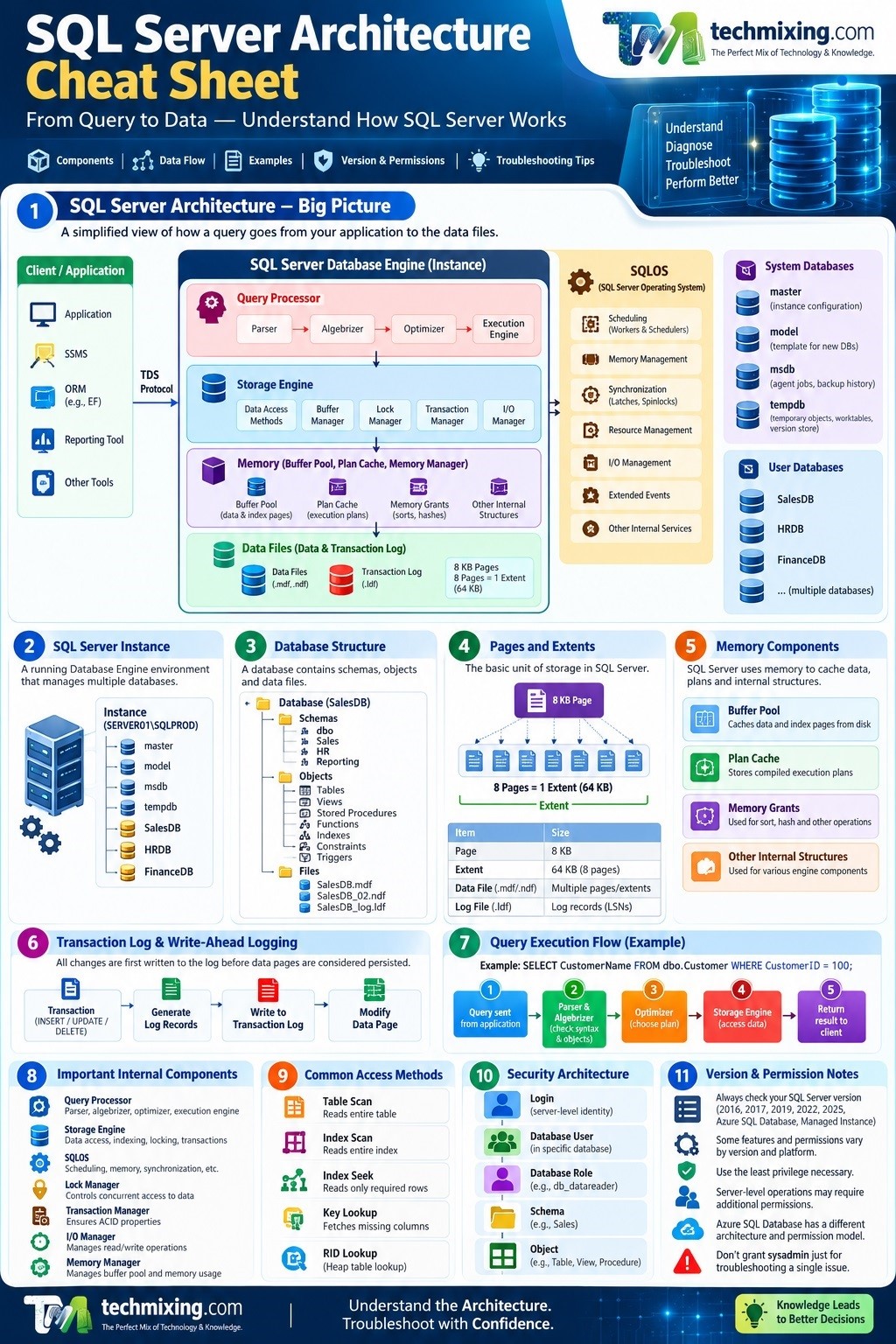
SQL Server Architecture at a High Level
A simplified view looks like this:
Application
    ↓
Connection / Protocol Layer
    ↓
SQL Server Database Engine
    ↓
Query Processor
    ↓
Storage Engine
    ↓
Buffer Pool / Memory
    ↓
Data & Log Files
Supporting all of this are components such as:
SQLOS
Security
Transaction Manager
Memory Manager
Lock Manager
Task Scheduler
I/O Management
Extended Events
Think of SQL Server as a team.
The Query Processor decides how to execute a request.
The Storage Engine gets the required data and performs physical data operations.
Memory management tries to keep frequently needed pages in memory.
The Transaction Manager makes sure changes follow transaction rules.
SQLOS provides several operating-system-like services to SQL Server.
1. SQL Server Instance
An SQL Server instance is the running Database Engine environment that manages databases and server-level resources.
A single SQL Server instance can contain multiple databases.
Example:
SQL Server Instance
│
├── master
├── model
├── msdb
├── tempdb
├── SalesDB
├── HRDB
└── FinanceDB
When you connect to:
SERVER01\SQLPRODyou are connecting to a SQL Server instance.
Important distinction
Instance ≠ Database
An instance can contain many databases.
Instance
   ↓
Multiple Databases
   ↓
Schemas
   ↓
Tables / Views / Procedures / Functions
2. System Databases
Every traditional SQL Server Database Engine instance has important system databases.
| Database | Main Purpose |
|---|---|
master | Instance-level metadata and configuration |
model | Template used when creating databases |
msdb | SQL Server Agent jobs, backup history and other automation metadata |
tempdb | Temporary objects, worktables, version store and other temporary operations |
Example
When you create:
CREATE DATABASE SalesDB;SQL Server uses the model database as part of the database creation process.
DBA Tip
Never treat tempdb as “just a temporary database.”
Poor tempdb configuration or heavy tempdb workload can become a significant production performance problem.
3. Database
A database is a logical collection of data and database objects.
For example:
SalesDB
│
├── dbo.Customer
├── dbo.Product
├── dbo.OrderHeader
├── dbo.OrderDetail
├── dbo.usp_GetCustomerOrders
└── dbo.vw_SalesSummary
A database contains more than tables.
It can contain:
- Tables
- Indexes
- Views
- Stored procedures
- Functions
- Triggers
- Constraints
- Schemas
- Statistics
- Security principals
- Database metadata
4. Schemas
A schema is a logical container for database objects.
For example:
SalesDB
│
├── Sales
│   ├── Customer
│   └── Order
│
├── HR
│   ├── Employee
│   └── Department
│
└── Reporting
    └── SalesSummary
You can then grant permissions at the schema level.
For example:
GRANT SELECT ON SCHEMA::Sales TO SalesReader;This is often easier to manage than granting SELECT separately on hundreds of tables.
Microsoft recommends using granular permissions and following the principle of granting the least permission necessary. (Microsoft Learn)
5. Data Files
SQL Server stores database data in data files.
Common extensions are:
.mdf
.ndf
The .mdf file is normally the primary data file.
.ndf files are secondary data files.
Example:
SalesDB
│
├── SalesDB.mdf
├── SalesDB_02.ndf
└── SalesDB_log.ldf
Data files contain database pages.
6. Pages
The fundamental unit of SQL Server data storage is the 8-KB page.
For example:
SQL Server Data File
        ↓
      Pages
        ↓
      8 KB
        ↓
Rows / Index information
This is an important concept for understanding:
- Logical reads
- Physical reads
- Indexes
- Table scans
- Buffer pool
- I/O performance
Example
If SQL Server needs 1,000 pages from disk:
1,000 × 8 KB
≈ 7.8 MB
The number of pages accessed can therefore have a significant impact on I/O and memory usage.
7. Extents
SQL Server groups eight 8-KB pages into an extent.
1 Extent
   ↓
8 Pages
   ↓
8 × 8 KB
   ↓
64 KB
Understanding pages and extents becomes particularly useful when studying allocation and storage internals.
8. Buffer Pool
One of the most important components for SQL Server performance is memory.
SQL Server uses the buffer pool to cache data and index pages in memory.
Consider:
SELECT *
FROM dbo.Customer
WHERE CustomerID = 100;
If the required data page is already in memory:
Query
 ↓
Buffer Pool
 ↓
Page found
 ↓
Return data
If the page isn’t in memory:
Query
 ↓
Buffer Pool
 ↓
Page not found
 ↓
Storage I/O
 ↓
Data Page
 ↓
Buffer Pool
 ↓
Return data
This is why memory and I/O are closely related.
9. Logical Read vs Physical Read
This is extremely important for performance troubleshooting.
Logical Read
SQL Server reads a page from memory.
Physical Read
SQL Server has to read the page from storage into memory.
For example:
Logical Read
Storage → Buffer Pool → Query
             ↑
        Page already there
versus:
Physical Read
Storage → Buffer Pool → Query
The key point:
A logical read doesn’t mean SQL Server accessed the physical disk.
This is why SET STATISTICS IO ON is so useful when analyzing query performance.
10. Transaction Log
Every SQL Server database has a transaction log.
The log records transactions and database modifications and is essential for recovering the database to a consistent state after failures. (Microsoft Learn)
The log file normally has:
.ldfExample:
SalesDB
├── SalesDB.mdf
└── SalesDB_log.ldf
Consider:
UPDATE dbo.Customer
SET CreditLimit = 50000
WHERE CustomerID = 100;
SQL Server records the necessary transaction information in the transaction log.
The transaction log uses Log Sequence Numbers (LSNs) to identify log records. (Microsoft Learn)
Why is the transaction log important?
It supports:
- Transaction rollback
- Crash recovery
- Transaction log backups
- Point-in-time recovery
- High availability and recovery mechanisms
11. Write-Ahead Logging
One of the most important SQL Server concepts is Write-Ahead Logging (WAL).
In simple language:
SQL Server must record the necessary log information before the corresponding changed data page is considered safely persisted.
Simplified:
Transaction
    ↓
Generate Log Records
    ↓
Write Log
    ↓
Data Page Changes
This is one of the reasons SQL Server can recover transactions after a crash.
12. Query Processor
When you submit:
SELECT *
FROM dbo.Customer
WHERE CustomerID = 100;
the Query Processor determines how SQL Server should execute it.
The Query Processor includes important areas such as:
- Parser
- Algebrizer
- Optimizer
- Execution engine
13. Parser
The parser checks whether your SQL statement follows SQL syntax.
For example:
SELECT CustomerID
FROM dbo.Customer;
is syntactically valid.
But:
SELEC CustomerID
FROM dbo.Customer;
contains a syntax error.
The parser identifies this before SQL Server can execute the query.
14. Algebrizer
The algebrizer performs tasks such as:
- Object resolution
- Column resolution
- Data type checking
- Binding names to database objects
For example:
SELECT CustomerName
FROM dbo.Customer;
SQL Server needs to determine:
CustomerName
     ↓
dbo.Customer
     ↓
SalesDB
If the column doesn’t exist, SQL Server reports an error before execution.
15. Query Optimizer
This is one of the most important components for a DBA.
The Query Optimizer evaluates possible execution strategies and chooses an execution plan based on available information.
For example:
SELECT *
FROM dbo.Customer
WHERE CustomerID = 100;
Possible access methods could include:
Table Scan
Index Scan
Index Seek
If there is a suitable index:
CREATE INDEX IX_Customer_CustomerID
ON dbo.Customer(CustomerID);
the optimizer may choose an Index Seek.
Important
Don’t use this rule:
“Index Seek = good, Index Scan = bad.”
Execution plans must be interpreted in context.
An Index Scan can be perfectly appropriate when SQL Server needs a large portion of an index.
16. Execution Plan
The execution plan describes how SQL Server intends to execute the query.
Example:
SELECT
  ↓
Index Seek
  ↓
Nested Loops
  ↓
Output
or:
SELECT
  ↓
Table Scan
  ↓
Sort
  ↓
Output
When troubleshooting a slow query, the execution plan is one of your most important diagnostic tools.
17. Statistics
Statistics provide information about data distribution that helps the optimizer estimate how many rows a query may return.
For example:
Estimated Rows = 10
Actual Rows    = 100,000
That is a major estimation difference.
It can influence the optimizer’s choice of:
- Join type
- Access method
- Memory grant
- Parallelism
DBA Tip
When investigating a bad execution plan, don’t look only for missing indexes.
Check:
Statistics
Cardinality estimates
Parameter sensitivity
Data distribution
Predicates
Indexes
Query shape
18. Storage Engine
The Storage Engine is responsible for the physical work of accessing and modifying data.
It handles areas such as:
- Data access
- Index access
- Buffer management
- Locking
- Transaction management
- I/O
A simplified view:
Query Processor
       ↓
Storage Engine
       ↓
Buffer Pool
       ↓
Data Files
19. Access Methods
SQL Server can access data through different methods.
Common examples include:
Table Scan
Index Scan
Index Seek
Key Lookup
RID Lookup
Example
Suppose:
SELECT CustomerName
FROM dbo.Customer
WHERE CustomerID = 500;
With an appropriate index, SQL Server may use:
Index Seekinstead of scanning thousands or millions of rows.
20. Index
An index is a data structure that can help SQL Server find rows more efficiently.
Think about a book.
Without an index:
Search every pageWith an index:
Find topic in index
        ↓
Go directly to relevant page
SQL Server indexes work differently internally, but this analogy is useful for beginners.
Common SQL Server index types include:
- Clustered
- Nonclustered
- Columnstore
- XML
- Spatial
- Full-text-related structures
21. Clustered Index
A clustered index determines the logical ordering of the data rows within the index structure.
A table can have at most one clustered index.
Example:
CREATE CLUSTERED INDEX IX_Order_OrderID
ON dbo.OrderHeader(OrderID);
The clustered index is particularly important because the leaf level contains the table’s data for a rowstore clustered table.
22. Nonclustered Index
A nonclustered index is a separate index structure that contains key values and row locators to help SQL Server find the corresponding data.
Example:
CREATE INDEX IX_Customer_Email
ON dbo.Customer(Email);
A query such as:
SELECT CustomerID
FROM dbo.Customer
WHERE Email = 'abc@example.com';
may benefit from this index.
23. Key Lookup
Suppose your nonclustered index finds the required rows but doesn’t contain all the columns needed by the query.
SQL Server may perform a Key Lookup against the clustered index.
Example:
Nonclustered Index Seek
          ↓
      Key Lookup
          ↓
        Result
If this happens for a very large number of rows, it can become expensive.
This is where a covering index may sometimes help.
24. Joins
When SQL Server combines rows from multiple tables, it can use different join algorithms.
The most common are:
Nested Loops
Hash Match
Merge Join
Nested Loops
Often useful when one input is relatively small and the other side can be efficiently accessed.
Small Input
    ↓
Nested Loops
    ↓
Index Seek
Hash Match
Often useful for larger unsorted inputs.
Input A
   +
Input B
   ↓
Hash Match
Merge Join
Works best when both inputs are appropriately ordered.
Sorted Input A
      +
Sorted Input B
      ↓
Merge Join
Again:
There is no universally “best” join operator.
The correct operator depends on the query and data.
25. Lock Manager
SQL Server uses locks to protect data while transactions are accessing or modifying it.
Common lock modes include:
Shared (S)
Exclusive (X)
Update (U)
Intent locks
Example:
UPDATE dbo.Customer
SET CreditLimit = 50000
WHERE CustomerID = 100;
SQL Server needs appropriate locks while modifying the row.
26. Blocking
Blocking occurs when one session holds a lock that another session needs.
Example:
Session 1
UPDATE Customer
   ↓
Holds lock

Session 2
SELECT Customer
   ↓
Waiting
This can lead to:
Blocking
   ↓
Longer query duration
   ↓
More waiting sessions
   ↓
Application slowdown
DBA Tools
Useful objects include:
sys.dm_exec_requests
sys.dm_os_waiting_tasks
sys.dm_tran_locks
27. Deadlock
A deadlock is different from ordinary blocking.
Example:
Session 1 locks Table A
       ↓
needs Table B

Session 2 locks Table B
       ↓
needs Table A
Neither can continue.
SQL Server detects the deadlock and chooses one transaction as the victim.
This is why deadlock troubleshooting requires looking at the transaction pattern, not simply increasing server resources.
28. SQLOS
SQLOS is a SQL Server internal layer that provides operating-system-like services to the Database Engine.
It supports areas such as:
- Scheduling
- Memory management
- Synchronization
- Exception handling
- Extended Events
- Resource management
You can think of it as a foundation used by SQL Server’s internal components.
29. SQL Server Scheduler
SQL Server uses schedulers to manage worker threads.
A simplified model:
CPU
 ↓
Scheduler
 ↓
Worker
 ↓
Task
This becomes important when investigating:
- High CPU
- Runnable tasks
- CPU pressure
- Parallelism
- Scheduler pressure
30. Worker Threads
A worker performs work for SQL Server.
For example:
Client Query
     ↓
Task
     ↓
Worker
     ↓
Scheduler
     ↓
CPU
If many tasks are waiting for CPU resources, you may see increased runnable workload.
31. Wait Statistics
Not every slow query is caused by CPU.
SQL Server often spends time waiting.
Examples include waits related to:
CPU
I/O
Locks
Memory
Parallelism
Network
Log
This is why wait statistics are extremely useful for performance troubleshooting.
A good DBA asks:
What is SQL Server waiting for?
rather than:
Why is SQL Server slow?
32. Memory Manager
SQL Server needs memory for many activities, including:
- Data pages
- Execution plans
- Query execution
- Sort operations
- Hash operations
- Internal structures
If memory is insufficient, SQL Server may need to perform more I/O or experience memory-related waits.
Important
Don’t simply allocate:
“As much RAM as possible to SQL Server.”
The operating system and other required components also need memory.
33. Plan Cache
SQL Server can cache compiled execution plans.
For example:
SELECT *
FROM dbo.Customer
WHERE CustomerID = 100;
After compilation, SQL Server may reuse the execution plan for subsequent executions when appropriate.
Plan reuse can reduce compilation overhead.
However, plan reuse isn’t automatically good in every situation.
Parameter sensitivity or changing data distributions can result in a plan that is not optimal for every execution.
34. Parameter Sniffing / Parameter Sensitivity
Consider:
CREATE PROCEDURE dbo.GetOrders
    @CustomerID INT
AS
BEGIN
    SELECT *
    FROM dbo.OrderHeader
    WHERE CustomerID = @CustomerID;
END;
Suppose one customer has:
10 rowsand another has:
5,000,000 rowsA plan that works well for one value may not work well for another.
This is why parameter-sensitive workloads need careful investigation.
Don’t automatically assume:
“Parameter sniffing is bad.”
The real question is:
Is the cached/selected plan appropriate for the workload?
35. TempDB
tempdb is a shared system database used for many temporary operations.
Examples include:
Temporary tables
Table variables
Worktables
Workfiles
Sort operations
Hash operations
Row versioning
Example:
SELECT *
INTO #CustomerData
FROM dbo.Customer;
The temporary table is stored in tempdb.
Heavy workloads can therefore place significant pressure on tempdb.
36. Query Execution: End-to-End Example
Let’s follow a simple query:
SELECT CustomerName
FROM dbo.Customer
WHERE CustomerID = 100;
Step 1 — Client sends query
Application
    ↓
SQL Server connection
Step 2 — Parser checks syntax
Is the SQL valid?Step 3 — Algebrizer resolves objects
CustomerName
     ↓
dbo.Customer
Step 4 — Security checks occur
Does the caller have permission to access the object?
Step 5 — Optimizer generates/chooses a plan
For example:
Index SeekStep 6 — Storage Engine accesses data
Index
   ↓
Buffer Pool
Step 7 — If page isn’t in memory
Buffer Pool
    ↓
Storage I/O
    ↓
Data File
Step 8 — Result returned
Storage Engine
     ↓
Query Processor
     ↓
Client
That is the basic journey of a query through SQL Server.
37. What Happens During an UPDATE?
Consider:
UPDATE dbo.Customer
SET CreditLimit = 50000
WHERE CustomerID = 100;
A simplified flow is:
Client
  ↓
Query Processor
  ↓
Execution Plan
  ↓
Storage Engine
  ↓
Lock required
  ↓
Data page modified
  ↓
Transaction log generated
  ↓
Log hardened according to transaction requirements
  ↓
Transaction completes
This is why SQL Server architecture isn’t just about reading data.
It also has to maintain:
Consistency
Durability
Concurrency
Recoverability
38. ACID and SQL Server
SQL Server transactions are designed around the ACID properties.
Atomicity
Either the transaction completes or it can be rolled back.
Consistency
The database moves from one valid state to another valid state, subject to defined constraints and transaction rules.
Isolation
Concurrent transactions are controlled according to the selected isolation behavior.
Durability
Once a transaction is committed, SQL Server’s recovery mechanisms are designed to preserve committed changes.
The transaction log is a critical part of this process. (Microsoft Learn)
39. SQL Server Security Architecture
A simple way to understand SQL Server security is:
Login
  ↓
Database User
  ↓
Database Role
  ↓
Schema
  ↓
Object
For example:
Windows Group
      ↓
SQL Server Login
      ↓
SalesDB User
      ↓
SalesReader Role
      ↓
Sales Schema
      ↓
Customer / Order tables
SQL Server manages permissions at server and database levels using principals, roles and permissions. (Microsoft Learn)
40. Login vs User
This is one of the most common beginner questions.
Login
A login is primarily an instance/server-level security identity.
User
A database user is the identity inside a particular database.
Example:
SQL Login: Vivek
        ↓
SalesDB User: Vivek
        ↓
SalesReader Role
A login can therefore exist at the server level while having different database-level access.
41. GRANT, DENY and REVOKE
SQL Server uses:
GRANT
DENY
REVOKE
Example:
GRANT SELECT
ON SCHEMA::Sales
TO SalesReader;
DENY explicitly denies a permission, while REVOKE removes a grant or deny in the relevant permission context.
Microsoft documents the permission hierarchy and recommends using granular permissions and least privilege where practical. (Microsoft Learn)
42. Permissions You May Need During Troubleshooting
This is an important area that is often missing from SQL Server cheat sheets.
The exact permission depends on what you are trying to investigate.
| Task | Typical Permission / Access Consideration |
|---|---|
| Read application tables | SELECT |
| View object definitions | VIEW DEFINITION |
| Run many server-level DMVs | May require server-level visibility permissions |
| Investigate all sessions/requests | Appropriate server-level visibility permission |
| Kill another session | Requires appropriate server-level permission |
| Change database objects | ALTER or appropriate object/schema/database permission |
| Create/modify indexes | Appropriate ALTER permission on the table/schema/database |
| Change server configuration | Appropriate server-level permission |
| Run DBCC commands | Depends on the specific DBCC command |
| Backup database | Appropriate database/backup privileges |
| Restore database | Requires appropriate server/database permissions and operational access |
Important: Don’t solve a permission problem by giving everyone sysadmin.
SQL Server supports granular permissions, and Microsoft recommends granting the least permission necessary. (Microsoft Learn)
43. Version Matters
This is another principle I want to make standard in TechMixing articles.
Always identify the SQL Server version before applying a feature, syntax or troubleshooting recommendation.
For example:
SQL Server 2016
SQL Server 2017
SQL Server 2019
SQL Server 2022
SQL Server 2025
Azure SQL Database
Azure SQL Managed Instance
These platforms are related, but they are not identical.
Some permissions and features vary between versions and platforms. Microsoft documents version-specific permission differences and notes that new permissions can be introduced in later releases. (Microsoft Learn)
SQL Server 2025 Example
SQL Server 2025 is version 17.x and introduces changes that can affect existing applications.
For example, Microsoft documents breaking changes involving linked servers and encryption behavior in SQL Server 2025. (Microsoft Learn)
So when writing or using a technical solution:
Always check the SQL Server version before assuming the same behavior applies everywhere.
44. SQL Server vs Azure SQL Database
Don’t automatically transfer an on-premises SQL Server architecture diagram directly to Azure SQL Database.
Azure SQL Database is a managed PaaS service.
For example, server-level permissions available in SQL Server aren’t available in the same way in Azure SQL Database. (Microsoft Learn)
A useful mental model is:
SQL Server
You manage more of the infrastructure
        ↓
OS
Storage
SQL Server
Instance
Databases
Whereas:
Azure SQL Database
Microsoft manages much of the infrastructure
        ↓
You primarily manage
Database
Schema
Objects
Queries
Security
Performance
This distinction is extremely important for DBAs moving from traditional SQL Server to Azure SQL.
45. Architecture and Troubleshooting
Understanding architecture helps you identify where a problem may exist.
| Problem | Architecture Area to Investigate |
|---|---|
| High CPU | Query execution, workers, schedulers, inefficient queries |
| High disk I/O | Storage Engine, data access, indexes, memory |
| Blocking | Locks, transactions, concurrency |
| Deadlocks | Locking and transaction patterns |
| Memory pressure | Buffer pool, memory grants, workload |
| Slow query | Query optimizer, execution plan, statistics, I/O |
| Long-running transaction | Transactions, locks, log |
| Transaction log full | Log usage, active transactions, recovery model, log backups |
| TempDB pressure | Temporary objects, version store, sorts, hashes |
| Bad execution plan | Optimizer, statistics, parameter sensitivity |
| Database corruption | Storage/I/O, memory, SQL Server, infrastructure |
| Failed backup | Backup subsystem, storage, permissions |
| Failed restore | Backup validity, permissions, storage, version compatibility |
This is where architecture knowledge becomes practical DBA knowledge.
46. Architecture Cheat Sheet: One-Page Mental Model
Remember this:
                    SQL SERVER
                        │
          ┌─────────────┴─────────────┐
          │                           │
    QUERY PROCESSOR             STORAGE ENGINE
          │                           │
    ┌─────┼─────┐              ┌─────┼─────┐
    │     │     │              │     │     │
 Parser  Bind  Optimizer      Buffer Locks  I/O
                │              │
                ↓              ↓
             Execution      Data Pages
                │              │
                └──────┬───────┘
                       ↓
                 Database Files
                       │
                ┌──────┴──────┐
                │             │
              Data           Log
             .mdf/.ndf       .ldf
And around all of this:
SQLOS
Security
Transactions
Memory
Schedulers
Waits
Extended Events
47. The DBA’s Architecture Questions
When something goes wrong, ask these questions:
Query is slow
What plan is being used?
How many rows are estimated?
How many rows are actually returned?
Are statistics current?
Are indexes appropriate?
Is the query waiting?
Is CPU high?
Is I/O high?
Is blocking involved?
CPU is high
Which process is consuming CPU?
Which SQL queries are consuming CPU?
Is this a sudden spike?
Is it SQL Server or another process?
Is parallelism involved?
Did a deployment change the workload?
Disk I/O is high
Which database?
Which files?
Which queries?
How many reads?
Are indexes appropriate?
Is memory sufficient?
Is storage healthy?
Blocking is high
Who is blocking?
Who is being blocked?
What transaction is open?
What query is running?
Why is the transaction taking so long?
Transaction log is growing
Why is the log growing?
What is the recovery model?
Are log backups running?
Is there a long-running transaction?
Is replication/AG/other feature preventing truncation?
Is the workload generating unusually high log activity?
48. Beginner-to-Advanced Learning Path
If you are new to SQL Server architecture, don’t try to learn everything at once.
Beginner
Start with:
Instance
Database
Schema
Table
Data files
Log files
Pages
Indexes
Transactions
Intermediate
Then learn:
Buffer Pool
Execution Plans
Statistics
Query Optimizer
Locks
Blocking
Deadlocks
TempDB
Transaction Log
Wait Statistics
Advanced
Then move to:
SQLOS
Schedulers
Workers
Memory Grants
Parallelism
Cardinality Estimation
Plan Cache
Parameter Sensitivity
Latch/Spinlock concepts
I/O architecture
HADR internals
Query Store
Extended Events
You don’t need advanced internals to start working as a DBA.
But understanding them becomes extremely valuable when troubleshooting complex production problems.
49. SQL Server Architecture: Quick Reference
| Component | Simple Meaning |
|---|---|
| Instance | Running SQL Server environment |
| Database | Logical container for data and objects |
| Schema | Logical grouping of objects |
| Table | Stores relational data |
| Page | 8-KB unit of data storage |
| Extent | 8 pages / 64 KB |
| MDF | Primary data file |
| NDF | Secondary data file |
| LDF | Transaction log file |
| Buffer Pool | Memory used to cache pages |
| Query Processor | Understands and executes queries |
| Parser | Checks SQL syntax |
| Algebrizer | Resolves objects and data types |
| Optimizer | Chooses an execution strategy |
| Execution Plan | Describes how SQL Server executes a query |
| Storage Engine | Performs physical data operations |
| Index | Helps locate data efficiently |
| Statistics | Help optimizer estimate row counts |
| Lock Manager | Controls concurrent access |
| Transaction Manager | Manages transactions |
| SQLOS | Provides core internal services |
| TempDB | Shared temporary workspace |
| Plan Cache | Stores reusable compiled plans |
| Transaction Log | Records database modifications for recovery |
50. Most Important Things to Remember
If you remember only ten things from this cheat sheet, remember these:
1. SQL Server instance and database are different things.
2. Data is stored in 8-KB pages.
3. The buffer pool keeps frequently accessed pages in memory.
4. The Query Optimizer chooses an execution strategy; it doesn’t simply “run your SQL.”
5. Execution plans tell you how SQL Server actually plans to access and process data.
6. Indexes can improve data access, but more indexes aren’t always better.
7. Statistics are critical to good cardinality estimates and plan selection.
8. The transaction log is fundamental to transaction durability and recovery. (Microsoft Learn)
9. Blocking, CPU, memory and I/O are different problems and require different investigation paths.
10. Always check SQL Server version, platform and required permissions before applying a technical solution.
Final DBA Perspective
You don’t become a better DBA by memorizing hundreds of SQL Server components.
You become better by understanding how those components interact.
When a production problem occurs, try to mentally trace the request:
Application
    ↓
Connection
    ↓
Security
    ↓
Query Processor
    ↓
Execution Plan
    ↓
Storage Engine
    ↓
Memory / Buffer Pool
    ↓
Locks / Transactions
    ↓
Data & Transaction Log
    ↓
Storage
Then ask:
Where exactly is the problem occurring?
That question is often more valuable than immediately searching for a command to run.
Practical DBA Tip
For any production troubleshooting article or solution, always check these three things before taking action:
1. SQL Server version/platform
Does this feature, syntax or behavior apply to my SQL Server version?
2. Required permission
Do I actually have permission to perform the investigation or change?
3. Impact of the action
Could this command change data, performance, availability or security?
If you don’t have the required permission, involve the DBA/security/infrastructure team rather than bypassing the permission model.
That small discipline can prevent a troubleshooting exercise from becoming a production incident.
Version note: This cheat sheet is written primarily for the modern SQL Server Database Engine, including SQL Server 2019, SQL Server 2022 and SQL Server 2025, while noting where Azure SQL Database differs. Always verify version-specific behavior in Microsoft documentation before applying an advanced or version-dependent feature. SQL Server’s permission model and available permissions have changed across releases. (Microsoft Learn)
Permission note: Examples that only read user data may require ordinary object permissions, while server-wide monitoring, configuration changes, killing other sessions, backups/restores and other administrative operations can require additional permissions. Use the least privilege necessary rather than defaulting to sysadmin. (Microsoft Learn)
Discover more from Technology with Vivek Johari
Subscribe to get the latest posts sent to your email.

