
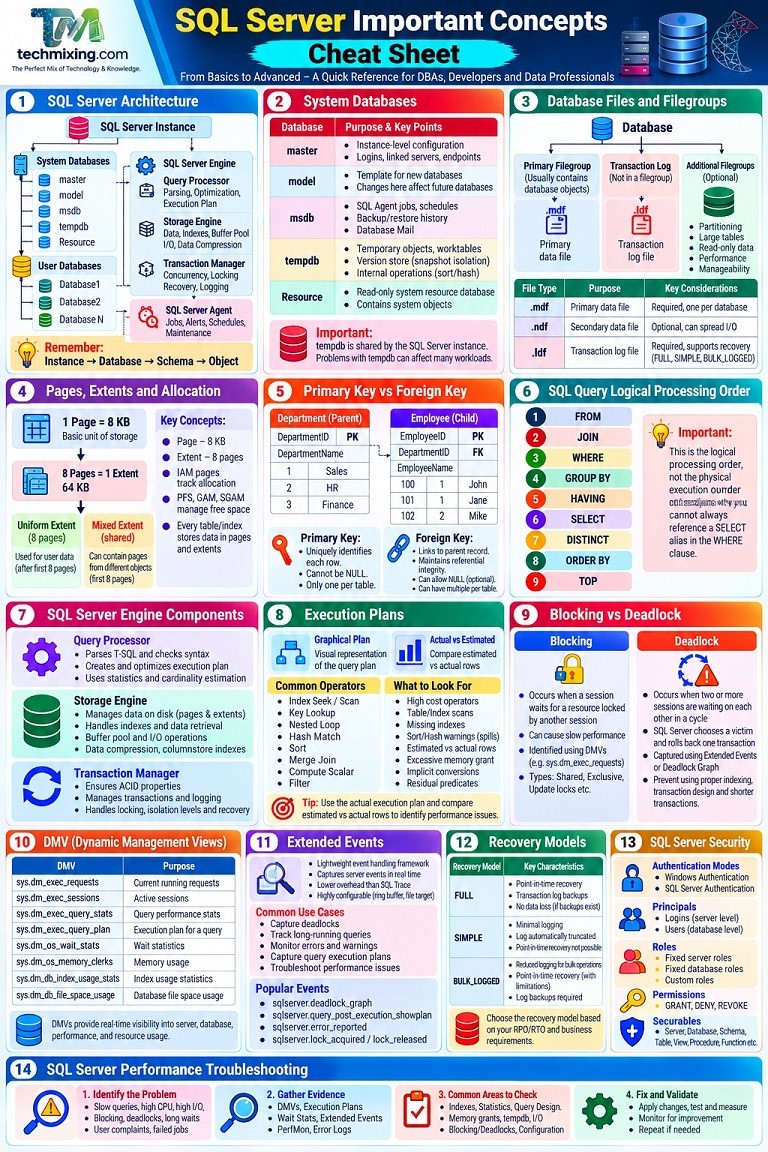
1. SQL Server Architecture
Start by understanding the major building blocks:

SQL Server
│
├── Instance
│   ├── System Databases
│   └── User Databases
│
├── Database
│   ├── Schemas
│   ├── Tables
│   ├── Views
│   ├── Procedures
│   ├── Functions
│   ├── Triggers
│   └── Indexes
│
├── SQL Server Engine
│   ├── Query Processor
│   ├── Storage Engine
│   └── Transaction Manager
│
└── SQL Server Agent
Remember:
Instance → Database → Schema → Object
2. SQL Server System Databases
| Database | Purpose |
|---|---|
| master | Instance-level configuration and metadata |
| model | Template for new databases |
| msdb | SQL Agent jobs, backup history and other metadata |
| tempdb | Temporary objects, worktables, versioning and internal operations |
| Resource | Read-only system resource database |
Most important to remember
tempdb is shared by the SQL Server instance.
Problems with tempdb can affect many workloads.
3. Database Files
A SQL Server database normally consists of:
Database
│
├── MDF
│   └── Primary data file
│
├── NDF
│   └── Secondary data files
│
└── LDF
└── Transaction log| File | Purpose |
|---|---|
.mdf | Primary data file |
.ndf | Secondary data file |
.ldf | Transaction log |
Data files store data.
Log files record changes needed for transaction durability and recovery.
4. Pages and Extents
SQL Server stores data in 8-KB pages.
1 Page = 8 KB

8 Pages = 1 Extent

1 Extent = 64 KB
Two important concepts:
- Page → basic unit of data storage
- Extent → 8 pages
5. Tables
A table stores data in rows and columns.
Example:
CREATE TABLE Employee
(
    EmployeeID INT,
    EmployeeName VARCHAR(100),
    Salary DECIMAL(12,2)
);
Important concepts:
- Rows
- Columns
- Data types
- Constraints
- Indexes
- Partitions
- Statistics
6. SQL Server Data Types
Numeric
INT
BIGINT
SMALLINT
DECIMAL
NUMERIC
FLOAT
Character
CHAR
VARCHAR
NCHAR
NVARCHAR
Date/Time
DATE
TIME
DATETIME
DATETIME2
DATETIMEOFFSET
Other important types
BIT
UNIQUEIDENTIFIER
VARBINARY
XML
JSON
VECTOR
Important difference
CHAR     → fixed length
VARCHAR  → variable length

VARCHAR  → non-Unicode
NVARCHAR → Unicode
7. Constraints
Constraints help maintain data integrity.
| Constraint | Purpose |
|---|---|
| PRIMARY KEY | Uniquely identifies rows |
| FOREIGN KEY | Maintains relationships |
| UNIQUE | Prevents duplicate values |
| CHECK | Validates values |
| DEFAULT | Provides default value |
| NOT NULL | Prevents NULL values |
8. Primary Key vs Foreign Key
Department
-----------
DepartmentID PK
DepartmentName

        ↓

Employee
-----------
EmployeeID PK
DepartmentID FK
EmployeeName
Primary Key: Who am I?
Foreign Key: Which parent record am I related to?
9. SQL Server Schemas
A schema provides a logical container for database objects.
Example:
dbo.Employee
Sales.Order
HR.Employee
Here:
dbo   → Schema
Employee → Table
Schemas are also important for security and organization.
10. SQL Query Logical Processing Order
One of the most important concepts to understand:
FROM
 ↓
JOIN
 ↓
WHERE
 ↓
GROUP BY
 ↓
HAVING
 ↓
SELECT
 ↓
DISTINCT
 ↓
ORDER BY
 ↓
TOP
This helps explain why you cannot always reference a SELECT alias in the WHERE clause.
11. JOINs
Know these extremely well:
INNER JOIN
LEFT JOIN
RIGHT JOIN
FULL OUTER JOIN
CROSS JOIN
CROSS APPLY
OUTER APPLY
Quick reference
| Join | Meaning |
|---|---|
| INNER JOIN | Matching rows |
| LEFT JOIN | All left + matching right |
| RIGHT JOIN | All right + matching left |
| FULL JOIN | All rows from both sides |
| CROSS JOIN | Cartesian product |
| CROSS APPLY | Correlated row-by-row evaluation |
| OUTER APPLY | Like APPLY with unmatched rows |
12. WHERE vs HAVING
WHERE
 ↓
Filters rows

GROUP BY
 ↓
Creates groups

HAVING
 ↓
Filters groups
Example:
SELECT DepartmentID, COUNT(*)
FROM Employee
WHERE Status = 'Active'
GROUP BY DepartmentID
HAVING COUNT(*) > 10;
13. Aggregate Functions
Important functions:
COUNT()
SUM()
AVG()
MIN()
MAX()
Learn how they work with:
GROUP BYHAVING- NULL values
- Window functions
14. NULL
NULL does not mean:
0
''
False
NULL means the value is unknown or missing.
Use:
IS NULL
IS NOT NULL
Not:
= NULLImportant functions:
ISNULL()
COALESCE()
NULLIF()
15. CTE
Common Table Expression:
WITH EmployeeData AS
(
    SELECT EmployeeID, EmployeeName
    FROM Employee
)
SELECT *
FROM EmployeeData;
Useful for:
- Readability
- Complex queries
- Recursive queries
- Breaking complex logic into steps
16. Temporary Tables
CREATE TABLE #Employee
(
    EmployeeID INT
);
Important types:
#TempTable
##GlobalTempTable
@TableVariable
Understand the differences between:
- Temp tables
- Table variables
- CTEs
- Permanent tables
17. Stored Procedures
Stored procedures encapsulate reusable SQL logic.
CREATE PROCEDURE dbo.GetEmployee
    @EmployeeID INT
AS
BEGIN
    SELECT *
    FROM Employee
    WHERE EmployeeID = @EmployeeID;
END;
Execute:
EXEC dbo.GetEmployee 10;Learn:
- Parameters
- Output parameters
- Transactions
- Error handling
- Dynamic SQL
- Parameter sensitivity
18. Functions
Important types:
Scalar-valued function
Inline table-valued function
Multi-statement table-valued function
Understand when functions are appropriate and their potential performance implications.
19. Views
A view stores a query definition.
CREATE VIEW dbo.ActiveEmployees
AS
SELECT *
FROM Employee
WHERE Status = 'Active';
Learn:
- Regular views
- Indexed views
- Security through views
- View limitations
20. Indexes
Indexes are one of the most important SQL Server performance concepts.
Understand:
Clustered Index
Nonclustered Index
Unique Index
Filtered Index
Columnstore Index
XML Index
Spatial Index
Basic rule
Clustered Index
→ Determines how table data is organized

Nonclustered Index
→ Separate structure used to locate data efficiently
A table can have one clustered index but multiple nonclustered indexes.
21. Covering Index
A covering index contains everything required by a query.
Example:
CREATE INDEX IX_Employee_Department
ON Employee(DepartmentID)
INCLUDE(EmployeeName, Salary);
It can help reduce Key Lookups.
But don’t blindly create covering indexes.
Every index has a maintenance and storage cost.
22. Index Seek vs Index Scan
Index Seek
→ Targeted access

Index Scan
→ Reads a larger portion of the index
Important:
Index Scan does not automatically mean bad performance.
If a query needs most rows, a scan may be the correct choice.
23. Execution Plans
Execution plans show how SQL Server executes a query.
Important operators:
Index Seek
Index Scan
Table Scan
Key Lookup
Nested Loops
Hash Match
Merge Join
Sort
Aggregate
Filter
Parallelism
When troubleshooting a slow query:
Query
 ↓
Actual Execution Plan
 ↓
Operators
 ↓
Estimated vs Actual Rows
 ↓
I/O
 ↓
CPU
 ↓
Root Cause
24. Statistics
Statistics help SQL Server estimate the number of rows that will be returned.
They influence:
- Join selection
- Index selection
- Query plan
- Cardinality estimation
Important concepts:
Statistics
Histogram
Cardinality Estimation
Auto Update Statistics
A large difference between:
Estimated Rows
Actual Rows
is an important performance clue.
25. Query Optimizer
The Query Optimizer determines an execution strategy for a query.
Conceptually:
SQL Query
   ↓
Parser
   ↓
Algebrizer
   ↓
Optimizer
   ↓
Execution Plan
   ↓
Execution
The optimizer considers:
- Indexes
- Statistics
- Join strategies
- Predicates
- Cardinality estimates
- Cost estimates
26. SARGability
A SARGable predicate allows SQL Server to use indexes efficiently where appropriate.
Good:
WHERE OrderDate >= '2026-01-01'Potentially problematic:
WHERE YEAR(OrderDate) = 2026Think:
Don’t unnecessarily apply functions to indexed columns in predicates.
27. Transactions
Transactions provide atomicity.
Basic structure:
BEGIN TRANSACTION;

UPDATE Employee
SET Salary = Salary * 1.10
WHERE DepartmentID = 10;

COMMIT TRANSACTION;
If something goes wrong:
ROLLBACK TRANSACTION;Learn:
BEGIN TRANSACTION
COMMIT
ROLLBACK
SAVEPOINT
28. ACID
The four fundamental transaction properties:
| Letter | Meaning |
|---|---|
| A | Atomicity |
| C | Consistency |
| I | Isolation |
| D | Durability |
This is a fundamental database concept.
29. Isolation Levels
Important SQL Server isolation levels:
READ UNCOMMITTED
READ COMMITTED
REPEATABLE READ
SERIALIZABLE
SNAPSHOT
READ COMMITTED SNAPSHOT
Understand:
- Dirty reads
- Non-repeatable reads
- Phantom reads
- Locking
- Row versioning
30. Locking
SQL Server uses locks to protect data.
Important concepts:
Shared (S)
Exclusive (X)
Update (U)
Intent locks
Schema locks
Lock escalation is another important DBA concept.
31. Blocking vs Deadlock
Blocking
Session A
   ↓
Holds lock

Session B
   ↓
Waiting
Deadlock
Session A → waits for B
Session B → waits for A
SQL Server detects the deadlock and selects a victim.
32. Wait Statistics
Wait statistics help identify what SQL Server sessions are waiting for.
Common categories include waits related to:
CPU
I/O
Locks
Memory
Parallelism
Log
Network
Wait statistics are extremely useful for production troubleshooting.
33. Query Store
Query Store provides historical query performance information.
Use it to identify:
- Slow queries
- High CPU queries
- Query regressions
- Plan changes
- Frequently executed queries
- Historical performance
Think:
Query Store = SQL Server’s performance history book.
34. DMVs
Dynamic Management Views provide information about SQL Server activity and state.
Important examples:
sys.dm_exec_requests
sys.dm_exec_sessions
sys.dm_exec_query_stats
sys.dm_os_wait_stats
sys.dm_io_virtual_file_stats
sys.dm_db_index_physical_stats
Learn to use DMVs for:
CPU
Blocking
Queries
Waits
I/O
Indexes
Sessions
Memory
35. Extended Events
Extended Events are useful for capturing specific SQL Server events.
Use them for:
Deadlocks
Errors
Long-running queries
Blocking
Timeouts
Performance investigations
For production troubleshooting, learn Extended Events well.
36. Transaction Log
The transaction log is fundamental to SQL Server recovery.
Understand:
Log Records
Log Sequence Number
Log Truncation
Virtual Log Files
Log Backup
Recovery Model
Important recovery models:
Simple
Full
Bulk-logged
37. Recovery Models
| Model | Point-in-Time Recovery |
|---|---|
| Simple | No |
| Full | Yes |
| Bulk-logged | Yes, with limitations depending on operations |
Don’t select a recovery model simply because it is commonly used.
Base it on the business recovery requirement.
38. Backup Types
Know these:
Full Backup
Differential Backup
Transaction Log Backup
Copy-only Backup
Typical Full + Differential + Log strategy:
Full
 ↓
Differential
 ↓
Log
 ↓
Log
 ↓
Log
39. Recovery Point Objective vs Recovery Time Objective
RPO
How much data can the business afford to lose?
RTO
How quickly must the system be restored?
RPO → Data Loss
RTO → Downtime
These concepts drive backup and HA/DR architecture.
40. High Availability & Disaster Recovery
Important SQL Server technologies:
Always On Availability Groups
Failover Cluster Instances
Log Shipping
Database Mirroring
Replication
Backup/Restore
Understand the difference between:
High Availability
and
Disaster Recovery
They are related but not the same.
41. Replication
Know the major SQL Server replication types:
Snapshot Replication
Transactional Replication
Merge Replication
Understand:
- Publisher
- Distributor
- Subscriber
42. SQL Server Agent
SQL Server Agent is used for automation.
Common tasks:
Backups
Maintenance
ETL
Data loads
Monitoring
Alerts
Notifications
Important objects:
Jobs
Schedules
Job Steps
Alerts
Operators
43. DBCC CHECKDB
Use:
DBCC CHECKDB ('DatabaseName');It checks database consistency.
It is an important tool for detecting:
- Corruption
- Allocation issues
- Structural problems
Important: Don’t jump directly to repair options when corruption is detected. Investigate backups and recovery options first.
44. TempDB
TempDB is used for many operations, including:
Temporary tables
Table variables
Sorts
Hash operations
Version stores
Internal worktables
Important DBA topics:
- Tempdb sizing
- Number of data files
- Autogrowth
- Contention
- Version store usage
- Disk performance
45. Memory
Understand the SQL Server memory architecture.
Important concepts:
Buffer Pool
Memory Grants
Plan Cache
Columnstore Memory
Clerks
Max Server Memory
A common DBA mistake is treating every memory-related symptom as simply:
“SQL Server needs more RAM.”
Investigate the evidence first.
46. CPU
High CPU can come from:
Poor query plans
Missing/inefficient indexes
Large scans
Excessive parallelism
Bad joins
High query frequency
Application workload
Don’t automatically blame SQL Server for high CPU.
Find the queries consuming the CPU.
47. I/O
Understand:
Logical Reads
Physical Reads
Read Latency
Write Latency
Data File I/O
Log File I/O
Useful DMV:
sys.dm_io_virtual_file_stats48. SQL Server Security
Important security concepts:
Login
User
Role
Permission
GRANT
DENY
REVOKE
Authentication
Authorization
Encryption
Auditing
Remember:
Authentication
→ Who are you?

Authorization
→ What are you allowed to do?
49. SQL Server Security Hierarchy
A simplified model:
Login
 ↓
Server
 ↓
Database User
 ↓
Database Role
 ↓
Object Permission
Prefer granting the minimum required permissions.
This is the principle of least privilege.
50. SQL Server Production Troubleshooting
A DBA should develop a structured troubleshooting approach.
Problem
  ↓
Collect Evidence
  ↓
Identify Symptoms
  ↓
Check Metrics
  ↓
Find Root Cause
  ↓
Choose Safe Fix
  ↓
Implement
  ↓
Validate
  ↓
Document
Useful tools:
SSMS
Query Store
Execution Plans
DMVs
Extended Events
STATISTICS IO
STATISTICS TIME
SQL Server Error Log
SQL Server Agent
DBCC CHECKDB
PerfMon
51. The Most Important Performance Metrics
Remember these:
CPU
Duration
Logical Reads
Physical Reads
Waits
Memory Grants
Rows
Executions
I/O Latency
Blocking
Deadlocks
When someone says:
“The query is slow.”
Don’t immediately change an index.
Ask:
Why is it slow?
52. SQL Server Performance Investigation Flow
Slow Query
    ↓
Query Store
    ↓
Execution Plan
    ↓
STATISTICS IO/TIME
    ↓
Estimated vs Actual Rows
    ↓
Indexes
    ↓
Statistics
    ↓
Waits
    ↓
Blocking
    ↓
Root Cause
    ↓
Fix
    ↓
Measure Again
53. SQL Server Concepts You Should Master First
If you are learning SQL Server, prioritize these concepts:
Level 1 — Foundation
Tables
Data Types
Constraints
Primary Keys
Foreign Keys
SELECT
WHERE
JOIN
GROUP BY
HAVING
ORDER BY
Subqueries
CTEs
Level 2 — Database Development
Stored Procedures
Functions
Views
Triggers
Transactions
Error Handling
Temporary Tables
Indexes
Level 3 — DBA
Backup & Restore
Recovery Models
SQL Server Agent
Security
TempDB
DBCC CHECKDB
Database Files
Maintenance
Monitoring
Level 4 — Performance
Execution Plans
Indexes
Statistics
Query Store
DMVs
Wait Statistics
Blocking
Deadlocks
SARGability
Memory
CPU
I/O
Level 5 — Advanced DBA
Always On
Replication
Log Shipping
Partitioning
High Availability
Disaster Recovery
Performance Architecture
Security Architecture
Azure SQL
SQL Server Learning Roadmap
A simple roadmap is:
SQL Basics
    ↓
T-SQL
    ↓
Database Design
    ↓
Indexes
    ↓
Transactions
    ↓
Stored Procedures
    ↓
Backup & Restore
    ↓
Security
    ↓
SQL Server Administration
    ↓
Execution Plans
    ↓
Performance Tuning
    ↓
Query Store + DMVs
    ↓
High Availability / DR
    ↓
Azure SQL
    ↓
AI + SQL ServerDiscover more from Technology with Vivek Johari
Subscribe to get the latest posts sent to your email.

