
Introduction
If you work with SQL Server as a DBA, SQL Developer, Database Developer, Data Engineer, Database Architect, or database professional, you will eventually encounter an error message that stops your query, application, deployment, backup, restore, or production workload.
And when that happens, the first reaction is often:
“Let me Google this error.”
Or today:
“Let me ask AI what this error means.”
Those tools are useful, but you shouldn’t have to start from zero every time.
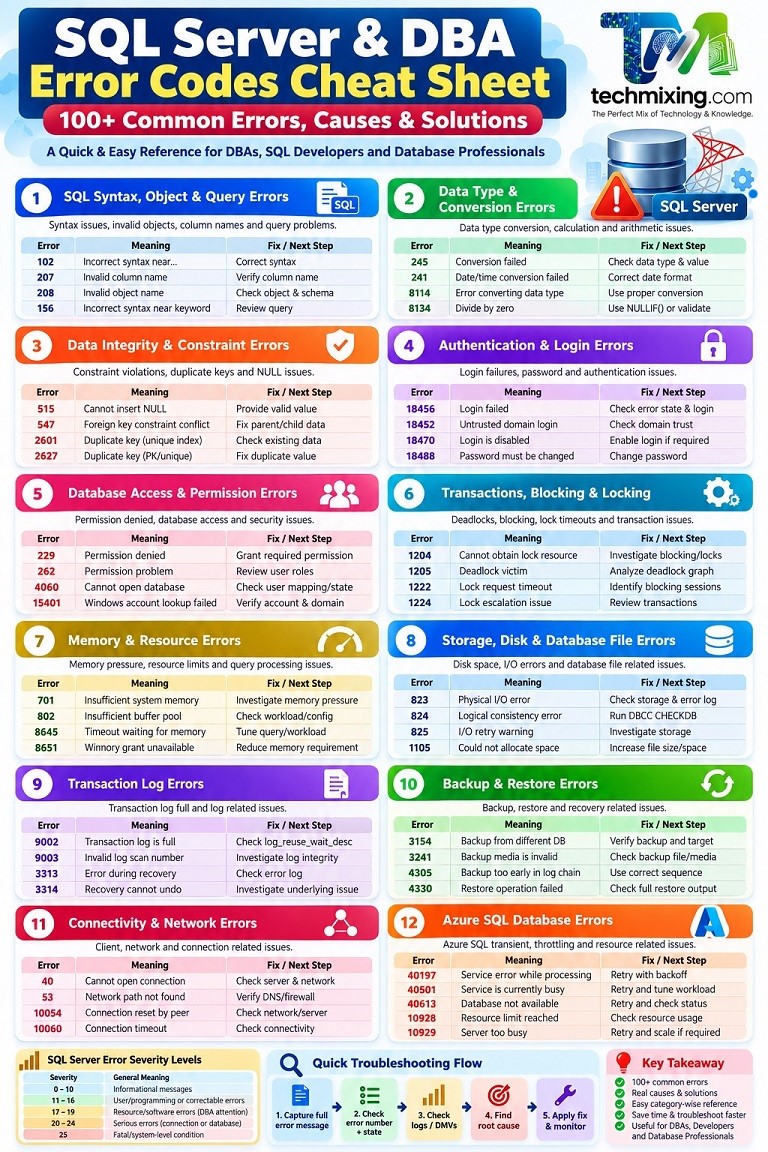
This SQL Server & DBA Error Codes Cheat Sheet is designed as a practical reference that you can bookmark and keep available while working with SQL Server.
It covers 100+ commonly encountered SQL Server, DBA, performance, security, storage, backup/restore, connectivity, and Azure SQL errors.
For each error, the goal is to answer five questions:
- What does the error mean?
- Why does it happen?
- What should I check first?
- What should I do next?
- How serious is it?
Please Note: An error number alone is not always enough to diagnose a problem. Always capture the complete error message, state, severity, database, procedure, line number, and surrounding context. Microsoft documents these attributes as important parts of SQL Server error information.
SQL Server Error Severity
Before looking at individual errors, understand the basic severity levels.
| Severity | General Meaning |
|---|---|
| 0–10 | Informational messages |
| 11–16 | User/programming or correctable errors |
| 17–19 | Resource/software errors that may require DBA attention |
| 20–24 | Serious errors that may affect the connection or database |
| 25 | Fatal/system-level condition |
Severity alone doesn’t determine how serious an incident is. The error number, state, frequency, impact, and environment also matter.
100+ SQL Server & DBA Error Codes Cheat Sheet
1. SQL Syntax, Object & Query Errors
| Error | Meaning | Why It Happens | First Check | Solution / Next Step |
|---|---|---|---|---|
| 102 | Incorrect syntax near… | T-SQL syntax is invalid | Statement around the reported location | Correct syntax |
| 105 | Unclosed quotation mark | String quotation is not closed | SQL text | Close the quotation or fix dynamic SQL |
| 109 | INSERT column/value mismatch | Number of values doesn’t match columns | INSERT statement | Match columns and values |
| 110 | Too many values | More values supplied than expected | INSERT statement | Correct column/value list |
| 111 | CREATE PROCEDURE must be first statement in batch | Procedure definition isn’t first in batch | Batch structure | Separate with GO or use separate batch |
| 113 | Comment not terminated | /* ... */ isn’t closed | SQL script | Close the comment |
| 156 | Incorrect syntax near keyword | Invalid syntax around a T-SQL keyword | SQL statement | Review syntax |
| 207 | Invalid column name | Column doesn’t exist or name is incorrect | Table/schema/column | Verify column and aliases |
| 208 | Invalid object name | Table/view/procedure doesn’t exist in current context | Database/schema/object | Verify database and schema |
| 209 | Ambiguous column name | Same column name exists in multiple referenced objects | JOIN/query | Qualify column with alias |
| 213 | Column/value mismatch | INSERT doesn’t match table definition | INSERT | Specify target columns explicitly |
| 2714 | Object already exists | Object with same name already exists | Object name | ALTER, DROP, or rename appropriately |
| 2812 | Could not find stored procedure | Procedure doesn’t exist in current database/schema | Procedure name | Verify database and schema |
| 8120 | Column invalid in SELECT list because not contained in GROUP BY | Aggregation/GROUP BY problem | SELECT and GROUP BY | Add column to GROUP BY or aggregate it |
| 8622 | Query processor unable to produce plan | Hints/restrictions prevent valid plan | Query hints and indexes | Remove inappropriate hints and retest |
| 8623 | Query processor ran out of internal resources | Query is too complex for available optimizer resources | Query complexity | Simplify/rewrite query |
| 8630 | Internal query processor error | Query optimizer encountered an internal condition | Error log and SQL version | Investigate and check current updates/CUs |
2. Data Type & Conversion Errors
| Error | Meaning | Why It Happens | First Check | Solution |
|---|---|---|---|---|
| 245 | Conversion failed when converting data type | Value cannot be converted to target type | Source values and data types | Validate input or use appropriate conversion |
| 241 | Conversion failed when converting date/time | Invalid date/time value | Input date | Correct date format/value |
| 242 | Date/time conversion resulted in out-of-range value | Date is outside valid range | Date expression | Validate date calculation |
| 257 | Implicit conversion not allowed | SQL Server cannot perform required conversion | Data types | Use compatible types or explicit conversion |
| 295 | Data conversion error | Value cannot be converted | Input data | Validate source data |
| 8114 | Error converting data type | Conversion failed | Source and destination types | Correct conversion |
| 8115 | Arithmetic overflow | Value exceeds data type range | Numeric value/type | Use larger appropriate data type |
| 8116 | Argument data type invalid | Function doesn’t accept supplied type | Function arguments | Use supported data type |
| 8117 | Operand data type invalid | Operation isn’t supported for the type | Expression | Correct data types |
| 8134 | Divide by zero | Denominator is zero | Calculation | Handle zero using validation or NULLIF() |
| 8144 | Too many parameters | Procedure/function received extra parameters | EXEC statement | Match parameters with definition |
| 8146 | Procedure has no parameters | Parameters supplied to procedure that accepts none | EXEC statement | Remove unnecessary parameters |
| 535 | Date/time difference overflow | Date calculation exceeds supported range | DATEDIFF/date expression | Use appropriate data type or calculation |
| 8118 | Operand/data type issue | Invalid operation involving data types | Expression | Check data types and implicit conversions |
Example: Avoiding divide-by-zero
SELECT
    SalesAmount / NULLIF(Quantity, 0) AS AveragePrice
FROM Sales;
3. Data Integrity & Constraint Errors
| Error | Meaning | Why It Happens | First Check | Solution |
|---|---|---|---|---|
| 515 | Cannot insert NULL | NOT NULL column receives NULL | Column definition and input | Supply a valid value |
| 547 | Constraint conflict | FOREIGN KEY/CHECK constraint violated | Related rows and constraint | Correct data or application logic |
| 2601 | Cannot insert duplicate key row | Unique index violation | Existing duplicate value | Correct duplicate data or INSERT logic |
| 2627 | Violation of PRIMARY KEY/UNIQUE constraint | Duplicate key value | Existing key | Correct INSERT/UPDATE logic |
| 544 | Explicit value must be specified for identity column when IDENTITY_INSERT is ON | Identity configuration issue | IDENTITY_INSERT | Correct identity handling |
| 1776 | Referenced table has no primary/unique key suitable for FK | Invalid FK definition | Parent table | Reference an appropriate key |
| 1785 | Adding FK may create multiple cascade paths | Cascade relationship conflict | FK definitions | Redesign cascade behavior |
| 1788 | Foreign key columns don’t match referenced columns | FK definition mismatch | Column types/count | Make FK and referenced columns compatible |
| 3726 | Cannot drop object because it is referenced | Dependencies exist | Foreign keys/dependencies | Remove or change dependencies |
| 3728 | Constraint cannot be dropped | Dependency or incorrect constraint name | Constraint definition | Verify dependency and name |
4. String & Data Truncation Errors
| Error | Meaning | Why It Happens | First Check | Solution |
|---|---|---|---|---|
| 8152 | String or binary data would be truncated | Source value is larger than destination | Column lengths | Increase destination size or correct source |
| 2628 | String or binary data would be truncated with more detail | Value exceeds destination column capacity | Error message/column | Fix source or target column size |
Example
CREATE TABLE Employee
(
    Name VARCHAR(10)
);

INSERT INTO Employee
VALUES ('Vivek Johari');
The destination column cannot hold the supplied value.
The correct solution isn’t always “increase the column size.” First determine whether the source data is actually valid.
5. Authentication & Login Errors
| Error | Meaning | Why It Happens | First Check | Solution |
|---|---|---|---|---|
| 18456 | Login failed | Authentication/login problem | Error state | Check login, password, authentication mode and state |
| 18452 | Login failed because login is from an untrusted domain | Windows/domain trust issue | Domain connectivity | Check domain trust and authentication |
| 18461 | Login failed because server is in single-user mode | Another connection consumed the available slot | Existing sessions | Identify the connection using the slot |
| 18470 | Login failed because login is disabled | Login is disabled | sys.server_principals | Enable login if appropriate |
| 18487 | Password expired | Password policy expired login password | Login policy | Reset password |
| 18488 | Password must be changed | Login requires password change | Login policy | Change password |
| 17806 | SSPI-related authentication error | Kerberos/Windows authentication issue | SPN/domain configuration | Check SPN, service account and Kerberos configuration |
Important: Error 18456
Do not stop at:
Login failed for user.
The state value is important for determining the reason.
6. Database Access & Permission Errors
| Error | Meaning | Why It Happens | First Check | Solution |
|---|---|---|---|---|
| 229 | Permission denied | User lacks required permission | User/role/object permissions | Grant least-privilege permission |
| 262 | Permission problem | Required permission isn’t available | Security configuration | Review roles/GRANTs |
| 4060 | Cannot open requested database | Login cannot access database or database unavailable | User mapping/database state | Fix mapping or database availability |
| 15151 | Cannot alter/drop object | Permission/object ownership issue | User permissions | Correct permissions/ownership |
| 15023 | User already exists | Database user already exists | Database principals | Map/fix existing user |
| 15401 | Windows account lookup failed | Domain/account issue | Windows/domain | Verify account and domain |
| 15405 | Cannot use special principal | Restricted system/security principal | Principal name/type | Review security configuration |
7. Transactions, Blocking & Locking
These errors are especially important for DBAs.
| Error | Meaning | Why It Happens | First Check | Solution |
|---|---|---|---|---|
| 1204 | SQL Server cannot obtain a LOCK resource | Excessive locking/resource pressure | Locks and active transactions | Investigate transaction size/blocking |
| 1205 | Transaction chosen as deadlock victim | Two or more transactions are deadlocked | Deadlock graph | Fix access order, indexing or transaction design |
| 1222 | Lock request timeout period exceeded | Required lock wasn’t acquired within timeout | Blocking chain | Identify blocker and investigate |
| 1223 | Lock request timed out | Lock unavailable | Blocking sessions | Investigate blocking |
| 1224 | Lock escalation/resource condition | SQL Server is unable to manage locks as expected | Locking workload | Investigate transactions and lock escalation |
| 1206 | Transaction involved in deadlock processing | Transaction deadlock condition | Deadlock information | Analyze deadlock pattern |
Error 1205: Deadlock
A common mistake is to simply kill a blocking session.
A deadlock is different from ordinary blocking.
A better approach is:
Capture deadlock → Identify participating queries → Identify resources → Compare access order → Fix root cause
8. Memory & Resource Errors
| Error | Meaning | Why It Happens | First Check | Solution |
|---|---|---|---|---|
| 701 | Insufficient system memory | SQL Server cannot obtain required memory | SQL/OS memory | Investigate memory pressure |
| 802 | Insufficient buffer pool memory | Buffer pool cannot provide required memory | Memory pressure | Investigate workload/configuration |
| 8645 | Timeout waiting for memory resources | Query couldn’t obtain execution memory in time | Memory grants | Tune query/workload |
| 8651 | Requested memory grant unavailable | Required memory grant isn’t available | Memory grants/resource pool | Reduce query memory requirement or address pressure |
| 8642 | Cannot start required thread resources | Parallel query cannot obtain required workers | Parallelism/load | Reduce load or review MAXDOP |
| 8646 | Unable to find index entry | Possible index corruption or update-plan problem | Affected index/table | Run DBCC CHECKDB/CHECKTABLE and investigate |
| 8648 | Row too large for hash table page | Hash operation encountered row-size limitation | Execution plan/query | Review query; consider appropriate plan strategy |
| 8649 | Query cost exceeds configured threshold | Query estimated cost exceeded configured threshold | Query cost/configuration | Review query and relevant threshold/configuration |
| 8653 | Query plan cannot be produced because filegroup is offline | Referenced object resides in offline filegroup | Filegroup state | Bring filegroup online if appropriate |
| 8655 | Query plan cannot be produced because index is disabled | Query references disabled index | Index status | Rebuild/re-enable or change query/index strategy |
Important correction: Error 8646 is not a generic memory error, and 8649 is not a generic parallelism error. Their exact meanings are different and should not be mixed with memory/resource errors.
9. Storage, Disk & Database File Errors
| Error | Meaning | Why It Happens | First Check | Solution |
|---|---|---|---|---|
| 1101 | Filegroup has insufficient space | Filegroup cannot allocate more space | Database files/free space | Add space or manage files |
| 1105 | Could not allocate space | Database/filegroup lacks available space | File size and disk | Increase capacity |
| 1117 | Cannot extend file | File growth cannot occur | File growth/disk | Check growth settings and disk |
| 112 | Insufficient disk space | Operating system cannot allocate space | Disk | Free/add storage |
| 823 | Physical I/O error | Storage/OS I/O failure | SQL Error Log + OS | Investigate storage immediately |
| 824 | Logical consistency I/O error | Data read failed a consistency check | Error Log/DBCC | Investigate possible corruption |
| 825 | I/O operation required retry | Storage temporarily failed an I/O operation | Error Log/storage | Investigate proactively |
| 945 | Database cannot be opened | Database/files aren’t accessible or database state prevents opening | Database state/files | Investigate files and database state |
| 926 | Database in recovery state | Database recovery is in progress/problematic | Error Log | Determine recovery status |
| 927 | Database is recovering/restoring | Database isn’t ready for normal access | Database state | Wait for operation or investigate |
| 942 | Database is offline | Database has been taken offline | Database state | Determine why it is offline |
| 5120 | Unable to open database file | File inaccessible | Path and file permissions | Correct permissions/path |
Errors 823, 824 and 825
These deserve special attention.
823 generally points toward a physical I/O problem.
824 indicates SQL Server detected a logical consistency problem while processing I/O.
825 means SQL Server had to retry an I/O operation.
Don’t treat these as ordinary application errors. Investigate the SQL Server Error Log, Windows/system logs, storage subsystem and database consistency.
10. Transaction Log Errors
| Error | Meaning | Why It Happens | First Check | Solution |
|---|---|---|---|---|
| 9002 | Transaction log is full | Log cannot reuse space | log_reuse_wait_desc | Resolve the actual reuse blocker |
| 9003 | Invalid log scan number | Log/metadata issue | Error Log | Investigate database/log integrity |
| 3313 | Error during database recovery | Recovery encountered a problem | Error Log | Investigate underlying error |
| 3314 | Recovery cannot undo operation | Recovery encountered an operation failure | Error Log | Investigate storage/database condition |
Don’t blindly increase the log
For Error 9002, first run:
SELECT
    name,
    recovery_model_desc,
    log_reuse_wait_desc
FROM sys.databases;
The important question is:
Why can’t SQL Server reuse the transaction log?
Possible causes include:
- Long-running transaction
- Missing log backups
- Availability Group/replication-related conditions
- Other log-reuse dependencies
11. Backup & Restore Errors
| Error | Meaning | Why It Happens | First Check | Solution |
|---|---|---|---|---|
| 3154 | Backup belongs to a different database | Backup/database mismatch | Backup metadata | Verify source and target |
| 3156 | File cannot be restored | Restore path/file conflict | RESTORE output | Use correct file mapping |
| 3241 | Backup media is invalid | Backup may be damaged/incompatible | Backup file/media | Validate backup |
| 3242 | Backup media/device problem | Backup media can’t be processed | Storage/media | Check backup file/device |
| 3254 | Backup device/file problem | Backup destination issue | Path/permissions/storage | Correct destination |
| 4305 | Backup in the log chain is too early | Wrong backup sequence | Backup history | Restore correct sequence |
| 4306 | Log backup cannot be applied | LSN/backup chain problem | Backup history | Identify missing/incorrect backup |
| 4326 | Log backup contains incomplete recovery information | Backup chain/recovery issue | Backup metadata | Verify backup sequence |
| 4330 | Restore operation failed | Restore encountered an error | Full RESTORE output | Investigate underlying error |
Best practice: Never troubleshoot a restore error using only the final line of the message. Read the complete RESTORE output.
12. Database State & File Problems
| Error | Meaning | Why It Happens | First Check | Solution |
|---|---|---|---|---|
| 5171 | Invalid database/file header condition | Database file metadata/header problem | Error Log | Investigate file integrity |
| 5172 | Invalid file header | Database file header is invalid | Database files | Investigate possible corruption |
| 5173 | File/database association problem | File belongs to another database or metadata mismatch | File metadata | Investigate database files |
| 1823 | Cannot create database | Creation/path/resource problem | Disk/path/permissions | Correct creation environment |
| 3729 | Cannot drop database | Database is being used | Active sessions | Identify and handle connections |
| 3702 | Database currently in use | Active connection exists | Sessions | Disconnect appropriate sessions |
13. Connectivity & Network Errors
Some connection errors originate from the client/network stack rather than the SQL Server Database Engine itself, so always investigate the full message.
| Error | Meaning | Why It Happens | First Check | Solution |
|---|---|---|---|---|
| 2 | File/path not found | Client or SQL operation cannot find specified path | Path | Verify path |
| 5 | Access denied / connection-related OS error | Permissions/firewall/resource issue depending on context | Complete message | Check permissions/network |
| 26 | Error locating server/instance | Client can’t locate SQL Server | Server/instance name | Verify connection configuration |
| 40 | Unable to open connection to SQL Server | Connectivity problem | Server/network | Check SQL service, TCP/IP and firewall |
| 53 | Network path/server unavailable | Server cannot be reached | Connectivity | Check DNS/network/firewall |
| 64 | Network name unavailable | Connection lost | Network | Investigate network path |
| 10053 | Transport-level connection aborted | Host/network software terminated connection | Network/client logs | Investigate network |
| 10054 | Connection forcibly closed | Connection reset by peer/network | Network/server | Investigate network and server |
| 10060 | Connection timeout | Server didn’t respond in time | Network/firewall | Check connectivity and timeout |
| 17830 | Network error during connection | Network/client issue | Network configuration | Investigate connection path |
14. Linked Server & Distributed Query Errors
| Error | Meaning | Why It Happens | First Check | Solution |
|---|---|---|---|---|
| 7303 | Cannot initialize data source | OLE DB/linked-server provider issue | Provider configuration | Test provider and remote connection |
| 7391 | Distributed transaction could not start | MSDTC/distributed transaction problem | MSDTC configuration | Check MSDTC or redesign transaction |
| 7399 | OLE DB provider reported an error | Remote provider returned an error | Complete provider message | Investigate provider/remote server |
| 7411 | Server not configured for RPC | RPC disabled | Linked-server options | Configure RPC if required |
| 7412 | Distributed query problem | Remote/linked-server issue | Linked server connection | Test remote server/provider |
15. Stored Procedure & Parameter Errors
| Error | Meaning | Why It Happens | First Check | Solution |
|---|---|---|---|---|
| 201 | Required parameter not supplied | Procedure parameter is missing | Procedure definition | Supply parameter |
| 8144 | Too many parameters | Extra parameters supplied | EXEC statement | Remove extra parameters |
| 8145 | Parameter already declared | Duplicate parameter | Procedure/call | Remove duplicate |
| 8146 | Procedure has no parameters | Parameters supplied to parameterless procedure | EXEC | Remove parameters |
| 2812 | Procedure not found | Wrong procedure/database/schema | Object name | Verify procedure |
16. Query Processor & Execution Plan Errors
| Error | Meaning | First Check | Next Step |
|---|---|---|---|
| 8621 | Query processor ran out of internal resources | Query complexity | Simplify/rewrite query |
| 8622 | Query processor cannot produce plan due to hints/restrictions | Query hints | Remove inappropriate hints |
| 8623 | Query processor ran out of internal resources | Complex query | Break query into simpler operations |
| 8630 | Internal query processor error | Error log/SQL version | Investigate and check updates |
| 8642 | Parallel query cannot obtain required thread resources | CPU/workload/parallelism | Investigate workload and MAXDOP |
| 8645 | Timeout waiting for memory resources | Memory grants | Tune query/workload |
| 8646 | Index entry cannot be found; possible corruption/update-plan issue | Index/table | Run consistency checks |
| 8648 | Hash-table row too large | Execution plan/query | Review query/plan |
| 8649 | Estimated query cost exceeds configured threshold | Query cost/configuration | Investigate query and threshold |
| 8651 | Requested memory grant unavailable | Memory grant/resource pool | Reduce memory demand/address pressure |
| 8653 | Filegroup offline prevents plan generation | Filegroup state | Check filegroup |
| 8655 | Disabled index prevents plan generation | Index status | Review/re-enable/rebuild index |
Microsoft’s current error catalog confirms these distinctions; for example, 8646 is an index/corruption or update-plan message, 8649 concerns the configured query-cost threshold, 8645 concerns waiting for memory, and 8651 concerns an unavailable memory grant.
17. SQL Server Agent & Job Troubleshooting
SQL Server Agent job failures don’t always have one universal Database Engine error number.
When a SQL Agent job fails, check:
- Job history
- Step history
- SQL Agent error log
- SQL Server Error Log
- Job owner
- Proxy credentials
- Database permissions
- CmdExec/PowerShell subsystem
- Network/share access
- The actual error returned by the job step
Common problems
| Problem | Typical Cause | First Check |
|---|---|---|
| Job cannot access database | Permission/login | Job owner/proxy |
| Job cannot access network share | SQL Agent service account | Share + NTFS permissions |
| SSIS step fails | Package/environment issue | SSIS execution log |
| PowerShell step fails | Execution policy/account | Agent subsystem |
| Job doesn’t start | Schedule/Agent service | SQL Server Agent status |
Important: Don’t create artificial error-code mappings for SQL Agent problems. The actual job-step error should be captured and diagnosed.
18. Azure SQL Database Errors
Azure SQL introduces additional transient and resource-governance errors. These should be treated separately from traditional SQL Server errors.
| Error | Meaning | Why It Happens | First Check | Solution / Next Step |
|---|---|---|---|---|
| 40197 | Service error while processing request | Azure SQL service/infrastructure transient condition | Azure service health + complete message | Retry; investigate if persistent |
| 40501 | Service currently busy | Resource governance/throttling | Resource utilization | Retry with backoff and tune workload |
| 40531 | Cannot connect/login to server | Azure SQL connectivity/authentication condition | Complete message/network | Check connectivity/authentication |
| 40544 | Database reached size quota | Database exceeded configured size limit | Database size | Delete/archive data, optimize storage or scale |
| 40553 | Session terminated due to excessive memory usage | Query/session consumed excessive memory | Query/workload | Reduce rows/memory requirement and optimize |
| 40613 | Database isn’t currently available | Transient service/database availability condition | Azure status/database state | Retry and investigate if persistent |
| 10928 | Resource limit reached | Database/pool worker/session limit reached | Resource ID + workload | Investigate workers/sessions/blocking and scale if appropriate |
| 10929 | Server too busy to support requests above current resource guarantee | Resource governance | Resource usage | Retry/tune/scale |
| 49918 | Not enough resources to process request | Azure resource pressure | Resource utilization | Retry and investigate workload |
| 49919 | Too many create/update operations | Azure management operation limit | Current operations | Wait and retry |
| 49920 | Too many operations in progress | Azure resource operation limit | Current operations | Wait and retry |
| 40615 | Cannot connect to server | Azure SQL firewall/connectivity issue | Firewall/network | Correct firewall/network configuration |
Microsoft specifically identifies 40197, 40613 and related errors as transient conditions, and recommends resilient retry logic for cloud-connected applications. Microsoft also documents 10928/10929 as Azure SQL resource-governance errors and 40501 as an engine-throttling/resource-limit error.
Azure SQL retry principle
For transient errors, don’t simply retry in a tight loop.
Use:
Retry → Delay → Exponential backoff → Maximum retry count → Fail gracefully
Microsoft recommends retry logic for cloud-connected applications and notes that an initial delay of around five seconds can be appropriate for these Azure SQL transient conditions.
19. Security & Permission Troubleshooting Checklist
When you see a permission error, don’t immediately grant db_owner.
Check:
SELECT
    dp.name,
    dp.type_desc,
    dp.authentication_type_desc
FROM sys.database_principals AS dp
WHERE dp.name = USER_NAME();
Then determine:
- Is the login mapped to the correct database user?
- Is the user a member of the appropriate role?
- Does the user have permission on the object?
- Is the object owned by the expected schema?
- Is the application using the expected login?
Use least privilege rather than solving every permission problem with excessive access.
20. The Most Important DBA Error Codes to Remember
If you don’t want to memorize 100+ numbers, start with these:
| Error | Remember It As |
|---|---|
| 1205 | Deadlock |
| 1222 | Lock timeout |
| 1204 | Lock resource problem |
| 9002 | Transaction log full |
| 1105 | Could not allocate database space |
| 823 | Physical I/O |
| 824 | Logical I/O consistency |
| 825 | I/O retry |
| 701 | Memory |
| 8645 | Memory-resource timeout |
| 8651 | Memory grant unavailable |
| 18456 | Login failed |
| 4060 | Cannot open database |
| 229 | Permission denied |
| 208 | Invalid object |
| 207 | Invalid column |
| 547 | Constraint conflict |
| 2601 | Duplicate unique index |
| 2627 | Duplicate PK/unique constraint |
| 515 | NULL into NOT NULL |
| 8152 | Data truncation |
| 2628 | Detailed truncation |
| 245 | Conversion failed |
| 8114 | Conversion error |
| 8115 | Arithmetic overflow |
| 8134 | Divide by zero |
| 40501 | Azure SQL service busy |
| 40613 | Azure SQL database unavailable |
| 10928 | Azure SQL resource limit |
| 10929 | Azure SQL resource pressure |
| 40544 | Azure SQL database size quota |
How to Troubleshoot Any Unknown SQL Server Error
You don’t need to memorize every error number.
Use this process.
              ERROR OCCURS
                   |
                   v
       Capture COMPLETE message
                   |
                   v
       Record error number + state
                   |
                   v
       Identify database/object/session
                   |
                   v
        Check SQL Server Error Log
                   |
                   v
       Check relevant DMV / Query Store
                   |
                   v
       Identify probable root cause
                   |
                   v
           Test the solution
                   |
                   v
        Apply controlled change
                   |
                   v
              Monitor
Useful T-SQL for Error Investigation
1. Find the SQL Server Error Message
SQL Server stores system and user-defined messages in sys.messages. Microsoft documents message_id, severity, event logging status, language and message text in this catalog view.
SELECT message_id, severity, is_event_logged, [text] FROM sys.messages WHERE language_id = 1033 AND message_id = 1205;Change 1205 to the error number you want to investigate.
2. Search for an Error Number
SELECT
    message_id,
    severity,
    [text]
FROM sys.messages
WHERE language_id = 1033
  AND message_id IN
  (
      1205,
      1222,
      9002,
      823,
      824,
      825,
      18456
  );
3. Check Database State
SELECT
    name,
    state_desc,
    recovery_model_desc,
    user_access_desc
FROM sys.databases;
4. Check Transaction Log Reuse
SELECT
    name,
    recovery_model_desc,
    log_reuse_wait_desc
FROM sys.databases;
This is especially useful for Error 9002.
5. Check Blocking
SELECT
    session_id,
    blocking_session_id,
    wait_type,
    wait_time,
    wait_resource,
    status,
    command
FROM sys.dm_exec_requests
WHERE blocking_session_id <> 0;
Useful for investigating 1222 and general blocking.
6. Check Active Requests
SELECT
    session_id,
    status,
    command,
    cpu_time,
    total_elapsed_time,
    logical_reads,
    reads,
    writes
FROM sys.dm_exec_requests;
7. Capture Errors in TRY…CATCH
For application and stored-procedure troubleshooting:
BEGIN TRY

    -- Your SQL code here

END TRY
BEGIN CATCH

    SELECT
        ERROR_NUMBER() AS ErrorNumber,
        ERROR_SEVERITY() AS ErrorSeverity,
        ERROR_STATE() AS ErrorState,
        ERROR_PROCEDURE() AS ErrorProcedure,
        ERROR_LINE() AS ErrorLine,
        ERROR_MESSAGE() AS ErrorMessage;

END CATCH;
This is especially useful because SQL Server provides functions such as ERROR_NUMBER(), ERROR_SEVERITY(), ERROR_STATE(), ERROR_PROCEDURE(), ERROR_LINE() and ERROR_MESSAGE() for error handling.
Error Code vs Error State
One of the most important concepts for SQL Server troubleshooting is that the error number isn’t always enough.
For example:
Error Number: 18456
State:       XX
Message:     Login failed for user...
The state can provide additional diagnostic information.
Therefore, whenever possible capture:
Error Number
Error Message
Severity
State
Database
Server
Login/User
Procedure
Line Number
Timestamp
Session ID
Don’t Just Search the Error Number
Suppose you see:
SQL Server Error 9002
A beginner might search:
“How to fix SQL Server error 9002?”
and immediately increase the transaction log.
An experienced DBA asks:
“Why is the log not reusable?”
Then checks:
SELECT
    name,
    log_reuse_wait_desc
FROM sys.databases;
Similarly:
Error 1205
Don’t simply kill sessions.
Ask:
Why are these transactions deadlocking?
Error 824
Don’t simply rerun the query.
Ask:
Is there a database/storage consistency problem?
Error 18456
Don’t automatically reset the password.
Ask:
What is the error state and authentication context?
Error 10928
Don’t immediately scale the database.
Ask:
Which resource limit was reached and why?
This difference between error recognition and root-cause analysis is one of the most important skills for a DBA.
SQL Server Error Troubleshooting Cheat Sheet
| Error Category | First Tool/Check |
|---|---|
| Login failure | Error state + SQL Error Log |
| Permission | Users, roles and permissions |
| Invalid object | Database/schema/object |
| Duplicate key | Existing data + index/constraint |
| FK violation | Parent/child relationship |
| Blocking | sys.dm_exec_requests |
| Deadlock | Deadlock graph / Extended Events |
| Log full | log_reuse_wait_desc |
| Disk full | Database files + OS storage |
| I/O error | SQL Error Log + storage |
| Corruption suspicion | DBCC CHECKDB |
| Memory issue | Memory grants + resource pressure |
| Slow query | Query Store + execution plan |
| Backup failure | Full backup/restore output |
| Azure throttling | Azure resource metrics |
| Azure transient error | Retry logic + service health |
| Network failure | TCP/IP, DNS, firewall and connectivity |
DBA Emergency Errors
If you are a SQL Server DBA, take these errors particularly seriously:
823
Possible physical I/O/storage problem.
824
Logical consistency error and possible corruption.
825
Storage/I/O retry warning.
9002
Transaction log is full.
701
Serious memory pressure.
8646
Potential index corruption/update-plan issue.
1205
Deadlock.
1204
Lock resource exhaustion.
The correct response to these errors depends on the environment, but they should not simply be dismissed as ordinary application errors.
SQL Server Error Codes: A Practical Learning Strategy for Freshers
If you’re new to SQL Server, don’t try to memorize all 100+ errors.
Start with these groups:
Beginner
Learn:
102, 105, 207, 208, 245, 515, 547, 8134, 18456, 229
SQL Developer
Add:
2601, 2627, 8152, 2628, 8114, 8115, 8120, 2812
DBA
Add:
1204, 1205, 1222, 9002, 1105, 823, 824, 825, 701, 8645
Azure SQL Professional
Add:
40501, 40613, 10928, 10929, 40544, 40553, 49918, 49919, 49920
This gives you a practical progression rather than trying to memorize a giant list.
Summary
SQL Server has a huge number of system messages, and Microsoft maintains them through the Database Engine error catalog and sys.messages. The catalog is the authoritative place to inspect the actual message, severity and logging characteristics for an installed SQL Server version.
But knowing an error number isn’t enough to become a good SQL Server professional.
The real skill is:
Recognize the error → collect evidence → identify the root cause → choose the safest solution → validate the result.
You don’t need to Google or ask AI every time a familiar error appears.
Use this cheat sheet as your first reference, then use Microsoft’s documentation, SQL Server logs, DMVs, Query Store, execution plans, Extended Events and other diagnostic tools when deeper investigation is required.
Bookmark this page
SQL Server & DBA Error Codes Cheat Sheet – 100+ Common Errors, Causes & Solutions
Keep it handy whenever you’re working with SQL Server.
Official Microsoft reference: Microsoft’s Database Engine error catalog and sys.messages should be used to verify error details for the specific SQL Server version/environment you’re troubleshooting.
Discover more from Technology with Vivek Johari
Subscribe to get the latest posts sent to your email.

