
Introduction
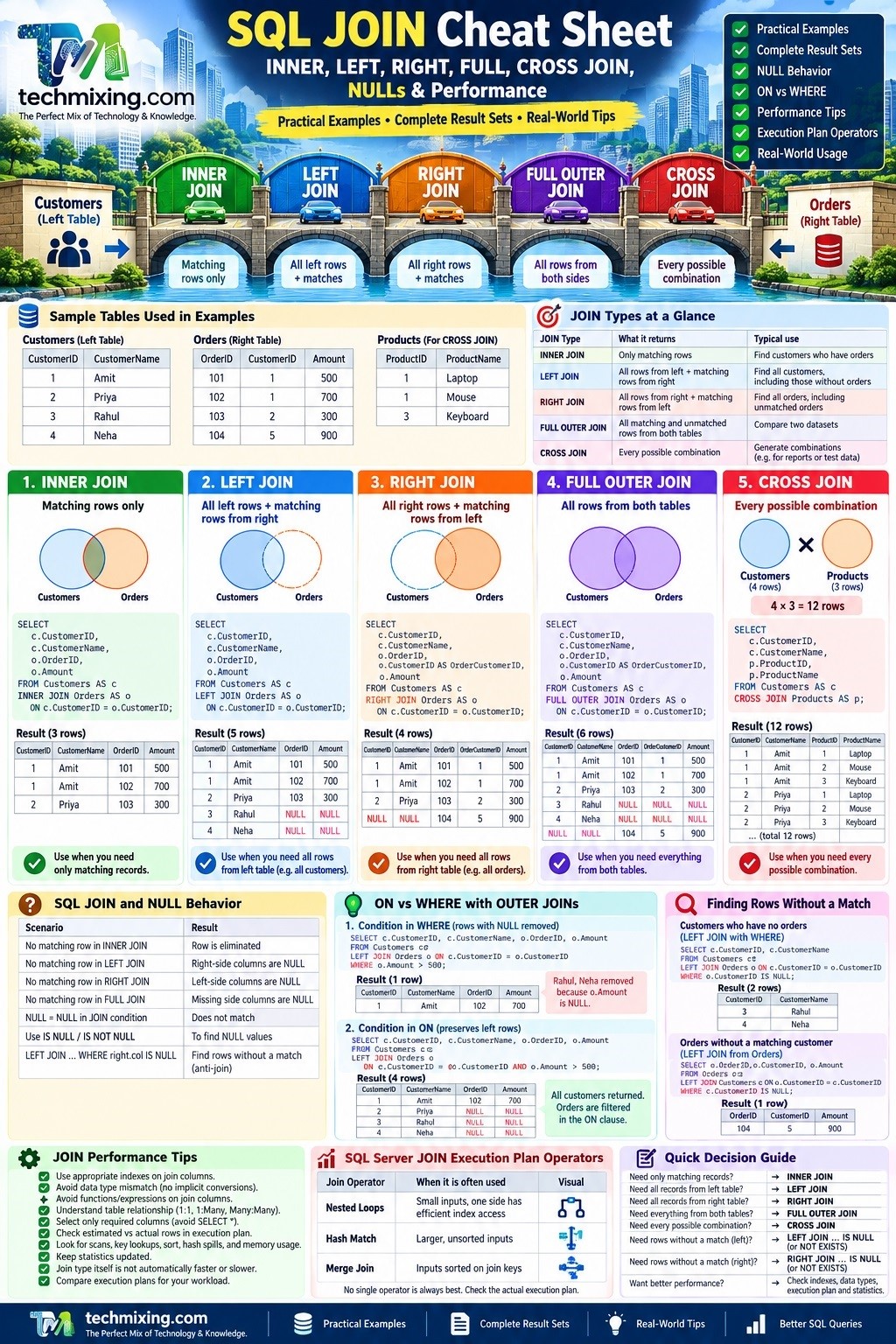
SQL JOINs are one of the most important concepts when working with relational databases. They allow us to combine related data from multiple tables.

But understanding JOIN syntax is only the beginning. In real-world SQL Server development and troubleshooting, you also need to understand NULL behavior, ON vs WHERE conditions, result-set multiplication, indexes, and execution plans.
This cheat sheet covers the most commonly used SQL JOINs along with practical NULL and performance considerations.
Sample Tables
Let’s use the following tables throughout the examples.
Customers
| CustomerID | CustomerName |
|---|---|
| 1 | Amit |
| 2 | Priya |
| 3 | Rahul |
| 4 | Neha |
Orders
| OrderID | CustomerID | Amount |
|---|---|---|
| 101 | 1 | 500 |
| 102 | 1 | 700 |
| 103 | 2 | 300 |
| 104 | 5 | 900 |
Notice two important things:
- Customers
3and4don’t have orders. - Order
104has CustomerID5, but customer5doesn’t exist in the Customers table.
For the CROSS JOIN example, we’ll also use:
Products
| ProductID | ProductName |
|---|---|
| 1 | Laptop |
| 2 | Mouse |
| 3 | Keyboard |
These examples make it easier to understand exactly how different JOINs behave.
SQL JOIN Cheat Sheet
| JOIN Type | What it returns | Typical use |
|---|---|---|
| INNER JOIN | Only matching rows | Find customers who have orders |
| LEFT JOIN | All rows from left + matching rows from right | Find all customers, including those without orders |
| RIGHT JOIN | All rows from right + matching rows from left | Find all orders, including unmatched orders |
| FULL OUTER JOIN | All matching and unmatched rows from both tables | Compare two datasets |
| CROSS JOIN | Every possible combination | Generate combinations |
1. INNER JOIN
An INNER JOIN returns only rows that have a match in both tables.
SELECT
    c.CustomerID,
    c.CustomerName,
    o.OrderID,
    o.Amount
FROM Customers AS c
INNER JOIN Orders AS o
    ON c.CustomerID = o.CustomerID;
Complete Result
| CustomerID | CustomerName | OrderID | Amount |
|---|---|---|---|
| 1 | Amit | 101 | 500 |
| 1 | Amit | 102 | 700 |
| 2 | Priya | 103 | 300 |
Rahul and Neha are excluded because they don’t have matching orders.
Order 104 is also excluded because CustomerID 5 doesn’t exist in Customers.
Visual rule
Customers                 Orders

Amit       ─────────────── Order 101
Amit       ─────────────── Order 102
Priya      ─────────────── Order 103

Rahul      ✕
Neha       ✕

Order 104  ✕
Remember:
INNER JOIN = Matching rows only
2. LEFT JOIN
A LEFT JOIN returns all rows from the left table and matching rows from the right table.
SELECT
    c.CustomerID,
    c.CustomerName,
    o.OrderID,
    o.Amount
FROM Customers AS c
LEFT JOIN Orders AS o
    ON c.CustomerID = o.CustomerID;
Complete Result
| CustomerID | CustomerName | OrderID | Amount |
|---|---|---|---|
| 1 | Amit | 101 | 500 |
| 1 | Amit | 102 | 700 |
| 2 | Priya | 103 | 300 |
| 3 | Rahul | NULL | NULL |
| 4 | Neha | NULL | NULL |
Rahul and Neha remain in the result because Customers is the left table.
Because they have no matching order, the columns coming from Orders are NULL.
Notice that Order 104 is not returned because the unmatched row exists on the right side.
Remember:
LEFT JOIN = Everything from left + matching rows from right
3. RIGHT JOIN
A RIGHT JOIN is the reverse of a LEFT JOIN.
SELECT
    c.CustomerID,
    c.CustomerName,
    o.OrderID,
    o.CustomerID AS OrderCustomerID,
    o.Amount
FROM Customers AS c
RIGHT JOIN Orders AS o
    ON c.CustomerID = o.CustomerID;
Complete Result
| CustomerID | CustomerName | OrderID | OrderCustomerID | Amount |
|---|---|---|---|---|
| 1 | Amit | 101 | 1 | 500 |
| 1 | Amit | 102 | 1 | 700 |
| 2 | Priya | 103 | 2 | 300 |
| NULL | NULL | 104 | 5 | 900 |
Order 104 remains because Orders is the right table.
Because there is no matching customer, the columns coming from Customers become NULL.
In practice, many developers prefer rewriting a RIGHT JOIN as a LEFT JOIN because it is often easier to read:
SELECT
    c.CustomerID,
    c.CustomerName,
    o.OrderID,
    o.Amount
FROM Orders AS o
LEFT JOIN Customers AS c
    ON o.CustomerID = c.CustomerID;
Remember:
RIGHT JOIN = Everything from right + matching rows from left
4. FULL OUTER JOIN
A FULL OUTER JOIN returns:
- Matching rows
- Unmatched rows from the left table
- Unmatched rows from the right table
SELECT
    c.CustomerID,
    c.CustomerName,
    o.OrderID,
    o.CustomerID AS OrderCustomerID,
    o.Amount
FROM Customers AS c
FULL OUTER JOIN Orders AS o
    ON c.CustomerID = o.CustomerID;
Complete Result
| CustomerID | CustomerName | OrderID | OrderCustomerID | Amount |
|---|---|---|---|---|
| 1 | Amit | 101 | 1 | 500 |
| 1 | Amit | 102 | 1 | 700 |
| 2 | Priya | 103 | 2 | 300 |
| 3 | Rahul | NULL | NULL | NULL |
| 4 | Neha | NULL | NULL | NULL |
| NULL | NULL | 104 | 5 | 900 |
This result shows everything from both tables.
- Rahul and Neha have no matching order.
- Order 104 has no matching customer.
- Amit and Priya have matching rows.
Where do NULLs come from?
For Rahul and Neha:
Orders columns → NULL
For Order 104:
Customers columns → NULL
Remember:
FULL OUTER JOIN = Everything from both tables
5. CROSS JOIN
A CROSS JOIN produces every possible combination of rows.
SELECT
    c.CustomerID,
    c.CustomerName,
    p.ProductID,
    p.ProductName
FROM Customers AS c
CROSS JOIN Products AS p;
We have:
4 Customers × 3 Products = 12 combinations
Complete Result
| CustomerID | CustomerName | ProductID | ProductName |
|---|---|---|---|
| 1 | Amit | 1 | Laptop |
| 1 | Amit | 2 | Mouse |
| 1 | Amit | 3 | Keyboard |
| 2 | Priya | 1 | Laptop |
| 2 | Priya | 2 | Mouse |
| 2 | Priya | 3 | Keyboard |
| 3 | Rahul | 1 | Laptop |
| 3 | Rahul | 2 | Mouse |
| 3 | Rahul | 3 | Keyboard |
| 4 | Neha | 1 | Laptop |
| 4 | Neha | 2 | Mouse |
| 4 | Neha | 3 | Keyboard |
A CROSS JOIN can be useful for generating combinations, test data, scenarios, or reporting dimensions.
However, it can produce a very large result set very quickly.
For example:
100 customers × 20 products = 2,000 rows
Remember:
CROSS JOIN = Every possible combination
SQL JOIN Result Comparison
Using our sample data, here’s the easiest way to compare the JOIN types:
| JOIN | Rows returned | Key behavior |
|---|---|---|
| INNER JOIN | 3 | Only matching customer/order rows |
| LEFT JOIN | 5 | All 4 customers + matching orders |
| RIGHT JOIN | 4 | All 4 orders + matching customers |
| FULL OUTER JOIN | 6 | Everything from both sides |
| CROSS JOIN | 12 | 4 customers × 3 products |
This table is useful as a quick reference when deciding which JOIN you need.
SQL JOIN and NULL Behavior
NULL behavior is one of the most commonly misunderstood parts of SQL JOINs.
Suppose a customer doesn’t have an order:
SELECT
    c.CustomerID,
    c.CustomerName,
    o.OrderID,
    o.Amount
FROM Customers AS c
LEFT JOIN Orders AS o
    ON c.CustomerID = o.CustomerID;
Complete Result
| CustomerID | CustomerName | OrderID | Amount |
|---|---|---|---|
| 1 | Amit | 101 | 500 |
| 1 | Amit | 102 | 700 |
| 2 | Priya | 103 | 300 |
| 3 | Rahul | NULL | NULL |
| 4 | Neha | NULL | NULL |
The NULL values for Rahul and Neha don’t mean that SQL Server found an actual NULL order.
They mean:
No matching row was found in the right-side table.
This distinction is important.
Finding Records Without a Match
A very common requirement is finding customers who have never placed an order.
SELECT
    c.CustomerID,
    c.CustomerName
FROM Customers AS c
LEFT JOIN Orders AS o
    ON c.CustomerID = o.CustomerID
WHERE o.CustomerID IS NULL;
Complete Result
| CustomerID | CustomerName |
|---|---|
| 3 | Rahul |
| 4 | Neha |
This is commonly called an anti-join pattern.
The same requirement can often be expressed using NOT EXISTS:
SELECT
    c.CustomerID,
    c.CustomerName
FROM Customers AS c
WHERE NOT EXISTS
(
    SELECT 1
    FROM Orders AS o
    WHERE o.CustomerID = c.CustomerID
);
Result
| CustomerID | CustomerName |
|---|---|
| 3 | Rahul |
| 4 | Neha |
Both approaches can be useful. When performance matters, compare the actual execution plans rather than assuming one approach is always faster.
Finding Orders Without a Matching Customer
We can reverse the logic to find orphaned orders.
SELECT
    o.OrderID,
    o.CustomerID,
    o.Amount
FROM Orders AS o
LEFT JOIN Customers AS c
    ON o.CustomerID = c.CustomerID
WHERE c.CustomerID IS NULL;
Complete Result
| OrderID | CustomerID | Amount |
|---|---|---|
| 104 | 5 | 900 |
This tells us that Order 104 references CustomerID 5, but CustomerID 5 does not exist in the Customers table.
This type of query is useful when looking for orphaned or inconsistent data.
Important: NULL Does Not Equal NULL
A common mistake is writing:
WHERE SomeColumn = NULL
This does not work as expected.
Use:
WHERE SomeColumn IS NULL
or:
WHERE SomeColumn IS NOT NULL
SQL uses three-valued logic:
TRUE
FALSE
UNKNOWN
Therefore:
NULL = NULL
does not evaluate to TRUE.
For JOIN conditions, this means that a normal equality condition does not match two NULL values:
ON a.SomeColumn = b.SomeColumn
If both columns contain NULL, that comparison does not produce a TRUE result.
ON vs WHERE with OUTER JOINs
This is one of the most important JOIN concepts to understand.
Consider:
SELECT
    c.CustomerID,
    c.CustomerName,
    o.OrderID,
    o.Amount
FROM Customers AS c
LEFT JOIN Orders AS o
    ON c.CustomerID = o.CustomerID
WHERE o.Amount > 500;
The WHERE condition removes rows where o.Amount is NULL.
Complete Result
| CustomerID | CustomerName | OrderID | Amount |
|---|---|---|---|
| 1 | Amit | 102 | 700 |
Although we started with a LEFT JOIN, the WHERE condition removes Rahul and Neha because their o.Amount is NULL.
Now compare that with:
SELECT
    c.CustomerID,
    c.CustomerName,
    o.OrderID,
    o.Amount
FROM Customers AS c
LEFT JOIN Orders AS o
    ON c.CustomerID = o.CustomerID
   AND o.Amount > 500;
Complete Result
| CustomerID | CustomerName | OrderID | Amount |
|---|---|---|---|
| 1 | Amit | 102 | 700 |
| 2 | Priya | NULL | NULL |
| 3 | Rahul | NULL | NULL |
| 4 | Neha | NULL | NULL |
The difference is important.
The condition in the ON clause controls which right-side rows can match, while the WHERE clause filters the final result.
Practical Rule
When using OUTER JOINs, always ask:
Should this condition affect matching, or should it filter the final result?
Moving a predicate between ON and WHERE can change the result set significantly.
JOIN Performance: What Should You Watch?
A common misconception is:
“INNER JOIN is faster than LEFT JOIN.”
There is no universal rule like this.
SQL Server chooses an execution strategy based on factors such as:
- Table size
- Indexes
- Statistics
- Data distribution
- Join predicates
- Cardinality estimates
- Available memory
- Query predicates
- Required output
- Execution plan
The important question isn’t simply:
Which JOIN is faster?
Instead ask:
Why did SQL Server choose this execution plan for this JOIN?
1. Indexes on JOIN Columns
Suppose we frequently execute:
SELECT
    c.CustomerID,
    c.CustomerName,
    o.OrderID,
    o.Amount
FROM Orders AS o
JOIN Customers AS c
    ON o.CustomerID = c.CustomerID;
An appropriate index on the JOIN column can help SQL Server locate matching rows efficiently.
For example:
CREATE INDEX IX_Orders_CustomerID
ON Orders(CustomerID);
However, don’t blindly create an index for every JOIN column.
Index design should consider:
- Query workload
- Selectivity
- Existing indexes
- Read/write balance
- Included columns
- Storage
- Actual execution plans
2. Data Type Mismatch
Be careful when joining columns with incompatible data types.
For example:
ON o.CustomerID = c.CustomerCode
where one column is an integer and the other is a character column.
SQL Server may need to perform an implicit conversion.
Check the execution plan and column definitions when investigating unexpected JOIN performance.
Prefer compatible data types for related keys.
3. Functions on JOIN Columns
Avoid unnecessary expressions on columns used for joining.
For example:
ON CAST(o.CustomerID AS VARCHAR(20)) = c.CustomerCode
Expressions such as this can make efficient index access more difficult, depending on the query and data types involved.
Prefer compatible data types and straightforward predicates where possible.
4. Large Intermediate Result Sets
A JOIN can produce far more rows than expected.
For example:
1 customer
      ↓
10 matching orders
      ↓
10 result rows
Now consider a many-to-many relationship:
100 rows
   ×
200 matching rows
   =
20,000 possible combinations
This is why understanding table relationships is important.
Before joining tables, determine whether the relationship is:
1 : 1
1 : Many
Many : Many
Many-to-many JOINs deserve particular attention because they can create unexpectedly large intermediate result sets.
5. SELECT Only the Columns You Need
Avoid:
SELECT *
when you don’t need every column.
Prefer:
SELECT
    c.CustomerID,
    c.CustomerName,
    o.OrderID,
    o.Amount
Returning only required columns can reduce the amount of data SQL Server needs to read, process, and return.
It can also make it easier to design useful covering indexes where appropriate.
SQL Server JOIN Execution Plan Operators
SQL Server can use different physical operators to implement a logical JOIN.
The three operators you will commonly encounter are:
| Join Operator | Common scenario |
|---|---|
| Nested Loops | Often useful when one input is relatively small and the other can be accessed efficiently |
| Hash Match | Often useful for larger unsorted inputs |
| Merge Join | Often effective when inputs are appropriately sorted on the join keys |
There is no universally “best” JOIN operator.
For example, seeing a Hash Match in an execution plan does not automatically mean there is a problem.
When analyzing a JOIN, look at:
- Estimated vs actual rows
- Table and index scans
- Key lookups
- Memory grants
- Hash spills
- Sort operations
- Predicate selectivity
- Missing or inappropriate indexes
- Statistics
- Overall query cost and execution time
Common JOIN Mistakes
1) Forgetting the JOIN condition
Be careful with:
FROM Customers AS c
JOIN Orders AS o
An unintended Cartesian product can produce a huge number of rows.
Always verify the JOIN predicate.
2) Using DISTINCT to Hide Duplicate Results
If a JOIN produces unexpected duplicates, don’t immediately add:
SELECT DISTINCT
Let understand why the JOIN is producing multiple rows.
The underlying issue may be:
- A one-to-many relationship
- A many-to-many relationship
- An incomplete JOIN condition
- Duplicate data
- An incorrect business relationship
3) Filtering an OUTER JOIN Incorrectly
A condition in the WHERE clause can unintentionally remove NULL-extended rows created by an OUTER JOIN.
Always check whether the condition belongs in ON or WHERE.
4) Ignoring Table Relationships
Before joining tables, understand whether the relationship is:
1 : 1
1 : Many
Many : Many
This can dramatically affect the number of rows returned.
Quick SQL JOIN Decision Guide
Need only matching records?
INNER JOIN
Need all records from the main/left table?
LEFT JOIN
Need all records from the right table?
RIGHT JOIN
Need everything from both tables?
FULL OUTER JOIN
Need every possible combination?
CROSS JOIN
Need records that don’t have a match?
LEFT JOIN ... WHERE right_table.key IS NULL
or:
NOT EXISTS
SQL JOIN One-Line Cheat Sheet
INNER JOIN  → Matching rows only

LEFT JOIN   → All left rows + matching right rows

RIGHT JOIN  → All right rows + matching left rows

FULL JOIN   → All rows from both tables

CROSS JOIN  → Every possible combination
Complete JOIN Comparison at a Glance
Using our sample Customers and Orders tables:
| Customer | CustomerID | Order | Order CustomerID | INNER | LEFT | RIGHT | FULL |
|---|---|---|---|---|---|---|---|
| Amit | 1 | 101 | 1 | ✓ | ✓ | ✓ | ✓ |
| Amit | 1 | 102 | 1 | ✓ | ✓ | ✓ | ✓ |
| Priya | 2 | 103 | 2 | ✓ | ✓ | ✓ | ✓ |
| Rahul | 3 | — | — | ✗ | ✓ | ✗ | ✓ |
| Neha | 4 | — | — | ✗ | ✓ | ✗ | ✓ |
| — | — | 104 | 5 | ✗ | ✗ | ✓ | ✓ |
This is perhaps the most important visual to remember:
INNER → Keep matches

LEFT  → Keep everything on the left

RIGHT → Keep everything on the right

FULL  → Keep everything on both sides
Final SQL JOIN Checklist
Before using a JOIN in a production query, ask:
- What rows must always appear?
- Is this a 1:1, 1:many, or many:many relationship?
- Can the JOIN create duplicate or unexpected rows?
- How should unmatched rows be handled?
- Could NULL values affect the result?
- Should a filter be in
ONorWHERE? - Are the JOIN columns using compatible data types?
- Are appropriate indexes available?
- Are statistics current enough for the workload?
- What does the actual execution plan show?
- Is SQL Server processing significantly more rows than expected?
Interview Questions On SQL Joins
Summary
A SQL JOIN is more than a piece of syntax.
The real skill is understanding which rows should be returned, how unmatched rows and NULLs behave, how JOIN conditions affect the result, and how SQL Server executes the JOIN.
Once you understand these concepts, JOINs become much easier to write, troubleshoot, and optimize.
Remember:
Choose the JOIN based on the result you need, then use the execution plan to understand its performance.
Discover more from Technology with Vivek Johari
Subscribe to get the latest posts sent to your email.

